Four-Channel Digital Video Recorder
17
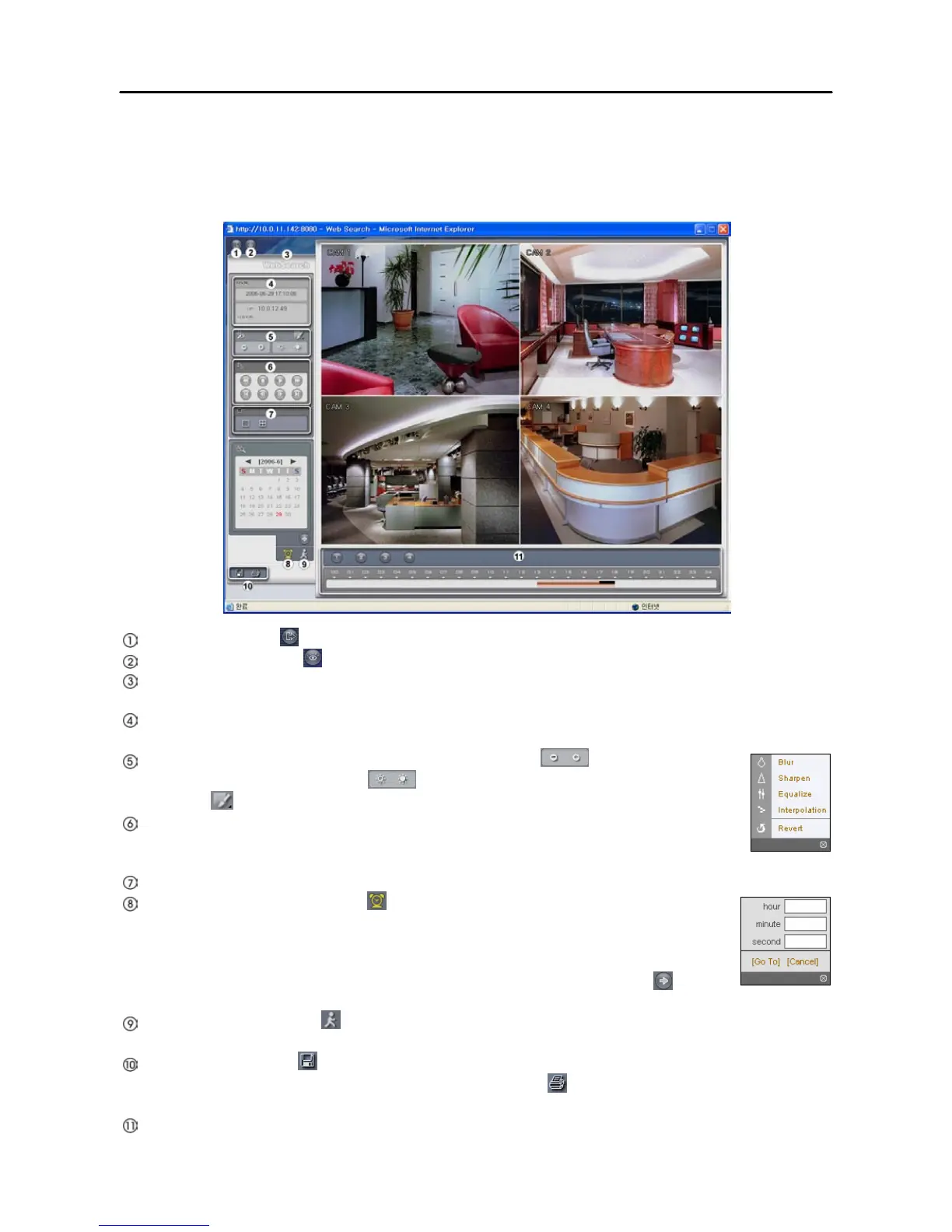
Web Search Mode
The WebSearch is a remote web search program that allows you to search recorded video on the remote
DVR.
Log Out: Click the to log out the WebGuard program.
WebWatch: Click the to access to the web monitoring mode.
WebSearch Logo: Position the mouse pointer on the logo to see the version of the WebGuard
program.
DVR Information: The DVR Information window displays the time information of recorded data on
the remote DVR and login information of WebGuard.
Zoom/Brightness Adjust/Image Processing: Click the to zoom out or zoom
in the recorded image. Click the to adjust the brightness of the recorded images.
Click the to blur, sharpen, equalize and interpolate playback images.
Playback Function Buttons: The Playback Function Buttons include fast backward,
pause, play, fast forward, go to the first image, go to the previous image, go to the next
image, and go to the last image.
Display Mode: Click the desired display mode.
Time-lapse Search: Click the to enter the time-lapse search mode which allows
you to search for recorded data by time and then play back images found within the
time parameters. The Timetable window located at the bottom displays the time
information for the image of the date selected on the calendar. Clicking a specific
time displays the image recorded at that time on the screen. Selecting the allows
you to display an image from a specific time.
Event Search: Click the to enter the event search mode which allows you to search for event log
entries using specific conditions and play back the images associated with those event entries.
Save/Print: Click the to save the current image in a bitmap or JPEG file format or to save any
video clip of recorded data as an executable file. Click the to print the current image on a printer
connected to your computer.
Timetable: The Timetable displays recorded data of the selected camera by time (in hour segments).







 To Next Page