ITALIANO ENGLISH DEUTSCH FRANÇAIS ESPAÑOL
004778600 - 21/10/2020 45
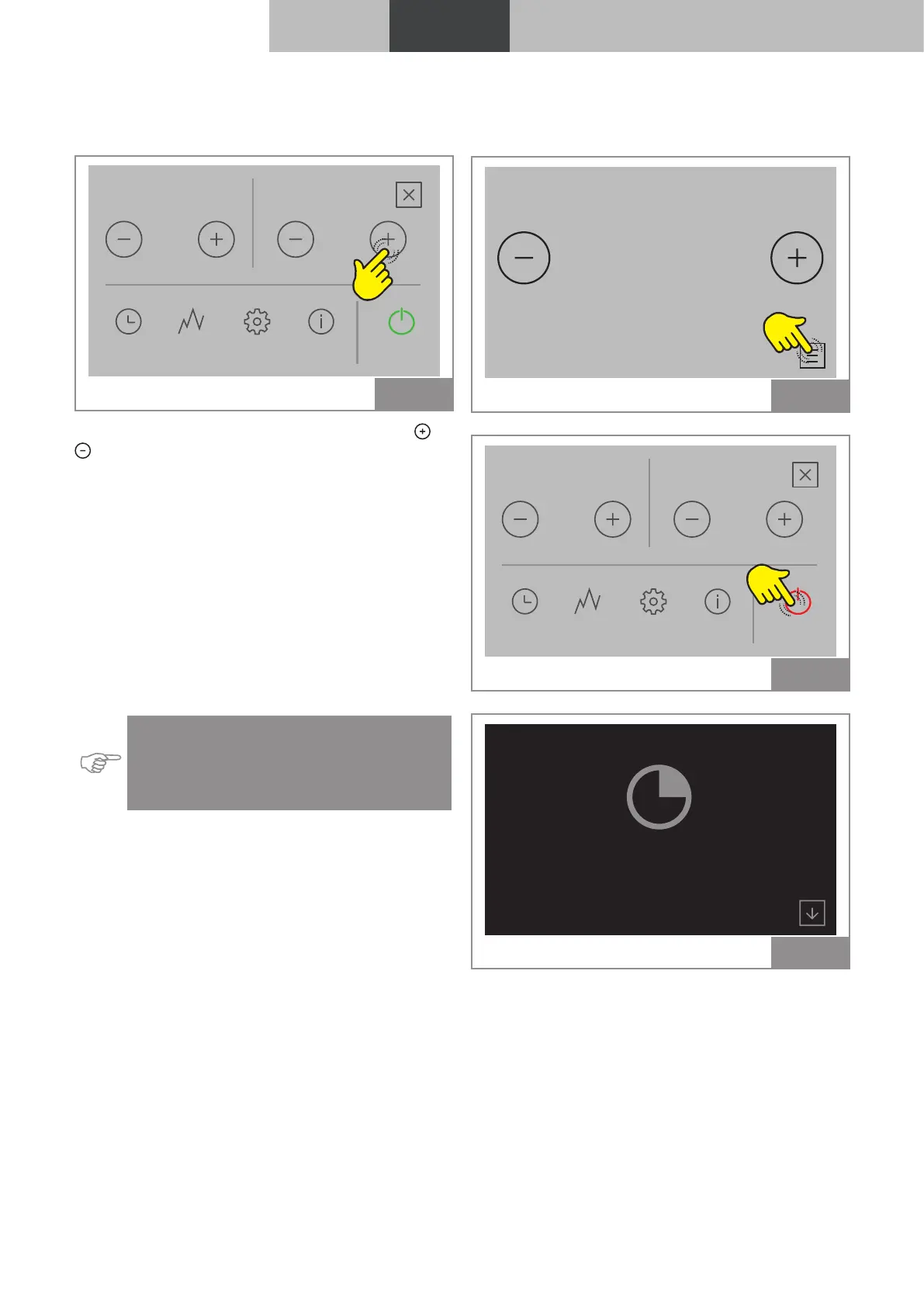
4.1.3 Changing the ventilation
Modifying this value defines the speed of the hot
air fan.
Power Fan
TIMERS STATS SETTINGS TIPS START
5 4
Fig. 63
To change the ventilation value, press the
or
icons:
The settable values are:
• "1" minimum, "2", "3", "4", "5" maximum;
• "AUTO" = automatic operation, the stove sets
the speed according to the room temperature;
• "HI" = ultra-fast operation, to be used only if
there is a need to quickly heat an environment.
4.2 Modifying the parameters
The operating parameters can be modified ac-
cording to the procedure described in chapter “3
Settings menu"
Indication: The set values will be saved until
the next variation, even if the device is shut
down or disconnected from the power
supply.
4.3 Shutdown
To shut down the device hold the STOP key
pressed for a few seconds;
AIR
°C
20,0
25,8 °C
Fig. 64
Power
TIMERS STATS SETTINGS TIPS STOP
5
2.2 kW
Fan
4
Fig. 65
Shutting down ...
Fig. 66



 To Next Page