ENGLISH
- 38 (E) -
[ADJUSTMENT with RCU]
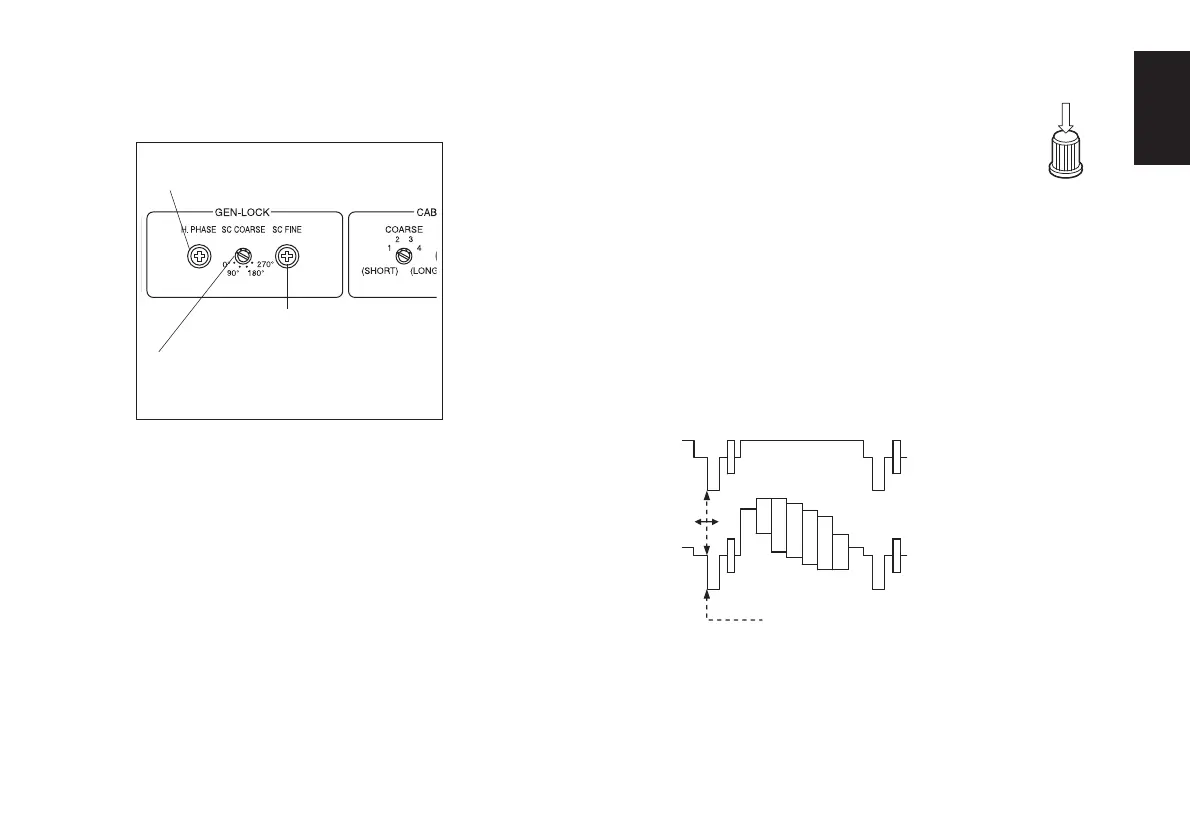
Use the horizontal phase control.
CAUTION:
When horizontal phase adjustment is required using
RCU, colour bar/camera selector switch should be set to
BAR. Horizontal phase cannot be adjusted if the switch
is in the CAM position. After adjustment set colour
bar/camera selector switch back to CAM.
[ADJUSTMENT with ROP]
1. Select the first camera to be adjusted by
pressing the CAM CONTROL button.
2. Press the MENU button, and display the
camera setting menu on the LCD panel.
3. Turn the CONT dial, and display the G/L SETTING
menu.
4. Push the CONT dial straight down, and display H
PHASE on the bottom line of the LCD.
5. Observe the waveforms of the genlock signal (black
burst signal or video signal (VBS)) and video signal
output on an oscilloscope, and adjust the CONT dial
in such a way that the horizontal phase is adjusted
as shown in the figure below.
6. Select the next camera by pressing the CAM
CONTROL button, and adjust the horizontal phase
of the next camera. Repeat this for all the connected
cameras.
Remote control unit
Horizontal phase
adjustment control
Subcarrier phase fine
adjustment control
Subcarrier phase coarse
adjustment switch
Adjust the horizontal phase here.
Video signal output
External sync (genlock)
signal input (black burst
signal)



 To Next Page