- 39 (E) -
O COLOUR PHASE ADJUSTMENT
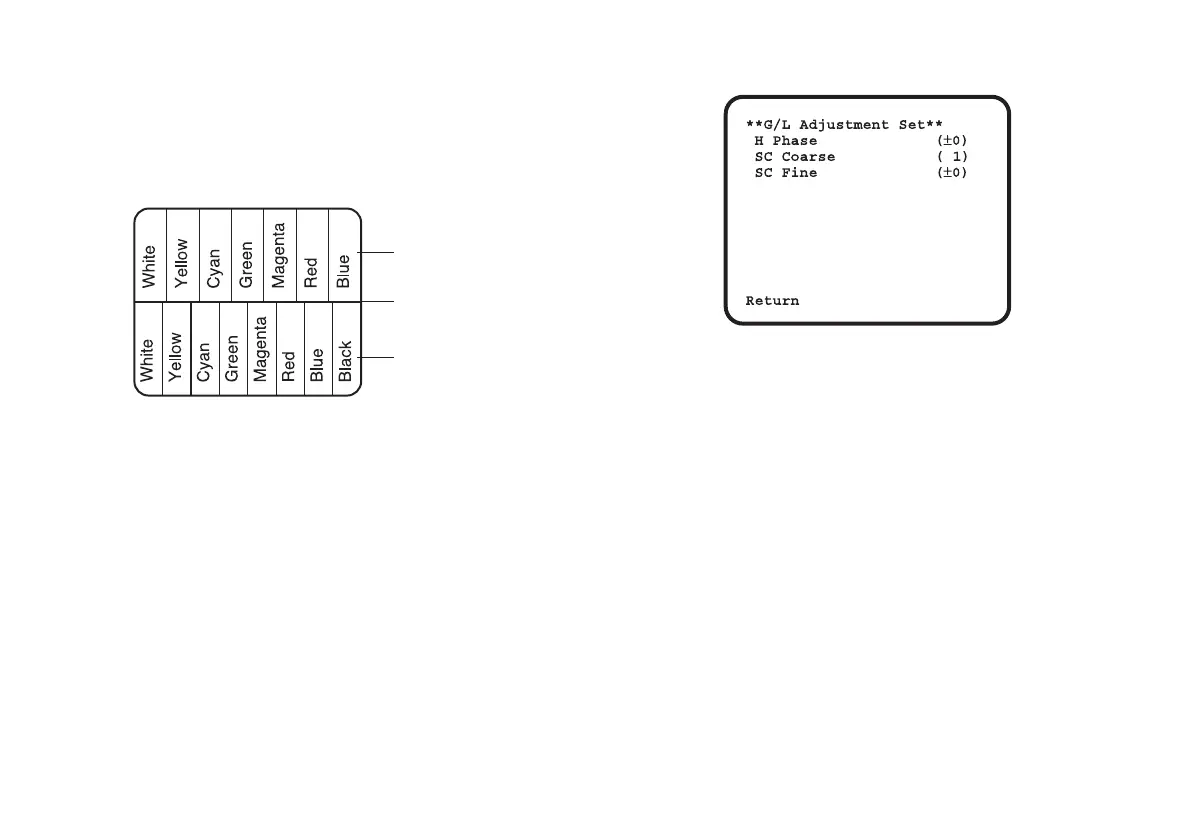
Supply the output signal (split colour bar) from the
colour special effect generator to a colour monitor or
vectorscope. Adjust the colour phase of the camera.
[ADJUSTMENT by CAMERA or multi hybrid control panel]
1. Press the NO/BAR switch for over 5 seconds for the
colour bar mode.
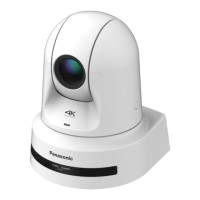
2. Select [G/L Adjustment] on the main menu, then
select [SC Coarse] on the sub menu.
3. Make coarse adjustment with the YES/ABC switch
and the NO/BAR switch.
4. Select [SC Fine] on the sub menu. Perform fine
adjustment with the YES/ABC switch and the
NO/BAR switch.
For details on the menu operations using the multi hybrid
control panel, refer to the Operating Instructions of the
multi hybrid control panel.
[ADJUSTMENT with RCU]
Use the subcarrier phase coarse adjustment control and
subcarrier phase fine control.
* It is recommended that a vectorscope be used for
maximum accuracy in colour phase adjustment.
CAUTION:
When colour phase adjustment is required using RCU,
colour bar/camera selector switch should be set to BAR.
Colour phase cannot be adjusted if the switch is in the
CAM position. After adjustment set colour bar/camera
selector switch back to CAM.
Colour bar of
camera
Colour bar of special
effects generator
Sprit line



 To Next Page