- 16 -
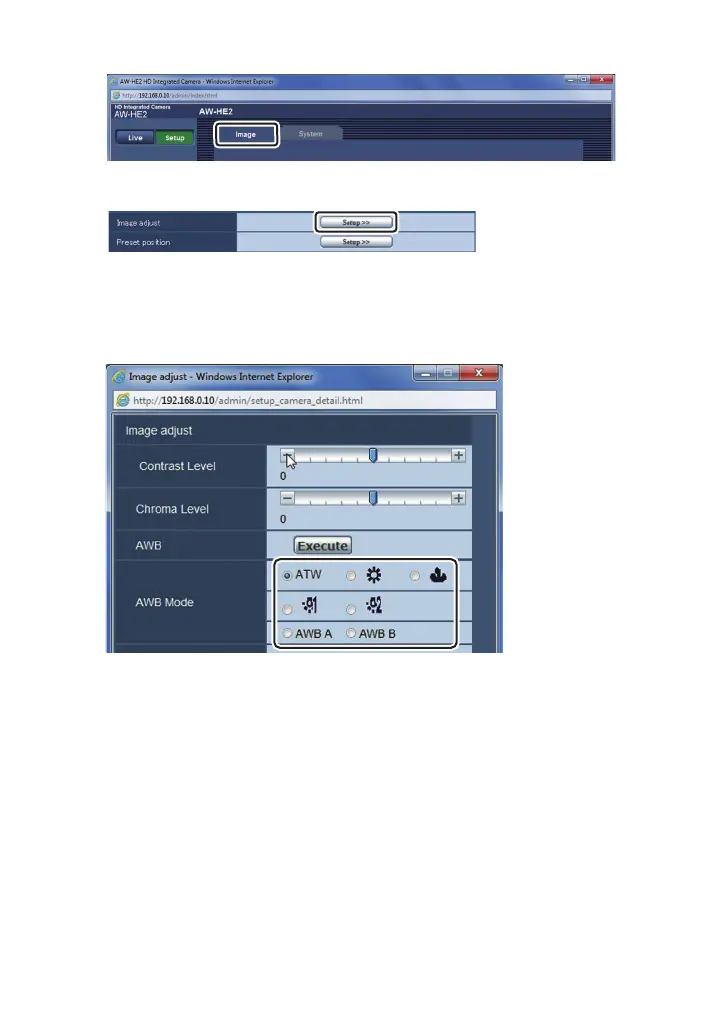
3 Click the [Image] tab on the Image screen.
4 Click [Setup] (Image adjust).
≥ The Image adjust screen opens in a separate window.
5 Select your desired [AWB Mode].
≥ Select a suitable mode by looking at the coloration on the screen.
≥ When [AWB A] or [AWB B] is selected, the registered setting is retrieved.
∫ Performing the White Balance Setting
1 Set the mode to either [AWB A] or [AWB B].
2 Fill the screen with a white subject.
≥ Do not shoot shiny or very bright objects.
3 Click [Execute] for [AWB].
≥ When [OSD Status] is set to [On], [AWB OK] is displayed on the screen and adjustment is
completed.
≥ When the white balance cannot be set, the error message [AWB NG] is displayed on the
screen. When this occurs, use another mode.



 To Next Page