- 4 -
This unit can be operated using a controller (AW-RP50: optional).
Operations available using the controller
The controller (AW-RP50) can perform the following operations.
j Switch between Power ON and Standby
modes
j Camera menu operations
j Zoom operations
j Pan/tilt operations
j White Balance Setting
j Brightness adjustment
j Preset memory registration/retrieval/
deletion
j USER button operations
(POWER OFF/AWB)
j Display/hide the color bar
≥ For details on operating methods, refer to the description in each item.
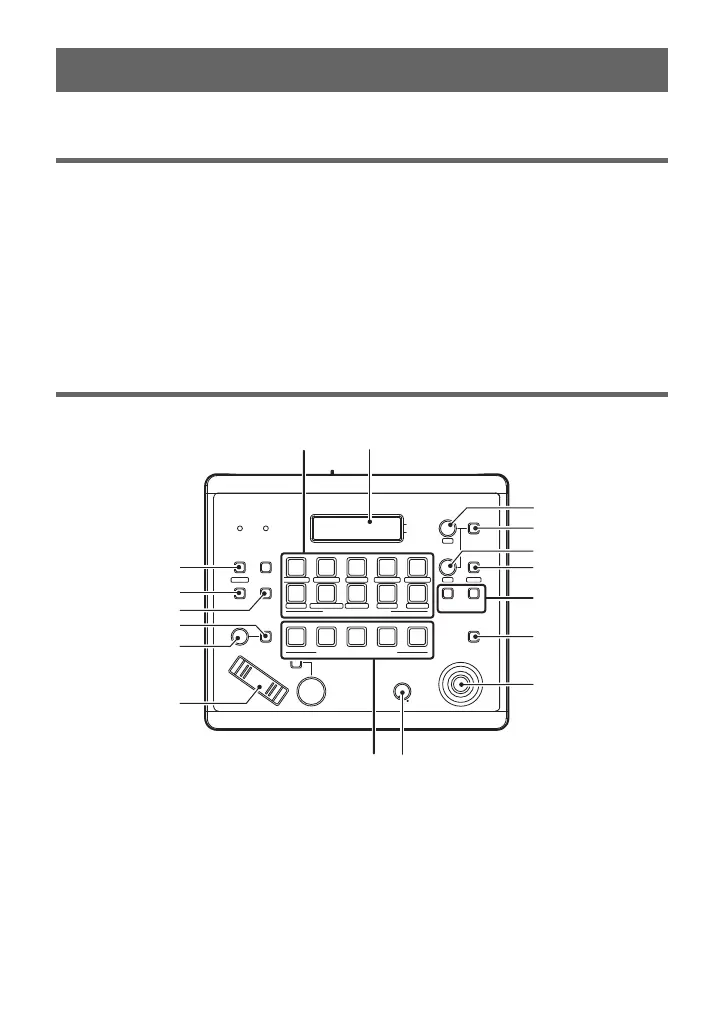
Names and Functions of Main Parts
Buttons and dials used for operating this unit are described.
1 MENU button
Press this when using the PRESET
MEMORY/MENU button to call up the
controller menu.
2STORE button (l 27)
Press this to register the preset memory
data.
3 DELETE button (l 27)
Press this to delete the preset memory data.
4 IRIS-AUTO button (l 20)
Switches brightness adjustment between
auto mode and manual mode.
5IRIS dial (l 20)
Adjust the brightness manually.
6 ZOOM button (l 14)
Controller
POWER ALARM F1 CAMERA
OSD
R/B GAIN R/B PED
SYSTEMSETUPCAMERA
SCENE/MODE
DETAIL
DELETESTORE
PAGEMENU F2 EXIT
USER2USER1
PT ACTIVE
PAN/TILT
AUTOIRIS
AUTO
HILOW
PTZ/FOCUS SPEEDFOCUS/PUSH OAF
TELE
ZOOM
WIDE
CAMERA STATUS / SELECTION
PRESET MEMORY / MENU
GAIN/PED
F2
F1
123
AWB/ABB
4
SHUTTER
5
12345
678910
1
2
3
4
5
6
78
9
10
11
12
14
13
15
17 16



 To Next Page