- 28 -
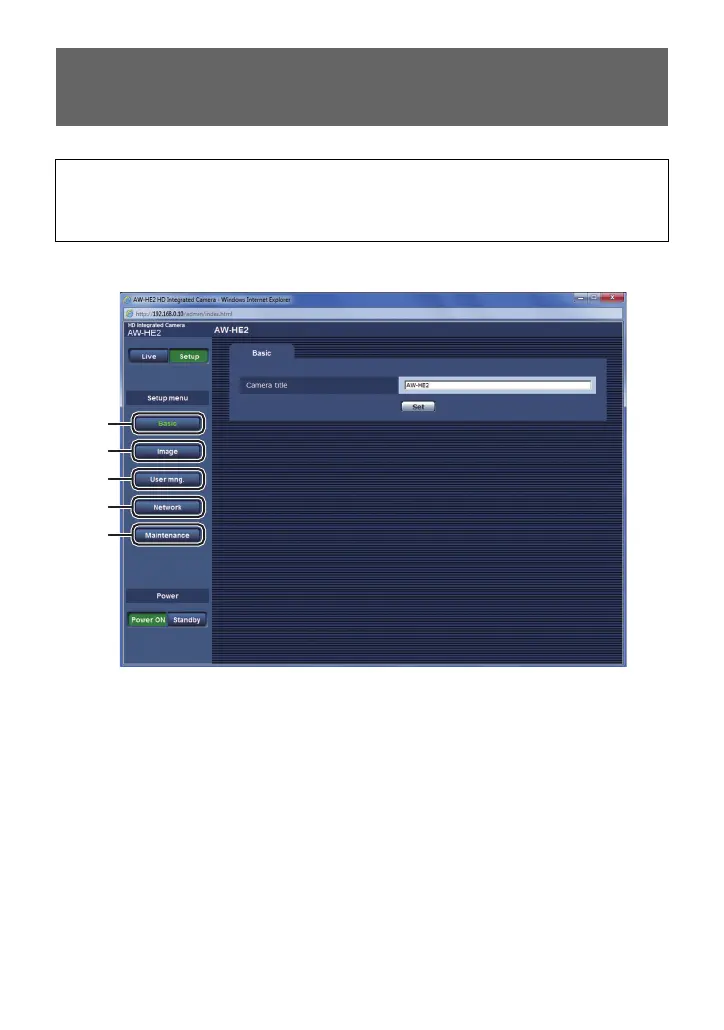
You can configure the unit’s settings on web setting screen (the Setup screen)/camera menu.
1 Open the Setup screen.
2 To open your desired screen, click one of the options A to E.
A Basic screen (Basic settings) (l 29)
B Image screen (Picture quality settings, System settings) (l 30)
C User mng. screen (User management settings) (l 37)
D Network screen (Network settings) (l 39)
E Maintenance screen (Maintenance settings) (l 41)
Using the Web setting screen/Camera
Menu to Configure Settings
This section mainly provides instructions for the web setting screen (the Setup screen),
but some of the items can also be set from the camera menu.
≥ Refer to page 9 for basic operations of the camera menu.
≥ For those items that can only be set in the camera menu, refer to page 44.



 To Next Page