- 31 -
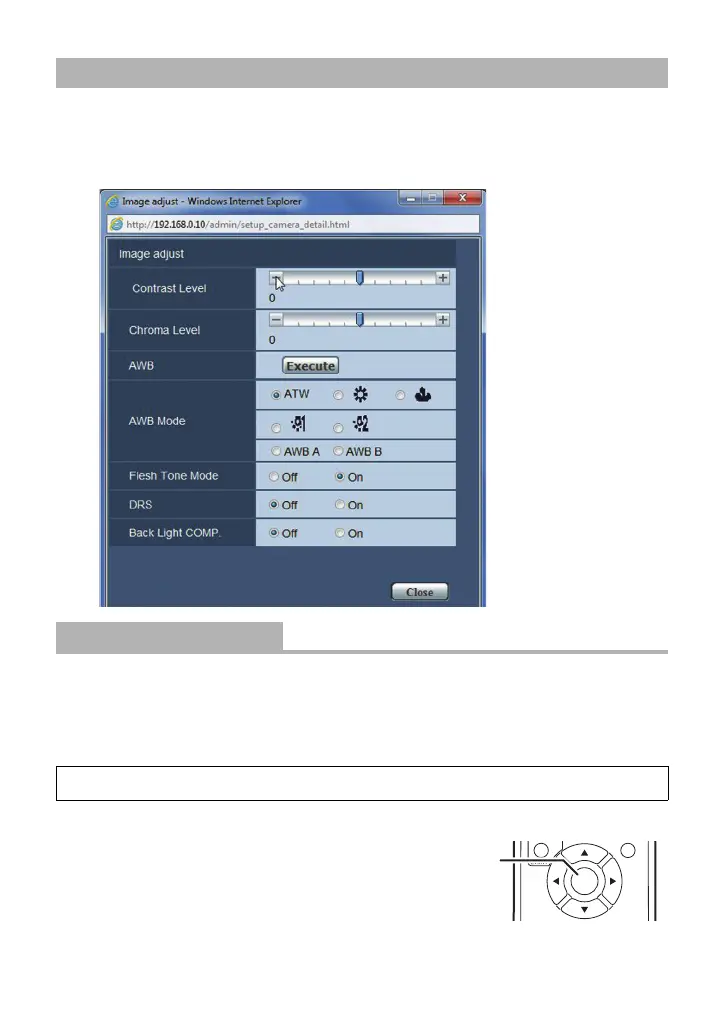
1 Click the [Image] tab on the Image screen.
2 Click [Setup] (Image adjust).
≥ The Image adjust screen opens in a separate window.
Adjust the contrast.
Click [
_] and [`] to adjust the level.
∫ Setting Using the Camera Menu
1 Select the menu.
2 Adjust the contrast level. (l 10, 11)
3 (When performing the operations using the wireless
remote controller)
Press the enter button A.
(When performing the operations using the controller)
Press the F1 button.
Adjusting the picture quality on the Image adjust screen
[Contrast Level]
[`5] to [_5]
[CAMERA] # [CONTRAST LEVEL]



 To Next Page