- 55 -
∫ Screen is deformed. Or when activating the compatibility view, part
of the screen is not displayed or a pop-up window appears to say
that the screen is not displayed again.
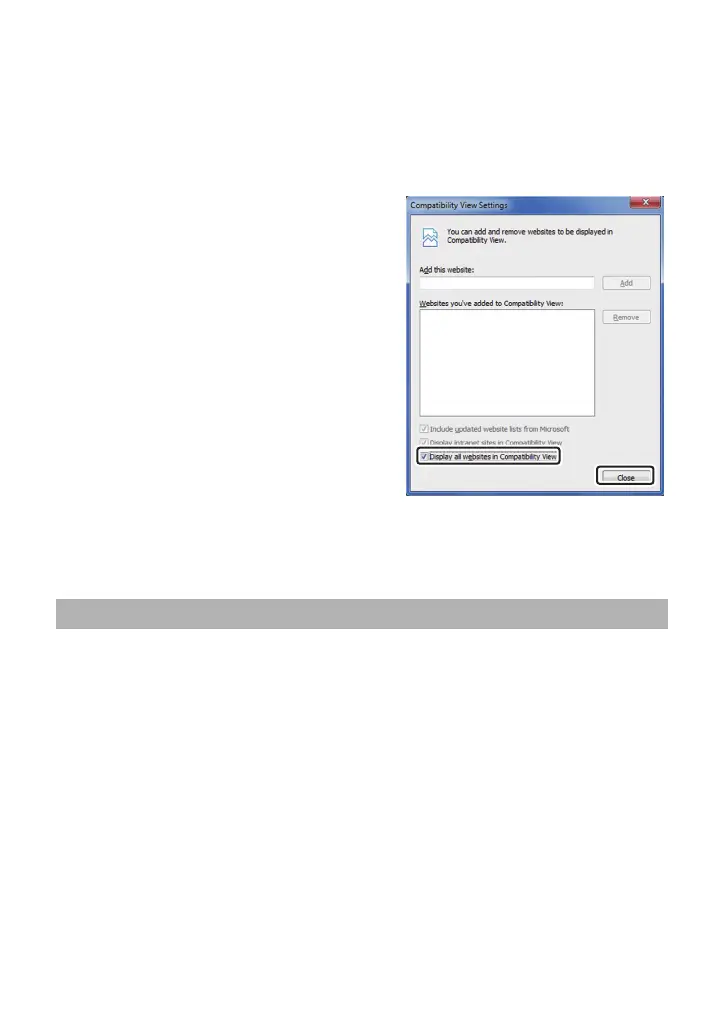
Check [Display all websites in Compatibility View] on the [Compatibility View settings]
screen.
1) In Internet Explorer, click [Tools].
2) Click [Compatibility View settings].
3) Check [Display all websites in Compatibility
View], and click [Close].
∫ Network disconnection occurs when the personal computer enters
the sleep mode.
After canceling the sleep mode, reload the screen as necessary.
The web setting screen does not appear as a pop-up even when the IP
address is input from Safari and the unit is accessed.
In Safari, select [Safari] # [Block Pop-Up Windows], and then remove its check mark.
When using Mac



 To Next Page