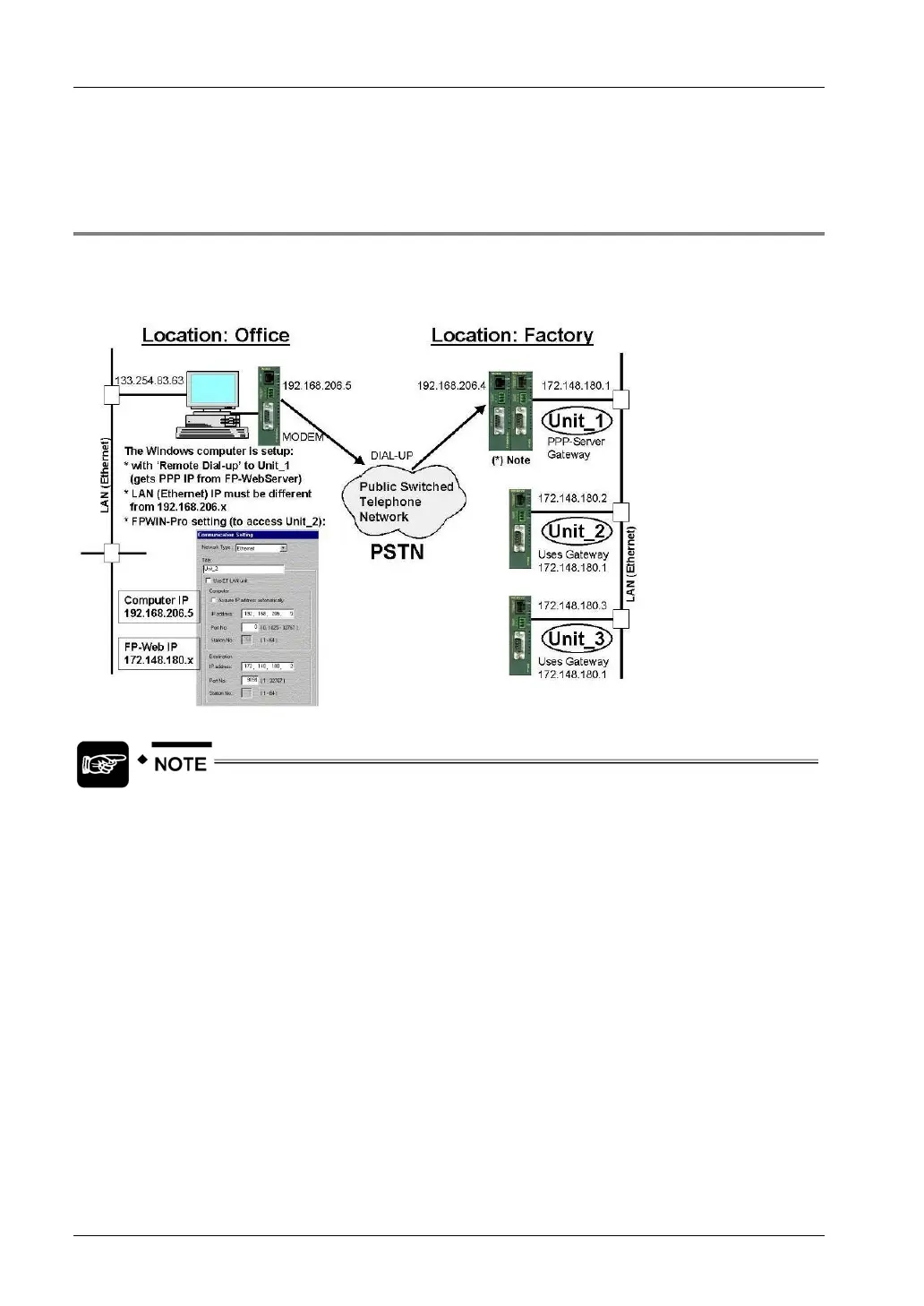
Dial-In Setup for PPP-Server
FP Web-Server V2.11
122
the Configurator) may not be forwarded via a gateway. See the description of [FIND] and details
at enter IP address manually how to configure these FP Web-Server via TCP communication.
9.1.5 FPWIN Pro Setup to Use the Remote Dialup Network
The standard function 'Remote Dialup Networking' of Windows is used for FPWIN Pro to
communicate with an FP Web-Server via modem dialup. You can see how to set up Windows,
FPWIN Pro and the FP Web-Servers in the following diagram:
See example setup in "Configuration for an Initial Test" of FP Web-Server PPP
Gateway Functions (see page
119). The PPP server gateway Unit_1 can also be
set up to dial up the Internet to send an email.
Comment:
The Windows computer is set up as follows:
- with "Remote Dialup" to Unit_1 (gets the PPP-IP from FP Web-Server)
- LAN (Ethernet) IP can be anything except for 192.168.206.xxx



 To Next Page