FP Web-Server V2.11
9.1 Dial-up Networking Setup for Computer/ FP Web-Server
123
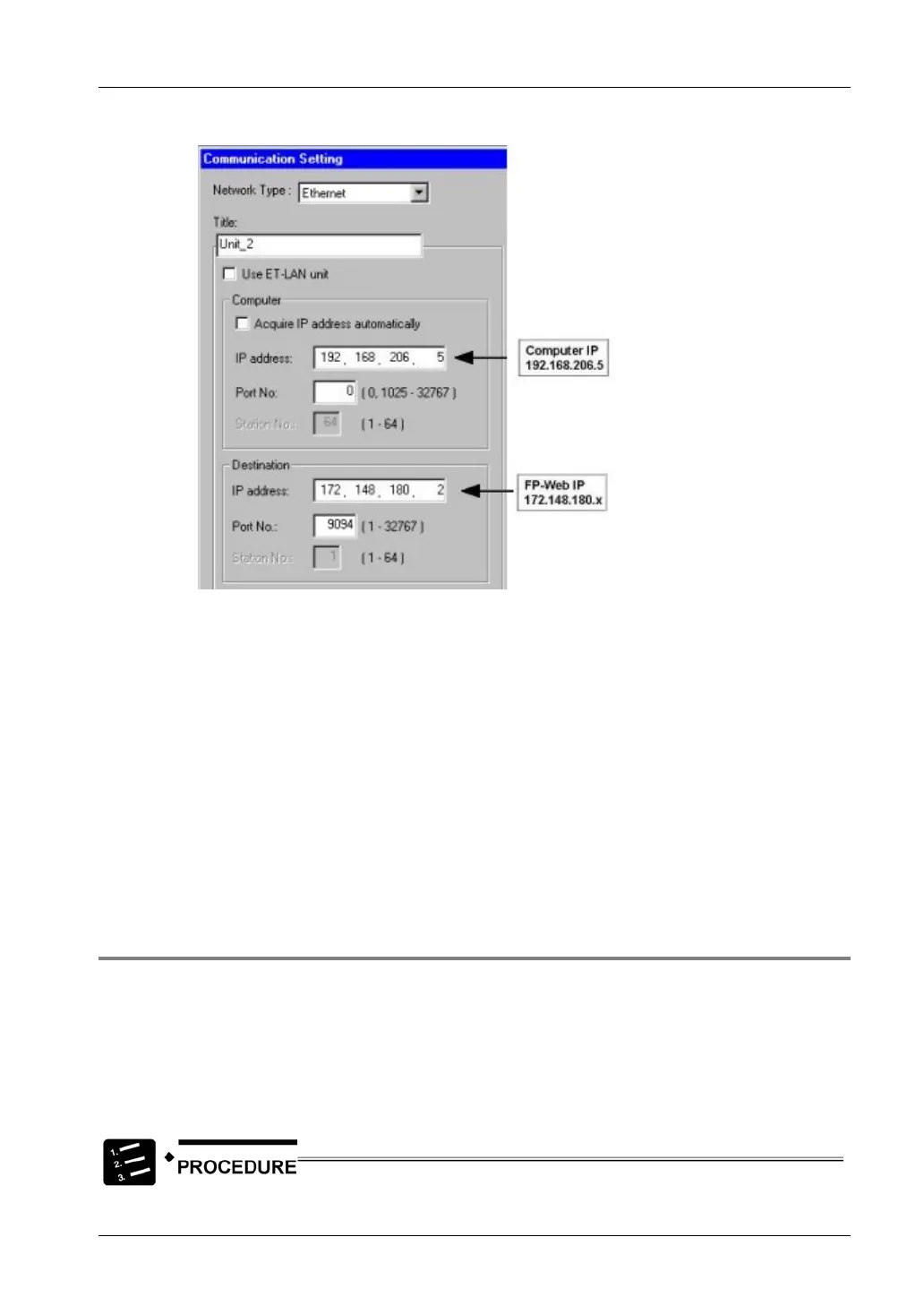
- FPWIN Pro settings to access Unit_2:
There are 3 IP sub-networks involved in this setup:
• 133.254.83.x: Computer Ethernet (any IP except 192.168.206.x or 172.148.180.x)
• 192.168.206.x: Computer + FP Web Modem (always use 192.168.206.x)
• 172.148.180.x: FP Web Ethernet (any IP except 192.168.206.x or 133.254.83.x)
Comments:
• Additionally (and in parallel) the FP Web-Server (Gateway Unit_1) can be set up to use
the modem for Internet dialup and email sending.
• For details on the PPP server settings of the FP Web-Server, refer to configuration
example for the FP Web-Server that implemented the PPP-Server access (see page
119).
9.1.6 PPP Communication via Null Modem Cable
Some Windows versions allow a PPP connection to be established to the FP Web-Server via
RS232C and null modem. Such an "RS232C - null modem cable" replaces both modems of the
PPP connection, i.e. the computer's RS232C COM port is directly connected to the FP
Web-Server's 9-pin port via a null modem cable.
Windows 98 and Windows NT setup for IP communication via RS232C null modem
cable:



 To Next Page