Additional Information
FP Web-Server V2.11
164
The 3-pin screw terminal is from Phoenix: Phoenix product: MC1,5/3-ST-3,5 Order number: 18
40 37 9
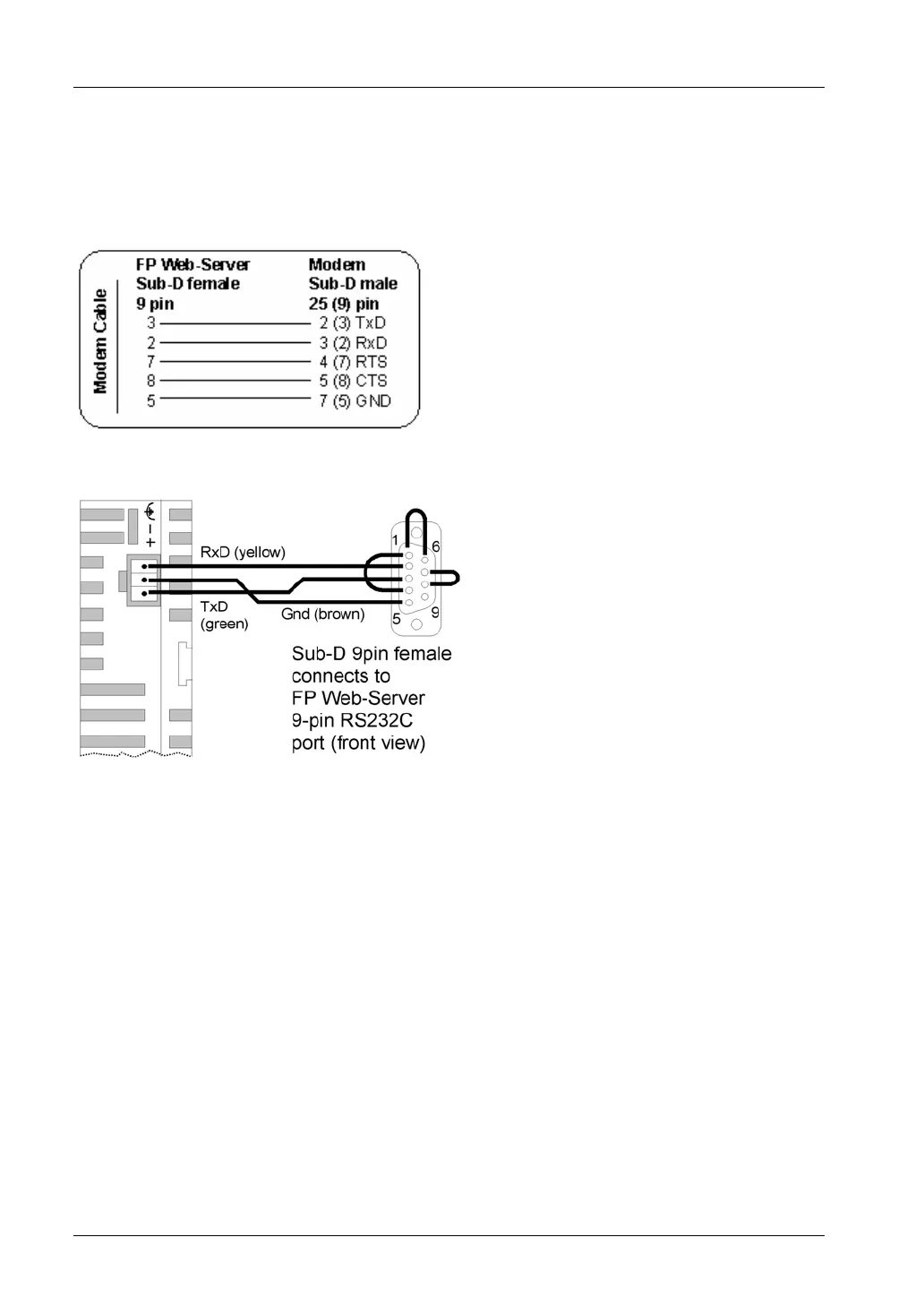
PPP-Server with modem:
Use a standard computer/ modem cable to connect the FP Web-Server to a modem:
For the FP ISDN 64k or FP Modem 14.4 (both available from PEW Germany) use the following
cable:
PPP-Server without modem:
Use a null modem cable to connect the FP Web-Server directly to a computer:
• A minimum, self-made adapter can be built by using two female connectors and 9-pin
SUB-D connectors. The wiring should be as follows: 2-3; 3-2; 5-5. (This is the minimum
number of wires required.)
• Or use a standard null modem adapter with full 25-pin, female RS232C connectors on
both sides to create a connection between the FP Web-Server (with 25/9 adapter) and
the computer's COM port.
• The full wiring of a standard 25-pin null modem adapter should be as follows:
1-1; 2-3; 3-2; 4+5-8; 6-20; 7-7; 8-4+5; 20-6.



 To Next Page