10
VQT2V00
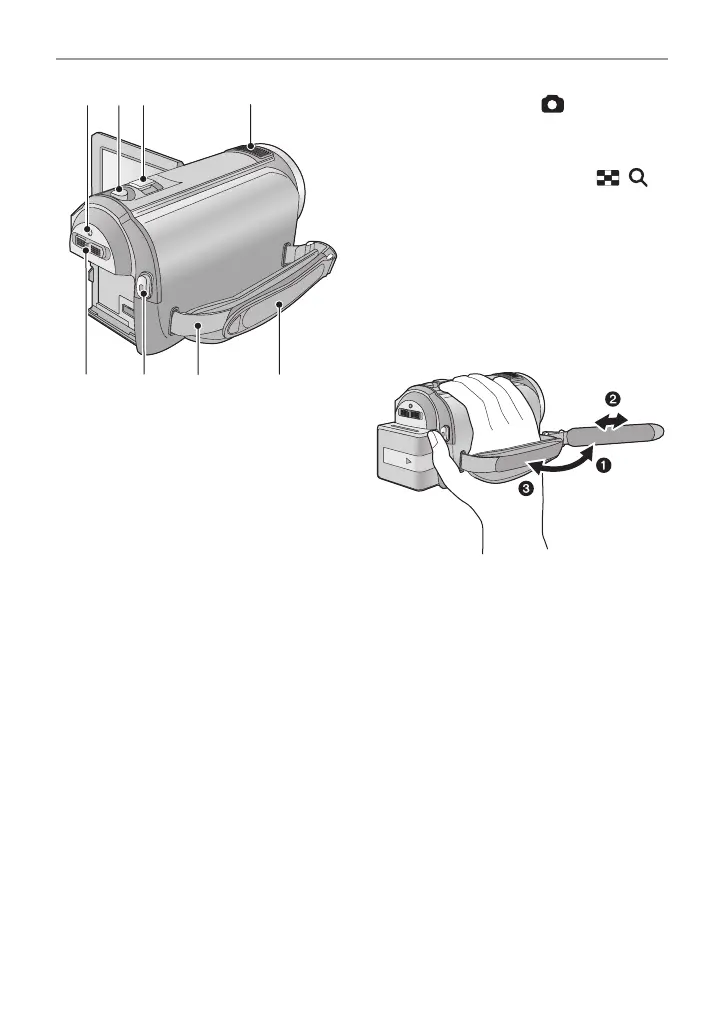
28 Status indicator (l 17)
29 Photoshot button [ ] (l 24)
30 Zoom lever [W/T] (In motion picture
recording mode or still picture
recording mode) (l 42)
Thumbnail display switch [ / ]/
Volume lever [sVOLr] (In playback
mode) (l 30)
31 Internal microphones
32 Mode switch (l 18)
33 Recording start/stop button (l 22)
34 Shoulder strap fixture
35 Grip belt
Adjust the length of the grip belt so that it fits
your hand.
1 Flip the belt.
2 Adjust the length.
3 Replace the belt.















 To Next Page