12
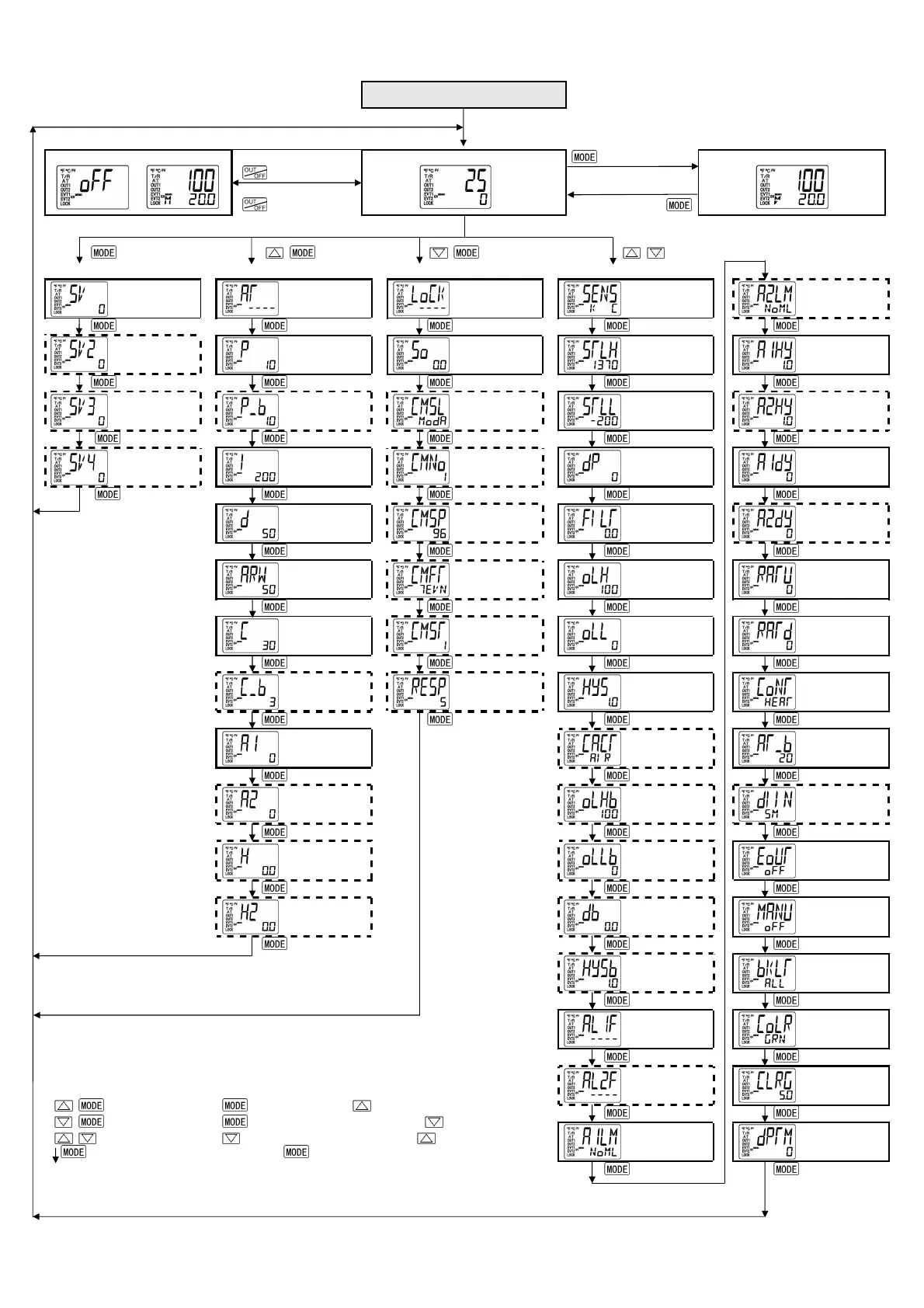
6.4 Operation flowchart
This instrument has been classified into the following modes and setting items.
Power ON
For 3 seconds after power on, the PV display indicates the
input type, and the SV display indicates input range high limit
value (thermocouple, RTD input) or scaling high limit value
(DC voltage, current input).
Control output OFF/Manual control
Control output OFF
(Approx. 1sec)
Auto/Manual control
PV/SV display mode (Automatic control)
(Approx. 3sec)
Output MV indication
+ + (Approx. 3sec) + (Approx. 3sec)
[Main setting mode](p.13) [Sub setting mode](p.14) [Auxiliary function setting mode](p.16) [Setup mode] (p.18)
SV
[1]
Auto-tuning/
Auto-reset
[5]
Set value
lock
[17]
Input type
[25]
Alarm 2
Energized/
Deenergized [41]
SV2
[2]
OUT1
proportional
band [6]
Sensor
correction
[18]
Scaling high
limit
[26]
Alarm 1
hysteresis
[42]
SV3
[3]
OUT2
proportional
band [7]
Communication
protocol
[19]
Scaling low
limit
[27]
Alarm 2
hysteresis
[43]
SV4
[4]
Integral time
[8]
Instrument
number
[20]
Decimal point
place
[28]
Alarm 1 action
delayed timer
[44]
Derivative time
[9]
Communication
speed
[21]
PV filter time
constant
[29]
Alarm 2 action
delayed timer
[45]
ARW
[10]
Data bit/Parity
[22]
OUT1 high limit
[30]
SV rise rate
[46]
OUT1
proportional
cycle [11]
Stop bit
[23]
OUT1 low limit
[31]
SV fall rate
[47]
OUT2
proportional
cycle [12]
Communication
response time
[24]
OUT1 ON/OFF
action hysteresis
[32]
Direct/Reverse
control action
[48]
Alarm 1 value
[13]
OUT2 action
mode
[33]
AT bias
[49]
Alarm 2 value
[14]
OUT2 high limit
[34]
Contact input
function
[50]
Heater burnout
alarm value
[15]
OUT2 low limit
[35]
Output status
selection when
input abnormal
Heater burnout
alarm 2 value
[16]
Overlap/Dead
band
[36]
OUT/OFF key
function
[52]
OUT2 ON/OFF
action hysteresis
[37]
Backlight
[53]
Alarm 1 type
[38]
PV color
[54]
Alarm 2 type
[39]
PV color
range
[55]
Alarm 1
Energized/
Deenergized [40]
Backlight time
[56]
[Key operation]
+ : Press key while pressing key.
+ (Approx.3sec) : Press key for 3 seconds while pressing key.
+ ( Approx.3sec) : Press key for 3 seconds while pressing key.
: This means that if key is pressed, the set value is saved,
and the controller proceeds to the next setting item.
Setting items with dotted lines are optional, and they appear only when the options are added.
Numbers such as [1], [2], etc. are setting item numbers.


 To Next Page