18
6.8 Setup mode
To enter the Setup mode, press key while pressing key for approximately 3 seconds in the PV/SV
display mode.
To set or select each setting item, use or key, then register the value with key.
Setting item numbers such as [25], [26], etc. are the same as those on the “6.4 Operation flowchart” (p.12).
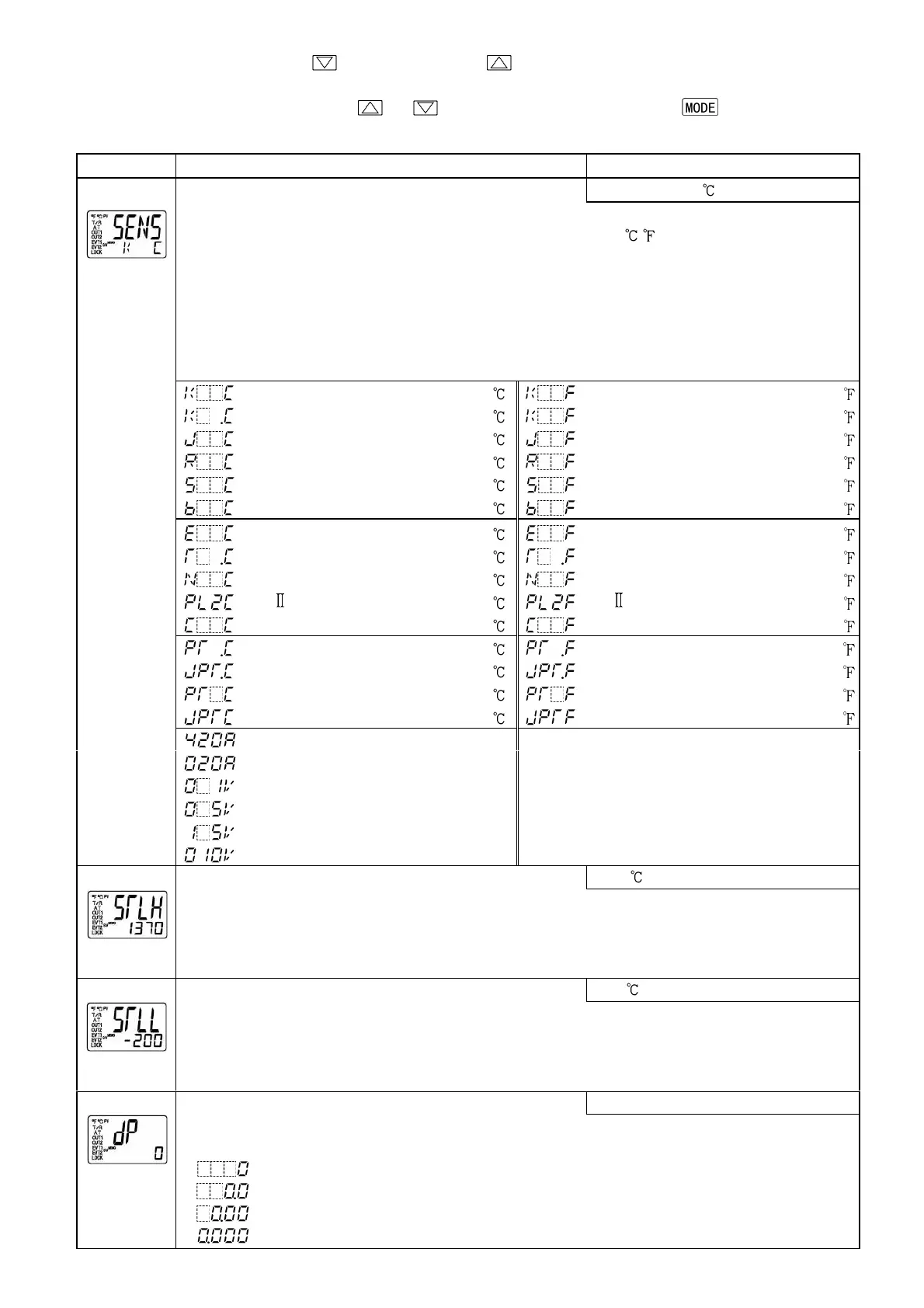
Character Name, Function, Setting range Default value
Input type selection
K (-200 to 1370 )
• The input type can be selected from a choice of; thermocouple (10 types), RTD (2 types),
DC current (2 types) and DC voltage (4 types), and the unit / can be selected as well.
• When changing the input from DC voltage to other inputs, remove the sensor connected to
this controller first, then change input type.
• (+) side input terminal number of 0 to 5V DC, 1 to 5V DC, 0 to 10V DC differs from
that of 0 to 1V DC.
(+) side input terminal number of 0 to 5V DC, 1 to 5V DC, 0 to 10V DC: 9
(+) side input terminal number of 0 to 1V DC: 10
K -200 to 1370 K -320 to 2500
K -200.0 to 400.0 K -320.0 to 750.0
J -200 to 1000 J -320 to 1800
R 0 to 1760 R 0 to 3200
S 0 to 1760 S 0 to 3200
B 0 to 1820 B 0 to 3300
E -200
to
800 E -320
to
1500
T -200.0 to 400.0 T -320.0 to 750.0
N -200 to 1300 N -320 to 2300
PL- 0 to 1390 PL- 0 to 2500
C(W/Re5-26) 0 to 2315 C(W/Re5-26) 0 to 4200
Pt100 -200.0 to 850.0 Pt100 -320.0 to 1500.0
JPt100 -200.0 to 500.0 JPt100 -320.0 to 900.0
Pt100 -200 to 850 Pt100 -320 to 1500
JPt100 -200 to 500 JPt100 -320 to 900
4 to 20mA DC -2000 to 10000
0 to 20mA DC -2000 to 10000
0 to 1V DC -2000 to 10000
0 to 5V DC -2000 to 10000
1 to 5V DC -2000 to 10000
[25]
0 to 10V DC -2000 to 10000
Scaling high limit setting
1370
[26]
• Sets scaling high limit value.
• Setting range: Scaling low limit value to input range high limit value
DC voltage, current input: -2000 to 10000 (The placement of the decimal
point follows the selection.)
Scaling low limit setting
-200
[27]
• Sets scaling low limit value.
• Setting range: Input range low limit value to Scaling high limit value
DC voltage, current input: -2000 to 10000 (The placement of the decimal
point follows the selection.)
Decimal point place selection
No decimal point
[28]
• Selects decimal point place.
Available only for DC input.
• : No decimal point
: 1 digit after the decimal point
: 2 digits after the decimal point
: 3 digits after the decimal point


 To Next Page