29
11. Action explanation
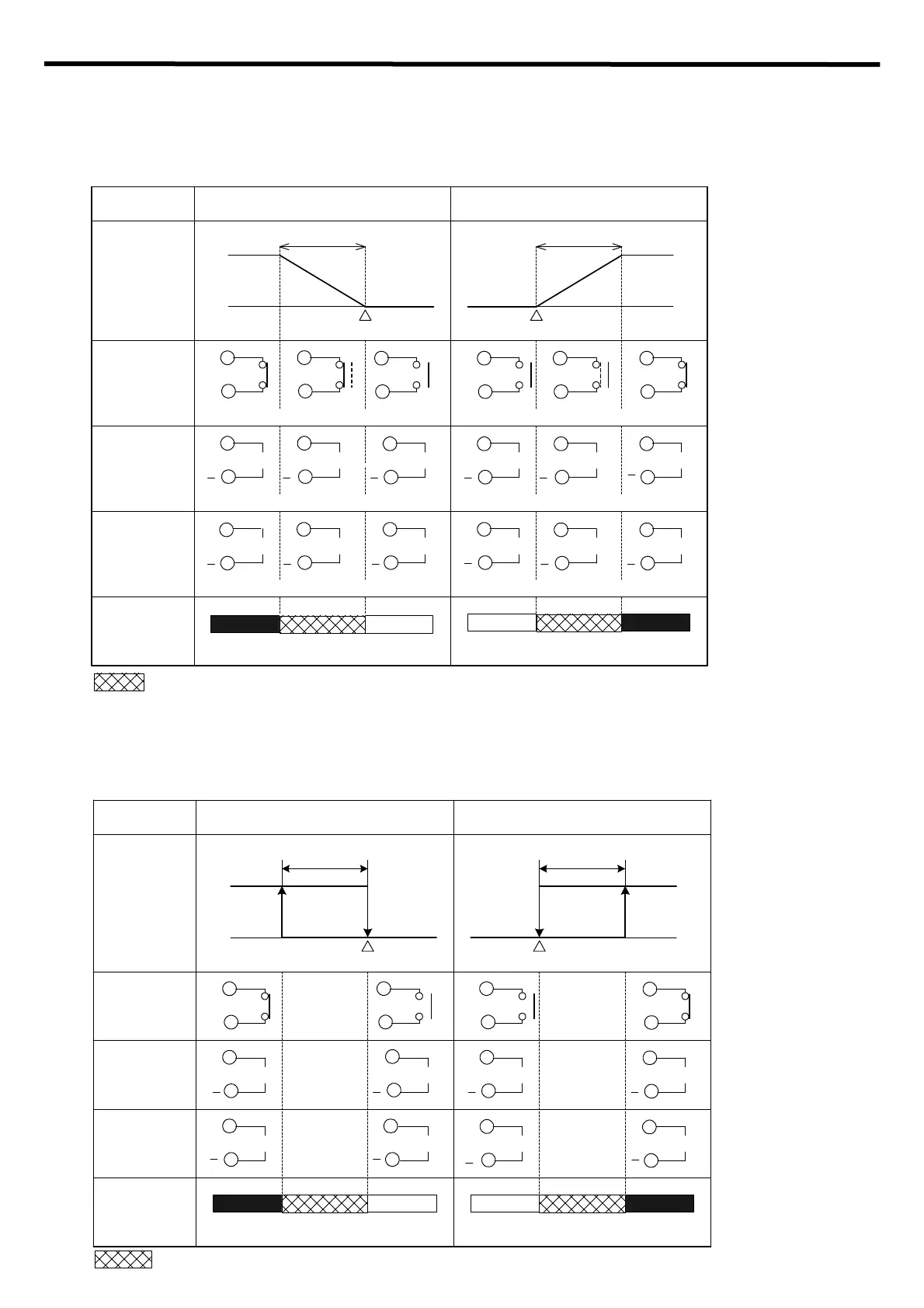
11.1 OUT1 PID, PI, PD, P actions
PI action : When derivative time is set to “0”
PD action: When integral time is set to “0”
P action : When both integral and derivative time are set to “0”
[8] Integral time and [9] Derivative time can be set in the Sub setting mode. (p.14)
[48] Direct (Cooling)/Reverse (Heating) action can be selected in the Setup mode. (p.21)
11.2 OUT1 ON/OFF action
ON/OFF action: When OUT1 proportional band is set to “0” or “0.0”
[6] OUT1 proportional band can be set in the Sub setting mode. (p.14)
[48] Direct (Cooling)/Reverse (Heating) action can be selected in the Setup mode. (p.21)
part : Acts ON or OFF.
Reverse (Heating) action Direct (Cooling) action
Control
action
Cycle action is performed according to deviation
Relay contact
output
Non-contact
voltage output
Changes continuously according to deviation
DC current
output
Indicator
(OUT1) Green
Lit Unlit
ON
OFF
SV setting
Proportional band
ON
OFF
0V DC
0/12V DC
12V DC
+
20mA DC 20 to 4mA DC
4 to 20mA DC
Proportional band
Lit
0V DC 12V DC
12/0V DC
20mA DC
4mA DC
Cycle action is performed according to deviation
Cycle action is performed according to deviation Cycle action is performed according to deviation
Changes continuously according to deviation
+ +
+ +
+
++
+++
+
Unlit
4mA DC
8
7
8
7
8
7
8
7
8
7
8
7
8
7
8
7
8
7
8
7
8
7
8
7
8
7
8
7
8
7
8
7
8
7
8
7
SV setting
part: Acts ON or OFF.
Reverse (Heating) action Direct (Cooling) action
Control
action
Relay contact
output
Non-contact
voltage output
DC current
output
Indicator
(OUT1)Green
0V DC12V DC
+
4mA DC
LitUnlit
ON
OFF
SV setting
ON
OFF
Hysteresis
Hysteresis
0V DC 12V DC
4mA DC
20mA DC
Unlit
Lit
20mA DC
+
+ +
+
+
+
+
8
7
8
7
8
7
8
7
8
7
8
7
8
7
8
7
8
7
8
7
8
7
8
7
SV setting


 To Next Page