Receiving Faxes
-44-
Receiving Faxes
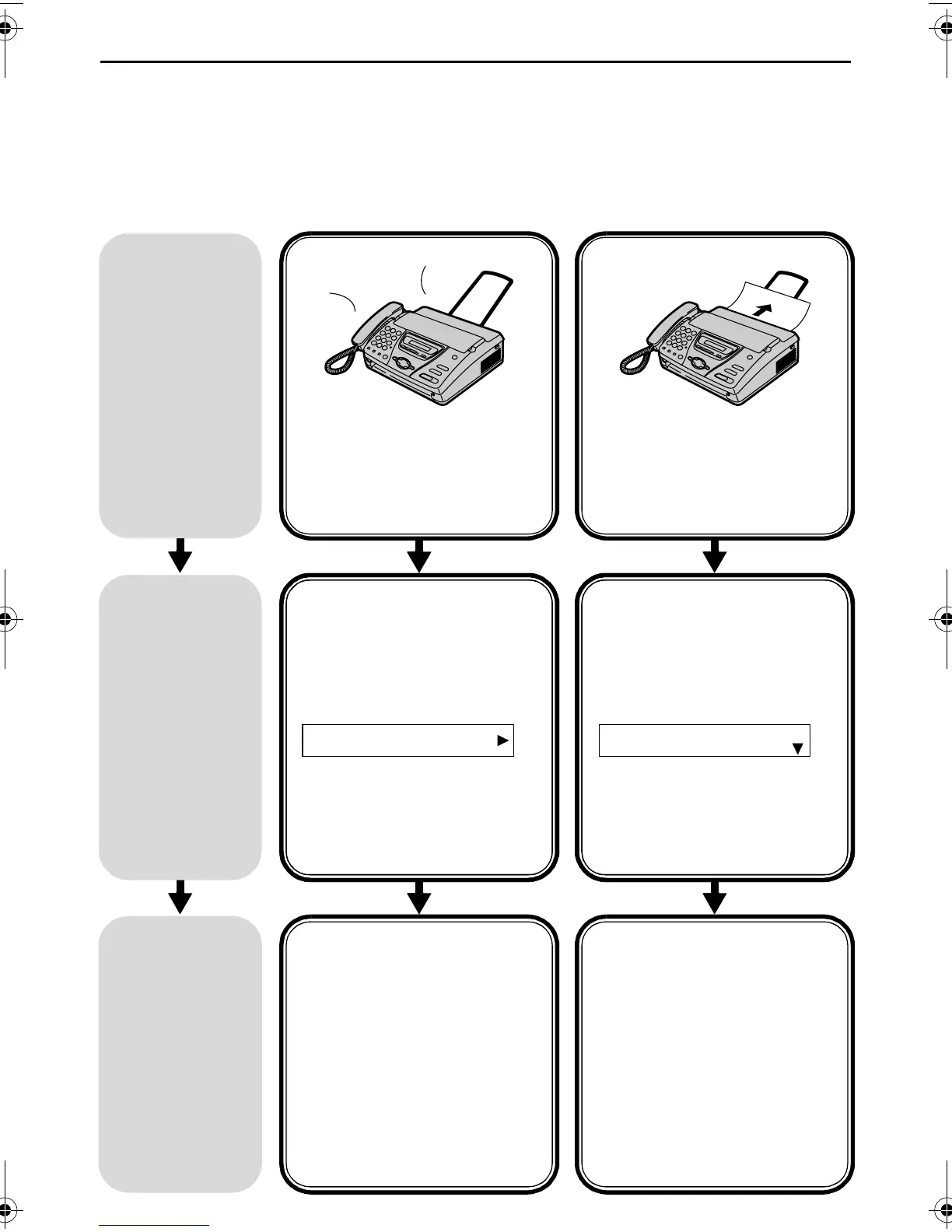
Setting the unit to receive faxes
Use as answering
device and/or fax
(KX-FT78 only)
Use only as a fax
How you
want the
unit to
receive
calls
You want to receive
all phone calls and
faxes automatically.
H
i, this
is M
ike...
You have a separate
telephone line just for
faxes.
Set the
unit this
way.
TAD/FAX mode
(page 57)
The arrow indicator on the
display points to “TAD ”.
L If the arrow indicator
points to “TEL”, press
{RECEIVE MODE}.
FAX
TEL
TAD
FAX ONLY mode
(page 47)
The arrow indicator on the
display points to “FAX”.
L If the arrow indicator
points to “TEL”, press
{RECEIVE MODE}.
FAX
TEL
This is
how the
unit will
operate.
When receiving phone
calls:
The unit will activate the
answering device and record
voice messages.
When receiving faxes:
The unit will activate the fax
function to receive
documents.
When receiving calls:
All incoming calls will be
answered as faxes.
FT74-78HK.book Page 44 Friday, June 28, 2002 9:45 AM









 To Next Page