Copying
-56-
Copy
Making a copy
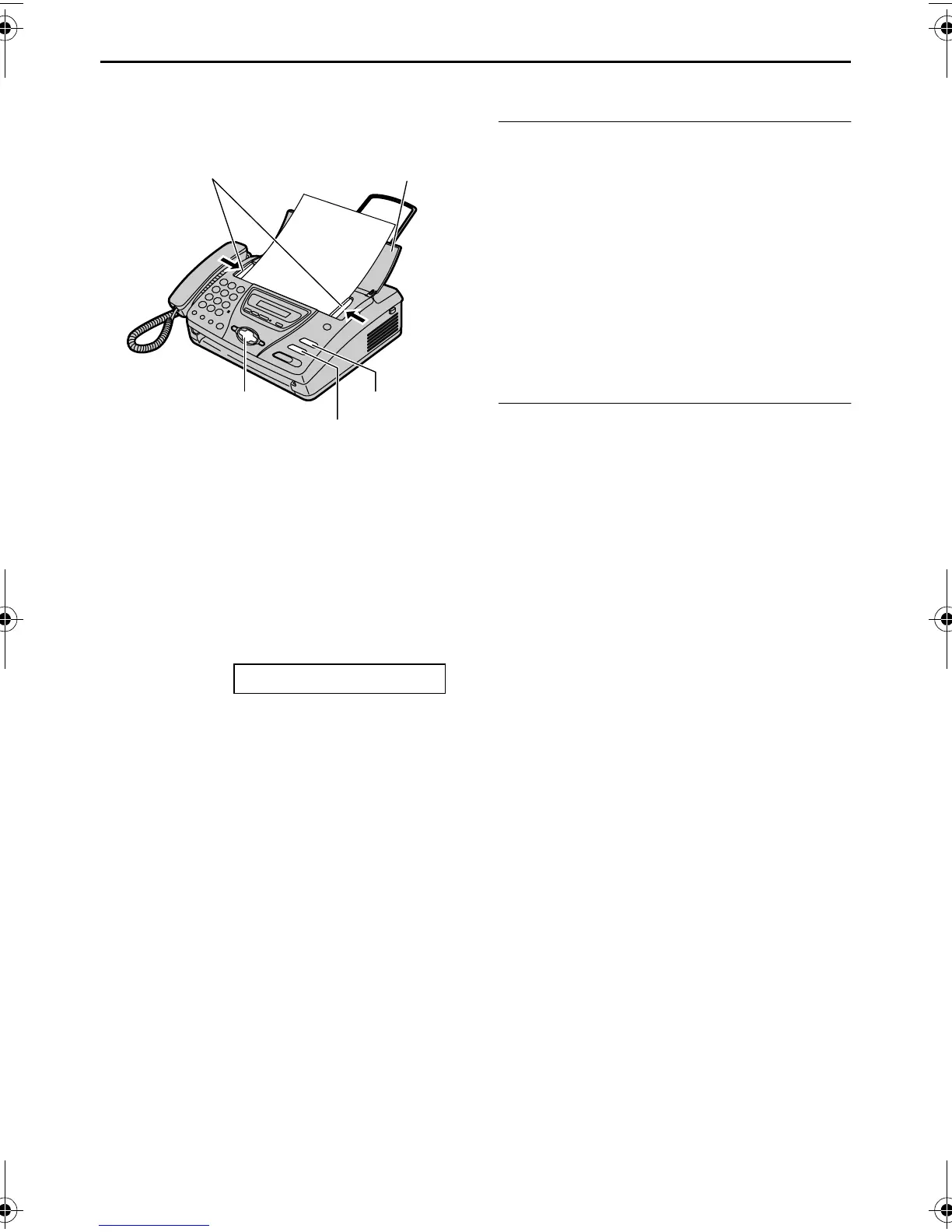
1 Open the document feeder tray.
2 Adjust the width of the document
guides to the size of the document.
3 Insert the document (up to 10 pages)
FACE DOWN until the unit grasps the
document and a single beep is heard.
STANDARD [±]
L If necessary, press {+} or {-}
repeatedly to select the desired
resolution.
4 Press {COPY}.
L The unit will start copying.
Note:
L When you copy a multiple page
document which is longer than A4 size
paper (approx. 300 mm), we recommend
you insert one page at a time.
L Any transmittable document can be
copied (page 39).
L The copied recording paper comes out
somewhat longer than the document
size.
To select the resolution
Select the desired resolution according to
the type of document.
– “FINE”: For printed or typewritten
originals with small printing.
– “SUPER FINE”: For originals with very
small printing.
– “PHOTO”: For originals containing
photographs, shaded drawings, etc.
L If you select “STANDARD”, copying will
be done using “FINE” mode.
To stop copying
Press {STOP}.
L To eject the document, press {STOP}
again.
FACE DOWN
FACE DOWN
{STOP}
Document guides
{COPY}
Document
feeder tray
{+} {-}
FT74-78HK.book Page 56 Friday, June 28, 2002 9:45 AM









 To Next Page