Auto Answer PBX Program
Flash/Recall Incoming Log
Pause Outgoing Log
R For operation, see Page 34.
R To edit the function key list, see "Key Option" on Page 66.
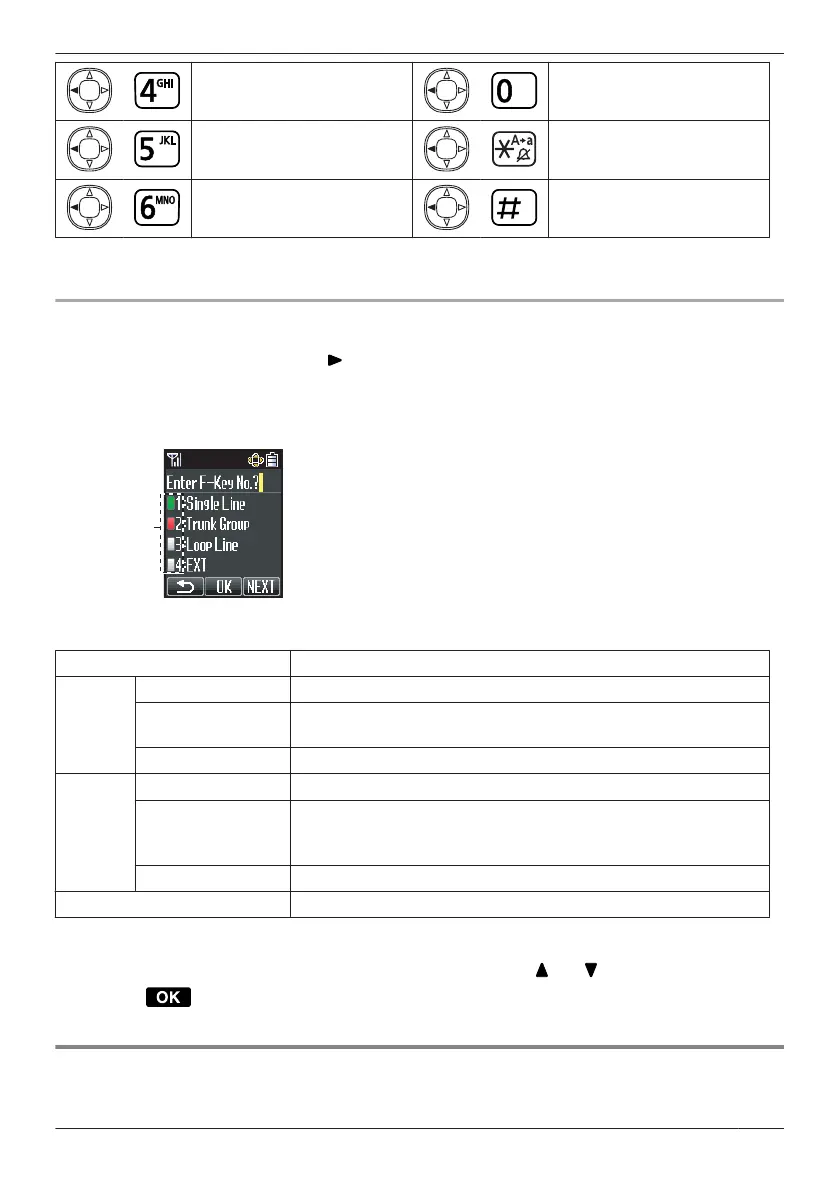
Flexible Keys
A Flexible Key can be used either to seize a line in order to make or receive an outside call, or used as a
function key. Press the Navigator Key [ ] to display the Flexible Key list. Here you can access the 12
Flexible Keys. The colour of each key number indicates line status similarly to the LED indicators on a
Proprietary Telephone.
[Example]
Understanding the Flexible Keys
*1
Colour of key numbers Line status
Green
On You are currently using this line.
flashing rapidly
You have an incoming call on this line.
(An outside call is coming in on a single extension.)
flashing slowly You have a call on hold on this line.
Red
On This line is in use by someone else.
flashing rapidly
You have an incoming call on this line.
(An outside call is coming in on multiple extensions
simultaneously.)
flashing slowly Someone has a call on hold on this line.
No colour This line is idle.
*1 The meanings of these colours of key numbers vary depending on the status of the outside line.
R To select a key, press its key number, or press the Navigator Key [ ] or [ ] to select the desired key
and press
.
R To edit the names of Flexible Keys, see Page 32.
Selecting the Display Language
You can select the language displayed on your handset.
31
Before Operating the Telephone




 To Next Page