Entering Characters
You can enter characters and digits using the dialling keys.
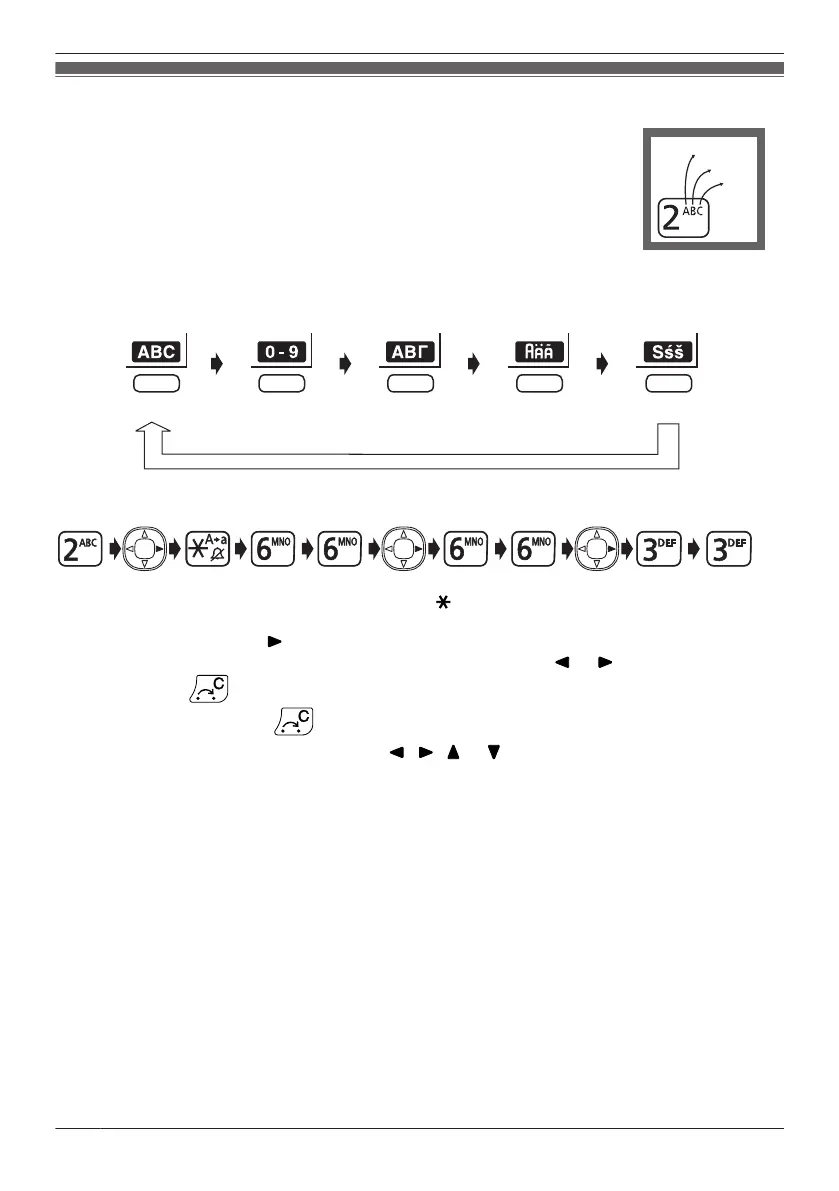
You can select one of 5 character modes by pressing the Right Soft Key while
entering a name. The function icon above the soft key displays the current
character mode.
For available characters, see "Character Mode Table" on Page 59.
To change the character mode while editing a name in the Phonebook, press the
right soft key.
Alphabetic Numeric Greek
Extended 2Extended 1
Example: To enter "Anne" in Alphabet Mode.
R To switch between uppercase and lowercase, press .
R To enter a character located on the same dialling key as the previous character, move the cursor by
pressing the Navigator Key , then enter the desired character.
R If you enter a different character by mistake, press the Navigator Key
or to highlight the
character, press to delete it, then enter the correct character.
R To clear an entire line, press for more than 1 second.
R To move the cursor, press the Navigator Key
, , or .
58
Using the Handset Phonebook




 To Next Page