Bluetooth Option (KX-TCA285/KX-TCA385)
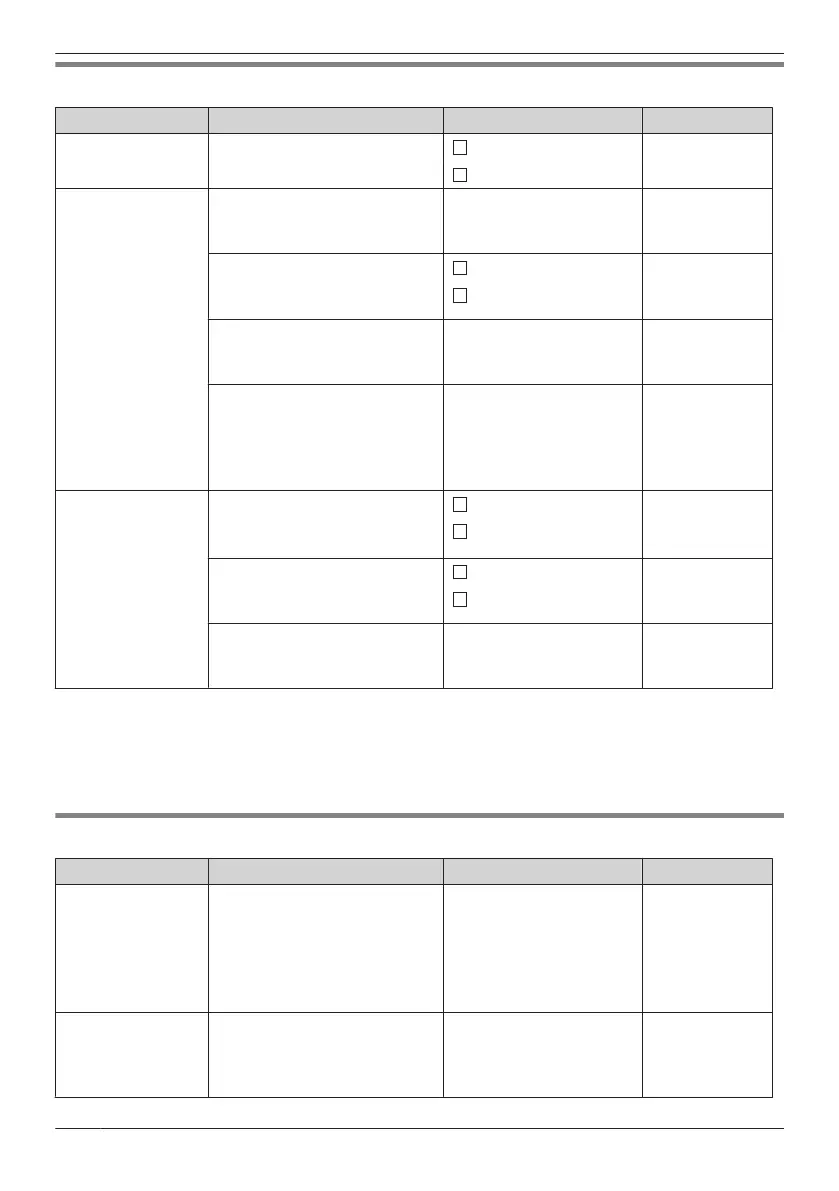
Sub Item Description Setting Default
On/Off
Turns the Bluetooth function on
or off.
On
Off
Off
Cell Phone Phonebook
Receives the phonebook from
a cell phone by Bluetooth.
— —
Registration
Registers or deregisters a cell
phone.
Register
Not registered
Deregister
Change BT PIN
Sets or changes the Bluetooth
PIN number.
Enter the PIN Code. (4
digits) Not registered
Prefix
*1
Sets the codes below.
– International
– Country Code
– National Access
0–6 digits
Not stored
BT Headset
Connection
*2
Connects or disconnects a
Bluetooth headset.
On
On
Off
Registration
Registers or deregisters a
Bluetooth headset.
Register
Not registered
Deregister
Headset Mic Vol
Adjusts the microphone volume
of the Bluetooth headset.
Level 1–6
Level 3
*1 If you set an International code, Country code, and/or National Access code, phone numbers that
include "+" will be converted to include in the international or national call prefix when they are
transferred from a cell phone’s phonebook data.
*2 If a Bluetooth headset has not been registered yet, the "Registration" screen of "BT Headset" is
displayed when this option is selected.
Other Option
Sub Item Description Setting Default
Change
Password
*1*2
Changes the handset password
(4 digits) used for unlocking the
Handset Phonebook, using the
Reset Handset option, and
unlocking the key lock.
Enter Old Password.
*3
Not registered
¯
Enter New Password.
¯
Verify New Password.
Line Access CD
Enters the line access code
that matches the setting of your
PBX. Three access line codes
can be stored.
Select a number, then
enter the code. (max. 6
digits)
No.1: 0/9
*4
No.2: 8XX
*5
No.3: Not Stored
70
Customising the Telephone



 To Next Page