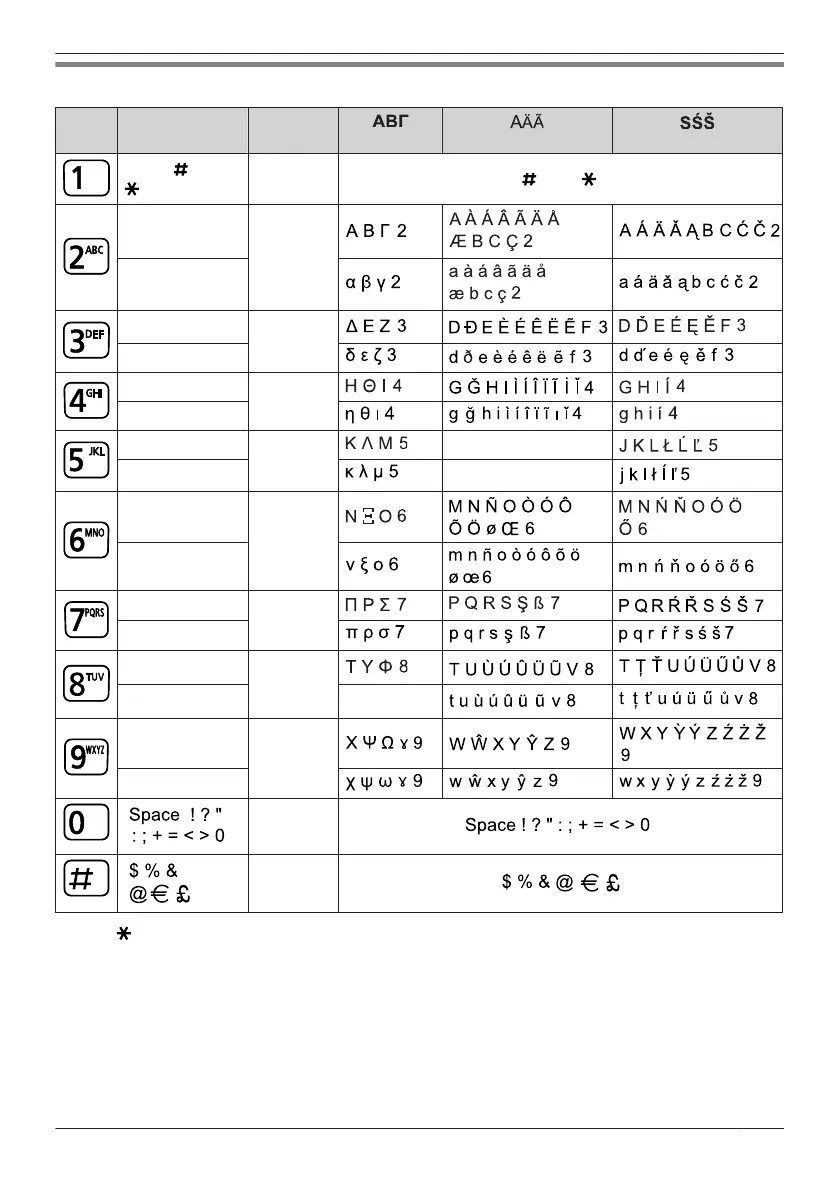
Character Mode Table
Keys
ABC
(Alphabetic)
0–9
(Numeric) (Greek) (Extended 1)
(Extended 2)
Space & ’ ( )
, – . / 1
1 Space & ’ ( ) , – . / 1
A B C 2
2
a b c 2
D E F 3
3
d e f 3
G H I 4
4
g h i 4
J K L 5
5
J K L 5
j k l 5 j k l 5
M N O 6
6
m n o 6
P Q R S 7
7
p q r s 7
T U V 8
8
t u v 8
W X Y Z 9
9
w x y z 9
0
#
R Press before or after entering a character to change between uppercase and lowercase.
R Pressing a key repeatedly will cycle through the characters associated with that key. For example, to
enter the letter "C" in Alphabet Mode, press 2 (3 times).
59
Using the Handset Phonebook




 To Next Page