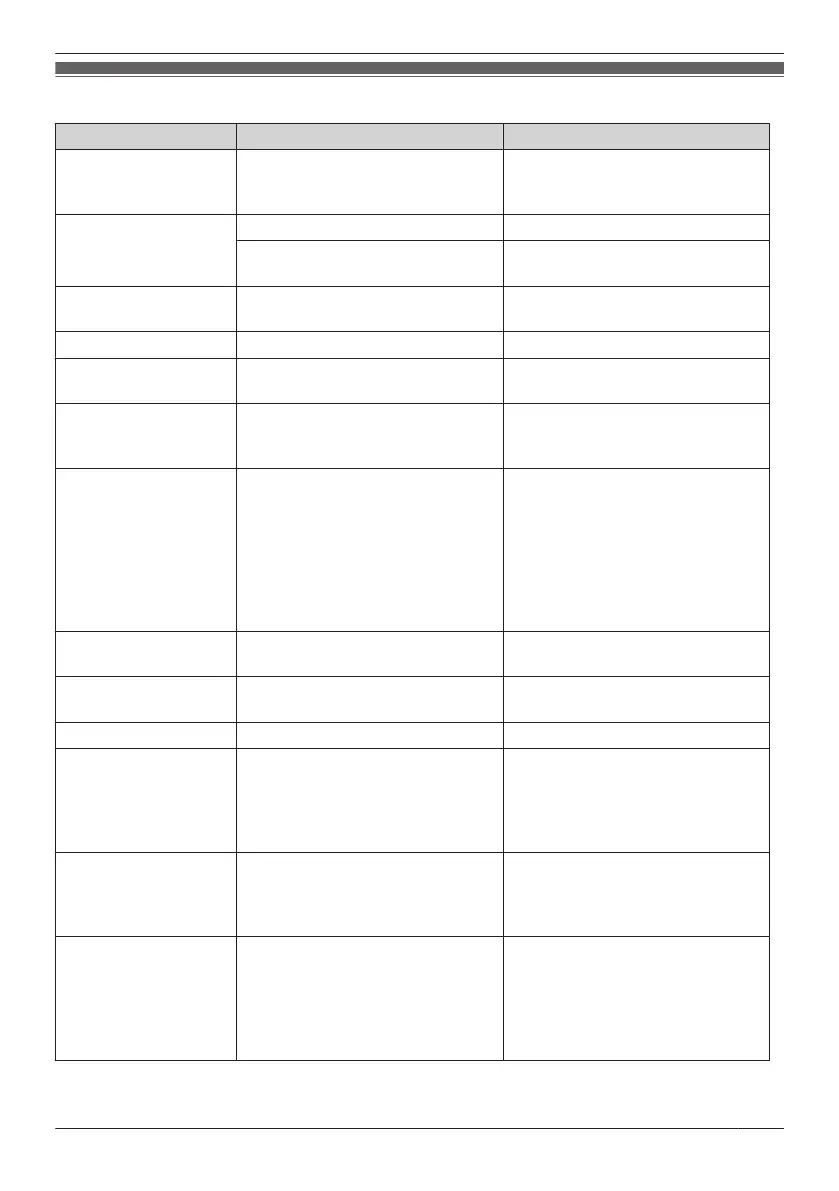
Error Messages
Error Message Possible Cause Solution
Register Unit
The handset has been cancelled
or the handset has not been
registered.
Consult your dealer.
No Service
The handset is out of range. Move closer to the CS.
The CS is turned off. Make sure the power cord is
connected.
PS Not Connected
The called handset is out of
range or is not turned on.
Try again later.
CS Busy
The CS is busy. Try again later.
Please Wait…
The handset is connecting to the
CS or PBX.
Wait for a moment.
Charge Battery
The handset battery has little
charge remaining.
Charge the battery fully. See
"Charging the Battery/Batteries" on
Page 74.
No Entries
When trying to view the
Phonebook: No items have been
stored. See "Storing an Item in
the Handset Phonebook" on
Page 47.
When trying to view the Incoming
or Outgoing Call Log: No logs
have been stored.
Memory Full
The Phonebook is full and cannot
store the new item.
Remove unnecessary data in the
Phonebook and try again.
Incorrect Entry
The numbers you entered are
invalid.
Recheck your entry (max. 5 digits)
and try again.
Need Repair
Consult your dealer.
Transfer Error
A connection with a cell phone
has been interrupted.
Perform the connection procedure
with the cell phone again.
For details, see "Transferring
Phonebook Data from a Cell Phone
using Bluetooth" on Page 53.
Connect Error
An error occurred when
establishing a Bluetooth headset
connection.
Ensure the headset is operating
correctly, and then try to establish
the connection with the handset
again.
BT Headset Link
Error
(For KX-TCA285/
KX-TCA385)
The Bluetooth headset is out of
range of the handset.
When you are using a Bluetooth
headset, always keep the handset
within range. We recommend
keeping the handset and headset
within 1 m of each other for best
performance.
85
Appendix










 To Next Page