Before Operating the PS
12
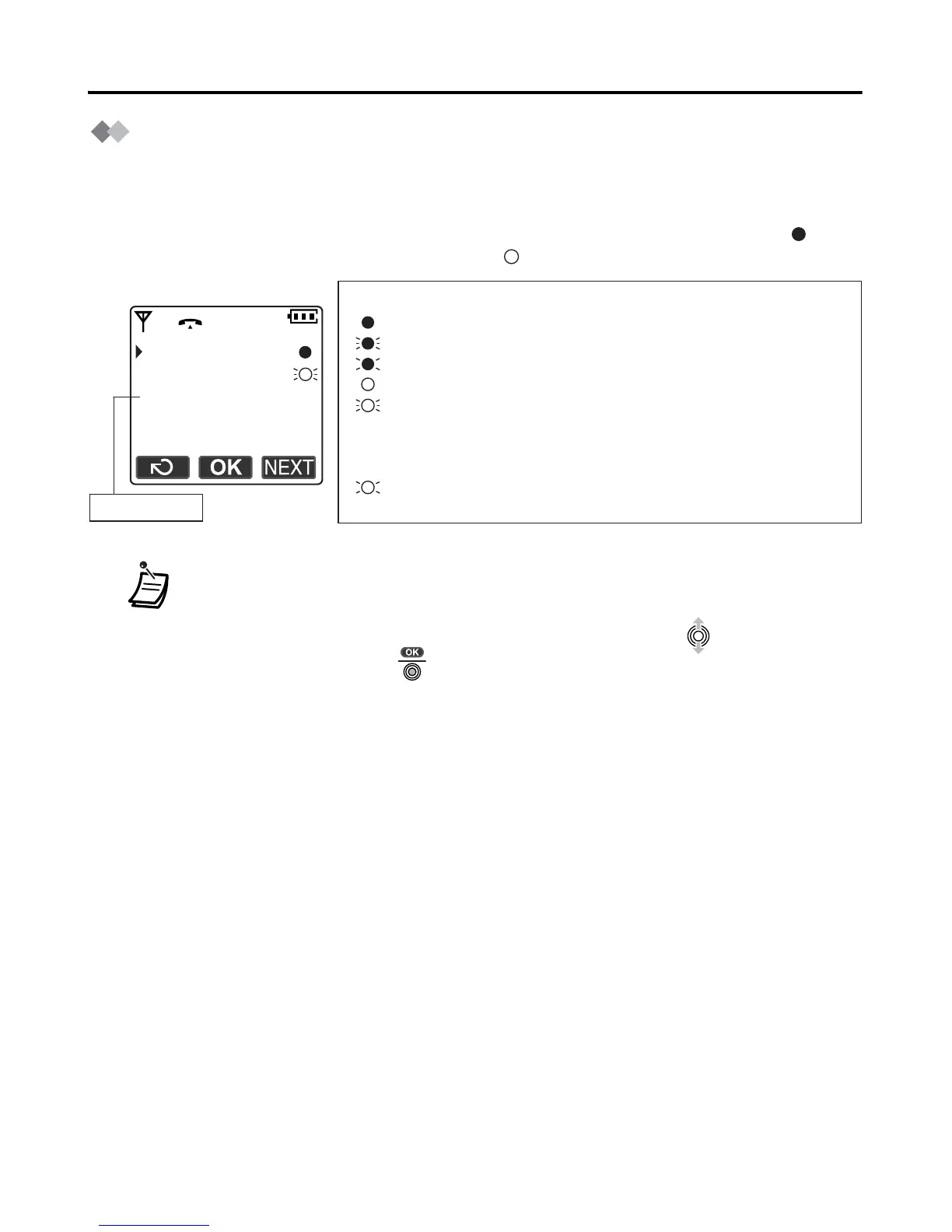
Flexible Key Display
A flexible key can be used either to seize a line in order to make or receive an outside call
(F-CO key), or used as a function key. Move the joystick right to display the flexible key
list. Here you can access the 12 flexible keys. The icon shown beside each F-CO key
indicates line status similarly to the LED indicators on a Proprietary Telephone;
means the same thing as a green LED, and means the same thing as a red LED.
• * The meanings of these icons vary depending on the status of the CO line.
• For further information, refer to “LED Indication” in the KX-TDA series/
KX-TD816/KX-TD1232 Business Telephone System Feature Guide.
• To select a key, press its key number, or move the joystick to select the
desired key then press .
• To assign a function to a flexible key, see page 43.
1:Single Line
2:Trunk Group
3:Loop Line
4:Single Line
5:Single Line
Example:
Understanding the Icons for the F-CO key
(on): You are currently using this line.
(flashing rapidly): You have an incoming call on this line.
(flashing slowly): You have a call on hold on this line.
(on): This line is in use by someone else.
(flashing rapidly): There is an incoming call received by an
incoming call distribution group to which
“Ring” is set as the group call distribution
method.
(flashing slowly): Someone has a call on hold on this line.
(no icon): This line is idle.
key number
*










 To Next Page