Before Operating the PS
15
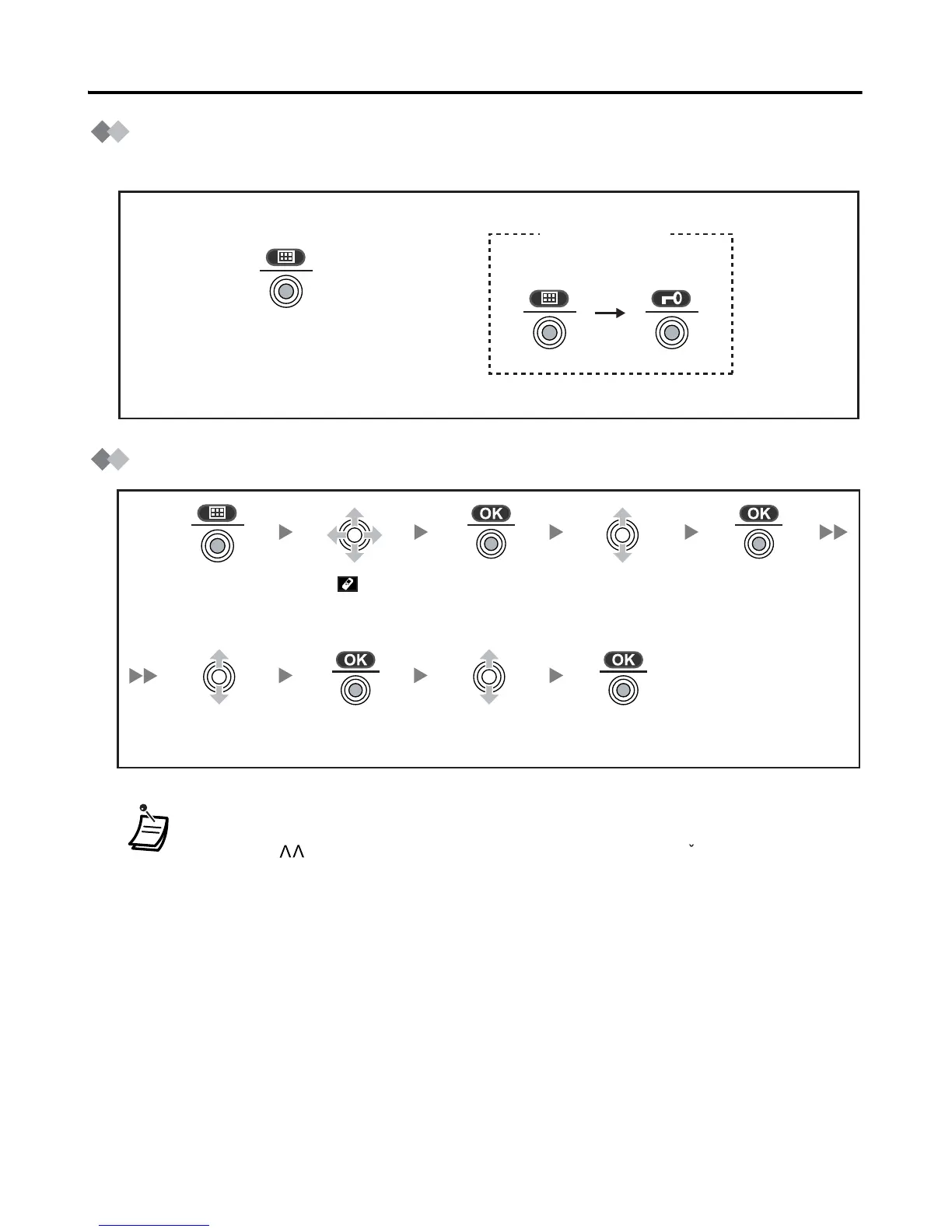
Key Lock
You can lock the dialling buttons while the PS is in idle status.
Selecting the Display Language
• You can select “Auto” or one of the 16 languages below:
• When set to “Auto”, the language settings of the Business Telephone System
will be used automatically.
• The display language of both the PS and Business Telephone System can be
selected, and both should be set to the same language. Refer to the Business
Telephone System User manual for more details.
Press the joystick for
more than 2 seconds
to lock/unlock.
Unlocked
<Display icon>
Locked
Press the
joystick.
Press the
joystick.
Press the
joystick.
Select “Display
Option”.
Select “Select
Language”.
Press the
joystick.
Press the
joystick.
Select the
desired language.
Select “ Setting
Handset”.
Deutsch, English, Español, FRANCAIS, Italiano, Dansk, Nederlands, Svenska,
Suomi, E HNIKA, Magyar, Português, Polski, slovensky, eština, Hrvatski.
c










 To Next Page