Making Calls
19
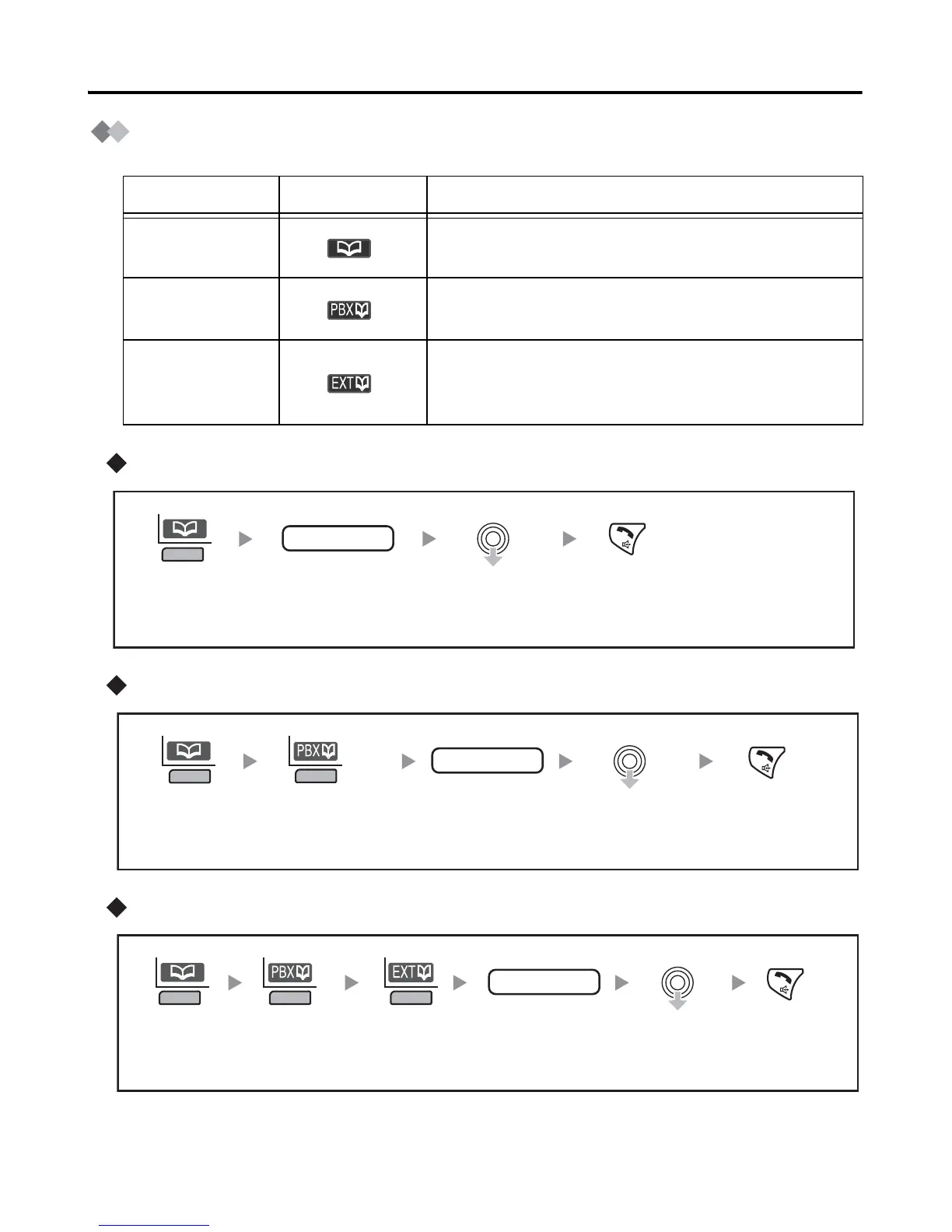
Using the Phonebook
Using the Handset Phonebook
Using the PBX System Phonebook
Using the PBX Extension Phonebook
Feature Display Icon Description
Handset
Phonebook
You can make a call using the numbers stored in
the Handset Phonebook (See page 26).
PBX System
Phonebook
You can make a call using the numbers stored in
the Business Telephone System.
PBX
Extension
Phonebook
You can make a call using the extension numbers
stored in the Business Telephone System.
name
Press the
left soft key.
Enter the first
letter of the
desired name.*
Select the
desired item.
Press
TALK/
SP-PHONE.
name
Press the
left soft key.
Press the
left soft key.
Enter the first
letter of the
desired name.*
Select the
desired item.
Press
TALK/
SP-PHONE.
name
Press the
left soft key.
Press the
left soft key.
Enter the first
letter of the
desired name.*
Select the
desired item.
Press
TALK/
SP-PHONE.
Press the
left soft key.










 To Next Page