EasyManua.ls Logo

Panasonic KX-TS620W - User Manual

Panasonic KX-TS620W
64 pages
Print Icon
To Next Page IconTo Next Page
Loading...
For assistance, please visit http://www.panasonic.com/phonehelp
Operating Instructions
Telephone Answering System
Model No. KX-TS620
This unit is compatible with Caller ID. To use this feature, you must subscribe to the
appropriate service offered by your service provider.
Please read these Operating Instructions before using the unit and save for future
reference.
Panasonic World Wide Web address: http://www.panasonic.com
for customers in the USA or Puerto Rico
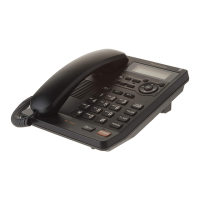
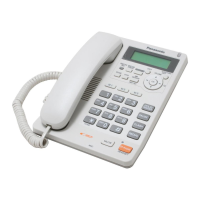
Model shown is KX-TS620W
TS620bk01.book Page 1 Wednesday, May 24, 2006 2:31 PM

Table of Contents

Questions and Answers

  • M
    mariaroyAug 17, 2025
    What to do if Panasonic KX-TS620W is not recording messages?
    • D
      Dr. Miranda HuberAug 17, 2025
      If your Panasonic answering system is on but not recording messages, the recording time may be set to “Greeting only”. Select “1 minute”, “2 minutes” or “3 minutes”. Also, the memory may be full, so erase some or all of the messages.
  • M
    Michael HoffmanAug 20, 2025
    Why is my Panasonic KX-TS620W not displaying caller ID?
    • R
      Richard BriggsAug 20, 2025
      If your Panasonic Answering Machine isn't displaying the caller's name and phone number, first ensure that you subscribe to a Caller ID service. Also, check the AC adapter is connected to the unit. Other telephone equipment or electrical appliances connected to the same outlet may be interfering with your phone. Disconnect it and try again. Telephone line noise may be interfering with the Caller ID information, consult your telephone company. If your unit is connected to a telephone line with DSL service, we recommend connecting a noise filter between the base unit and the telephone line jack. Contact your DSL provider for details.
  • M
    Mary WolfAug 22, 2025
    How to fix Panasonic KX-TS620W when it doesn't ring?
    • S
      Shannon SanchezAug 22, 2025
      If your Panasonic Answering Machine is not ringing, the ringer volume may be set to OFF and “~” is displayed. Select the ringer volume to HIGH, MID or LOW by pressing {HOLD/RINGER}.
  • A
    Anthony ReyesAug 25, 2025
    Why is Caller ID not showing during message playback on my Panasonic KX-TS620W Answering Machine?
    • W
      wcooperAug 26, 2025
      The caller information will not be displayed if the Caller List is renewed and the caller information is erased.
  • S
    shirleycampbellAug 27, 2025
    What to do if my Panasonic KX-TS620W Answering Machine says 'Message full'?
    • P
      Paul MillerAug 27, 2025
      If the MESSAGE indicator flashes rapidly, “Message full” is displayed, and no new messages are recorded on your Panasonic Answering Machine, it means the memory is full. Erase some, or all, of the messages.
  • M
    Margaret McguireAug 30, 2025
    How to operate Panasonic KX-TS620W Answering Machine from a touch tone phone?
    • T
      Tammy BaileyAug 30, 2025
      To operate your Panasonic Answering System from a touch tone phone, make sure you enter the correct remote code. The answering system may not respond if the tones are too short to activate the unit, so press each button firmly. Also, ensure the answering system is turned on.
  • J
    John HansenSep 1, 2025
    Why can't I store names and numbers on my Panasonic KX-TS620W?
    • J
      Julie CollinsSep 2, 2025
      If you cannot store a name and phone number in memory on your Panasonic Answering Machine, check the AC adaptor is connected to the unit. Do not pause for over 60 seconds while storing. Do not enter a phone number more than 32 digits long. If “Phonebook full” is displayed, erase other stored items from the Phonebook memory.
  • M
    Matthew WilsonSep 4, 2025
    Why can't the other party hear me on my Panasonic KX-TS620W Answering Machine?
    • M
      megan04Sep 4, 2025
      If the other party suddenly cannot hear your voice during a conversation on your Panasonic Answering Machine, {MUTE} may have been pressed. If “ ” is displayed, press {MUTE}.
  • M
    Mark MitchellSep 6, 2025
    What happens when Panasonic KX-TS620W Answering Machine rings during programming?
    • J
      Jonathan AndersonSep 7, 2025
      If, while programming or searching, your Panasonic Answering Machine starts to ring and stops the program/search, to answer the call, lift the handset or press {SP-PHONE/HEADSET}. Start again from the beginning after hanging up.
  • D
    David LucasSep 9, 2025
    Why does the display exit the Caller List on my Panasonic KX-TS620W?
    • P
      Paula CookSep 9, 2025
      The display exits the Caller List on your Panasonic Answering Machine if you pause for over 60 seconds while searching.

Summary

Preparation

Important Safety Instructions

Essential safety precautions to follow when using the telephone unit to prevent hazards.

Location of Controls

Identifies and explains the function of each button and indicator on the telephone unit.

Key Button Functions Overview

Illustrates and explains the purpose of major buttons on the telephone, such as ERASE, EXIT, FUNCTION/EDIT.

Settings

Connecting Cables

Step-by-step guide on how to connect the handset, AC adaptor, and telephone line cord to the unit.

Programming Summary

Overview of programmable functions and how to access them via the FUNCTION/EDIT button and menus.

Preparing the Answering System

Recording a Greeting Message

Step-by-step instructions for recording a personal greeting message for the answering system.

Answering System Programming Summary

Lists programmable functions for the answering system, such as remote code, number of rings, and call screening.

Making;Answering Calls

Caller ID Service

Caller Information Display

Explains how caller name and number are displayed when the unit rings and after answering.

Viewing the Caller List

Steps to access and navigate the list of incoming calls, including missed calls.

Calling Back from Caller List

How to initiate a call back to a caller directly from the Caller List.

Storing Caller List Info in Phonebook

Guide to saving incoming call numbers from the Caller List into the Phonebook memory.

Storing Caller List Info in Direct Dial Memory

How to save incoming call numbers from the Caller List to the Direct Dial memory buttons (M1, M2, M3).

Phonebook

Storing Phonebook Entries

Instructions for adding names and phone numbers (up to 50) into the unit's Phonebook memory.

Dialing from Phonebook

Procedures for accessing the Phonebook and dialing stored numbers, including searching by name.

Direct Dial (M1, M2, M3)

Storing Direct Dial Numbers

Guide to saving up to three names and numbers to the Direct Dial memory buttons for quick access.

Dialing Direct Dial Numbers

Instructions on how to dial numbers stored in the Direct Dial memory.

Special Features

Setting Security Password

Procedure for changing the default password used for Call Restriction and other security features.

Call Restriction Setup

How to prevent dialing numbers starting with specific digits, except for designated emergency numbers.

Answering System

Automatic Answering Operation

Overview of how the unit answers calls, plays greetings, and records messages.

Setting Answering System ON;OFF

How to turn the answering system on or off, including remote activation.

Listening to Messages

How to play back recorded messages, distinguishing between new and all messages.

Erasing Recorded Messages

Steps to erase individual or all recorded messages to free up memory.

Remote Operation via Touch Tone Phone

How to operate the answering system remotely using any touch-tone phone, with voice menu guidance.

Setting Remote Code

How to set a 2-digit remote code to prevent unauthorized access to your answering system.

Direct Remote Operation Commands

Lists direct commands (button presses) for controlling specific answering system functions remotely without using the voice menu.

Useful Information

Troubleshooting Common Issues

Addresses problems like the unit not working, not ringing, or inability to dial, providing causes and remedies.

Troubleshooting Continued

Further troubleshooting for issues related to Caller ID display, answering system operation, and remote access.

Panasonic KX-TS620W Specifications

General IconGeneral
TypeAnswering Machine
Caller IDYes
SpeakerphoneYes
Remote AccessYes
DisplayLCD
Phonebook entries50
BrandPanasonic
ModelKX-TS620W
Power SourceAC adapter
Battery BackupNo
Toll SaverYes
Voice GuidanceYes
Headphone JackNo
Answering MachineYes
Recording Time18 minutes
Incoming Message Length90 seconds

Related product manuals