............
-.-_._'"
,
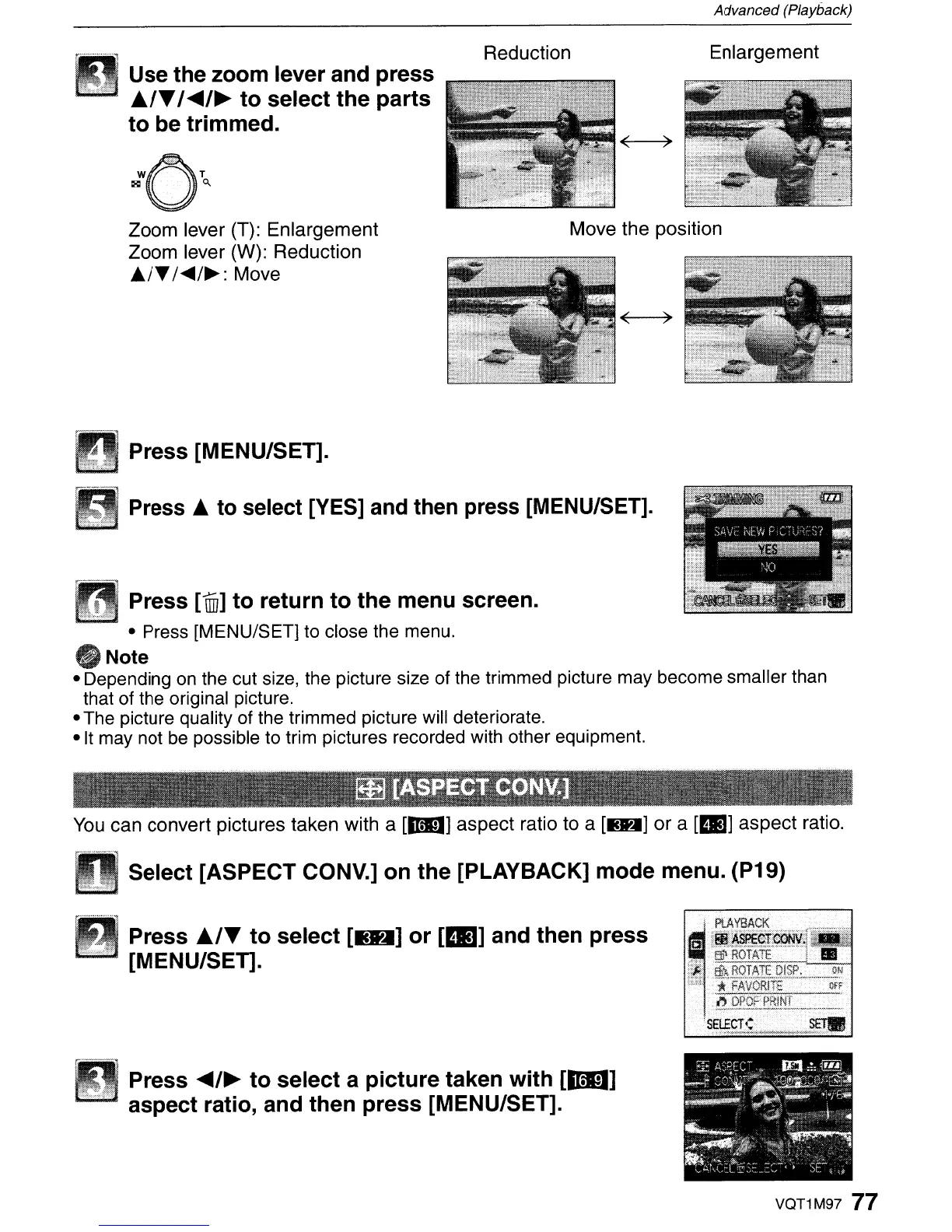
Use the zoom lever and press
..
/T
/
.....
/~
to
select
the
parts
to
be trimmed.
Reduction
Advanced (Playback)
Enlargement
Zoom lever (T): Enlargement
Zoom lever (W): Reduction
A/T/<tII4/~:
Move
Press [MENU/SET].
Move the position
Press
..
to select [YES] and then press [MENU/SET].
Press
[illJ]
to
return
to
the
menu screen.
- Press [MENU/SET] to close the menu.
oNote
- Depending
on
the cut size, the picture size of the trimmed picture may become smaller than
that of the original picture.
- The picture quality of the trimmed picture will deteriorate.
-It
may not
be
possible to trim pictures recorded with other equipment.
You
can convert pictures taken with a
[DU)
aspect ratio to a
[IMM)
or
a
[III)
aspect ratio.
Select [ASPECT CONV.]
on
the
[PLAYBACK]
mode
menu. (P19)
Press
..
/T
to
select
[IJH]
or
[IB]
and then press
[MENU/SET].
Press
.....
/~
to
select
a
picture
taken with
[mo]
aspect ratio, and then
press
[MENU/SET].
VQT1M97
77



 To Next Page
 Loading...