Mini VRF SYSTEM
Remote Controller Functions
5 - 8
1. Simple Settings Function
5
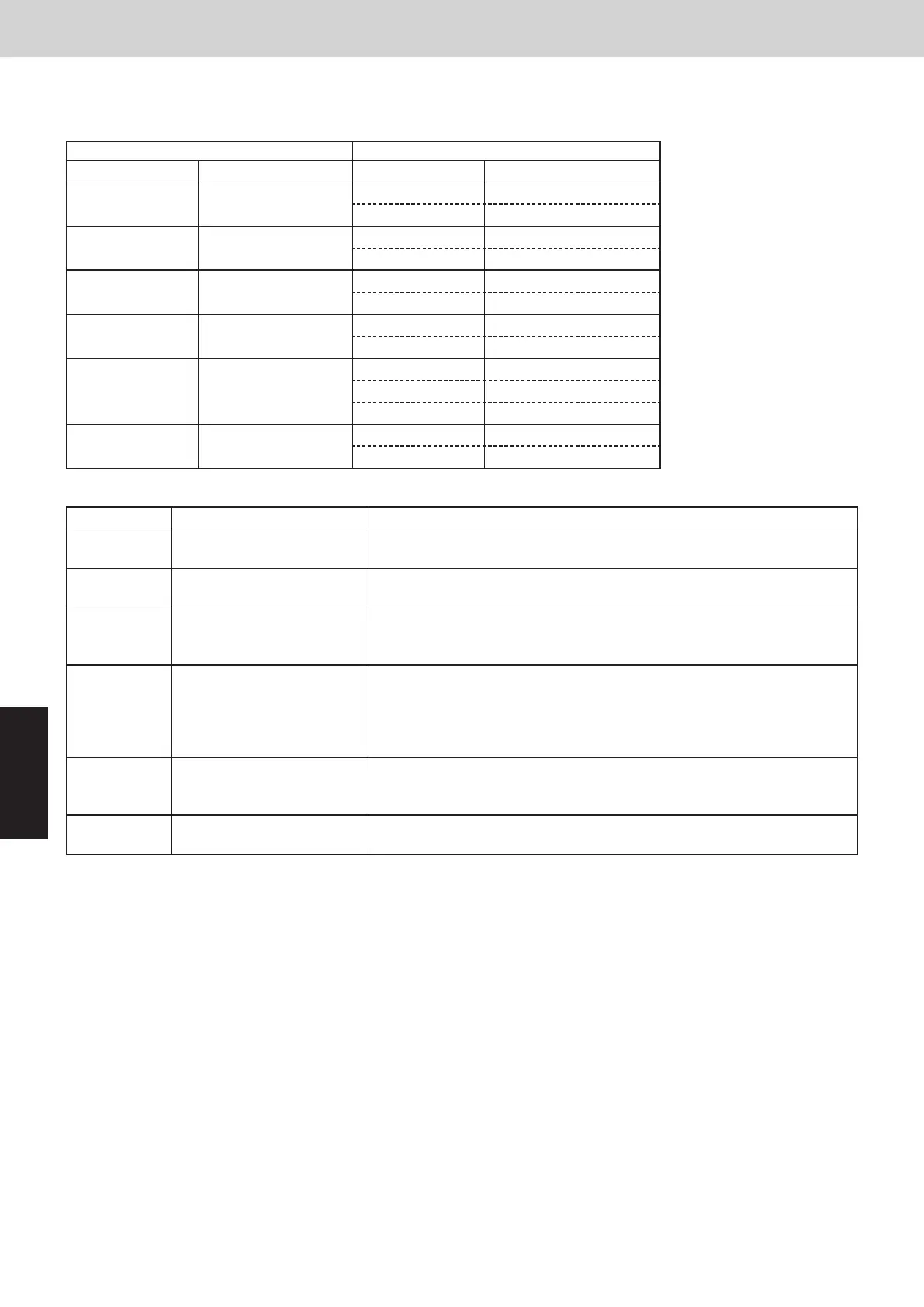
When the operating mode at the priority remote controller is changed, the operating modes of other remote
controllers change as shown below.
Mode change at priority remote controller Operating modes at other remote controllers
Current mode New mode Current mode New mode
Cooling or dry Heating
Cooling or dry Heating
Fan Fan (not changed)
Heating Cooling
Heating Cooling
Fan Fan (not changed)
Cooling Dry
Cooling Cooling (not changed)
Dry Dry (not changed)
Heating Dry
Heating Cooling
Fan Fan (not changed)
Cooling or dry Fan
Cooling Cooling (not changed)
Dry Dry (not changed)
Fan Fan (not changed)
Heating Fan
Heating Heating (not changed)
Fan Fan (not changed)
Item code Item Description
05
Fan speed setting when
heating thermostat is OFF
Changes the fan speed setting when the heating thermostat is OFF.
06
Heating intake temperature
shift
Shifts the intake temperature during heating.
Can be set when the body thermostat is used.
07 Electric heater installation
Set when cost distribution is performed using an AMY central control system
or similar system, and when an optional electric heater is installed.
(This is unrelated to control of the electric heater.)
08
Humidifying when heater
thermostat is OFF
Normally humidifying does not occur when the thermostat is OFF during
heating operation. However, this setting can be changed in order to increase
the amount of humidifying.
Caution: In order to avoid water leakage and damage to the fan, do not use
this setting unless a vaporizing humidifier is used.
0D
Permit/prohibit automatic
heating/cooling
This setting can be used to prevent the automatic heating/cooling display on
the remote control if the unit configuration permits automatic heating/cooling
operation.
0F Cooling-only
This setting allows a heat pump indoor unit to be operated as a cooling-only
unit.
Maintenance func
XX / XX
[ ][ ]
ECONAVI
nanoeX
RC. setting mode
Maintenance func
XX / XX
[ ][ ]
Simple settings
Detailed settings
Auto address
Detailed settings
[ ][ ]
Unit no.
Code no.
1-1
000010
Set data 00010001
Detailed settings
[ ][ ]
Unit no.
Code no.
1-1
000010
Set data 00010001
]
Detailed settings
[ ]
Unit no.
Code no.
1-1
000010
Set data 00010001
]
Confrm
[ ]
Detailed settings
[ ][ ]
Unit no.
Code no.
1-1
10
Set data 00010001
Detailed settings
[ ][ ]
Unit no.
Code no.
1-1
000010
Set data 00010001
Exit detailed
settings
and restart?
YES
NO
Select “Detailed settings” on the LCD display and press the
After selecting “Unit no.”, press the
Detailed Settings Function
<Procedure of CZ-RTC6 series>
Stop the system before performing these steps.
(1) Keep pressing the
This allows the system address, indoor unit address, and other settings to be made for the individual or group-control
indoor unit to which the remote controller used for detailed settings is connected.
When detailed settings mode is engaged, operation stops at the individual or group-control indoor unit where the
remote controller used for detailed settings is connected. Simple settings items can also be set at this time.
, and
4 or more second
The “Maintenance func” screen appears on the LCD display.
s.
buttons simultaneously for
(2) Press the or button to see each menu.
button.
The “Detailed settings” screen appears on the LCD display.
The “Detailed settings” screen appears on the LCD display (proceed to
Step (6)).
(3) Select the “Unit no.” by pressing the
or button.
button and proceed to Step (4).
(4) Select the “Code no.” by pressing the
After selecting “Code no.”, press the
or button.
button and proceed to Step (5).
If the
button is pressed, proceed to Step (6).
button.
(5) Select the “Set data” by pressing the
After selecting “Set data”, press the
or button.
NOT E
(6) If the button is pressed under the display, the following
display (Detailed setting-end screen) appears.
Then select “YES” by pressing the or button and
press the button. (Return to normal remote controller
display.)
SM830289-01_欧州向け R32 mini VRF 8,10HP SM&TRSM.indb 8SM830289-01_欧州向け R32 mini VRF 8,10HP SM&TRSM.indb 8 2021/05/07 10:16:132021/05/07 10:16:13



 To Next Page