Mini VRF SYSTEM
Remote Controller Functions
5 - 20
3. Remote Controller Servicing Functions
5
<Function of CZ-RTC5B>
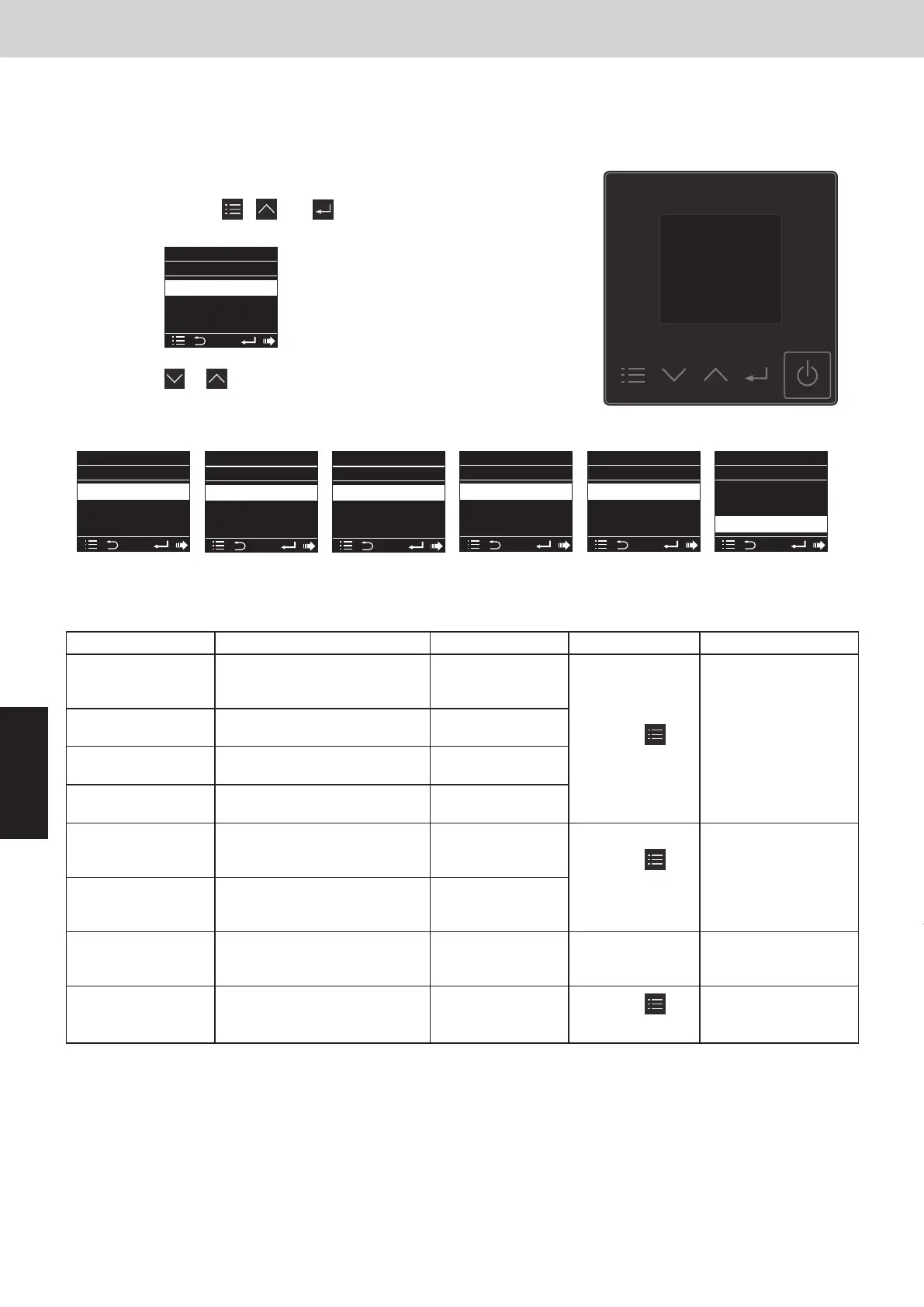
Display of “maintenance function” screen
(1)
Keep pressing the , and
buttons simultaneously for 4 or more seconds.
The “Maintenance func” screen appears on the
LCD display.
(2)
Press the or button to see each
menu.
If you wish to see the next screen instantly, press
the or button.
List of Servicing Functions
Functions Description Menu selection Reset operation Unit status
Press the
button.
Press the
button.
ECONAVI
・CZ-KPU3A
・CZ-CENSC1
Display from each sensor 0. ECONAVI info.
Test run
Operation with forced
thermostat ON
4. Test run
Sensor temperature
display
Temperature display from
each sensor
5. Sensor info
Press the
button.
(Restart)
2WAY SYSTEM
Remote Controller Functions
3. Remote Controller Servicing Functions
Filter lifetime, operating
mode priority, central control
address, and other settings
Simple settings 7. Simple settings
System address, indoor
unit address, central control
address, and other settings
Detailed settings 8. Detailed settings
Auto address setting based
on command from the wired
remote controller
When settings are
made from a remote
controller, the indoor
unit where that
remote controller is
connected stops.
Entire system stops.Auto address 9. Auto address Automatic reset
Servicing check
display
Alarm history display 6. Service check
nanoe™ X Display status of nanoe™ X 13. nanoe X
Sel.
20:30 (THU)
Maintenance func
Page [] Confirm
Sel
1. Outdoor unit error data
2. Service contact
3. RC setting mode
4. Test run
Maintenance function screen
Maintenance func
Sel. Page [] Confirm
20:30 (THU)
0. ECONAVI info.
1. Outdoor unit error data
2. Service contact
3. RC setting mode
Maintenance func
Sel. Page [] Confirm
20:30 (THU)
4. Test run
5. Sensor info.
6. Servicing check
7. Simple settings
Maintenance func
Sel. Page [] Confirm
20:30 (THU)
8. Detailed settings
9. Auto address
10.Set elec. consumption
11.Set touch key
Maintenance func
Sel. Page [] Confirm
20:30 (THU)
12.Check touch key
13.nanoe X
14.Initialize controller
15.datanavi
<Function of CZ-RTC6 series>
Stop the system before performing these steps.
Maintenance function screen
(1)
Keep pressing the , and buttons simultaneously for
4 or more seconds.
(2)
Press the or button to see each menu.
List of Servicing Functions
Functions Description Menu selection Reset operation Unit status
Press the
button.
Press the
button.
ECONAVI
・CZ-KPU3A
・CZ-CENSC1
Display from each sensor ECONAVI
Test run
Operation with forced
thermostat ON
Test run
Sensor temperature
display
Temperature display from
each sensor
Sensor info
Press the
button.
(Restart)
Filter lifetime, operating
mode priority, central control
address, and other settings
Simple settings Simple settings
System address, indoor
unit address, central control
address, and other settings
Detailed settings Detailed settings
Auto address setting based
on command from the wired
remote controller
When settings are
made from a remote
controller, the indoor
unit where that
remote controller is
connected stops.
Entire system stops.Auto address Auto address Automatic reset
Servicing check
display
Alarm history display Service check
nanoe™ X
Display status of nanoe™ X nanoeX
The remote controller includes a number of servicing functions. Use these as needed for test runs and
inspections.
Maintenance func
XX / XX
[ ][ ]
ECONAVI
nanoeX
RC. setting mode
Maintenance func
XX / XX
[ ][ ]
Test run
Sensor info.
Service check
Maintenance func
XX / XX
[ ][ ]
Simple settings
Detailed settings
Auto address
Maintenance func
XX / XX
[ ][ ]
Set elec. consump.
Setting list
Operation lock
Maintenance func
XX / XX
[ ][ ]
Password change
SMAAP
Set touch key
Maintenance func
XX / XX
[ ][ ]
Set touch key
Check touch key
Initialize cntrlr
Maintenance func
XX / XX
[ ][ ]
ECONAVI
nanoeX
RC. setting mode
SM830289-01_欧州向け R32 mini VRF 8,10HP SM&TRSM.indb 20SM830289-01_欧州向け R32 mini VRF 8,10HP SM&TRSM.indb 20 2021/05/07 10:16:202021/05/07 10:16:20



 To Next Page