Mini VRF SYSTEM
Outdoor Unit Maintenance Remote Controller
4 - 12
4
2WAY SYSTEM
Outdoor Unit Maintenance Remote Controller
6. Mode Settings
Setting mode 1
<Operating procedure>
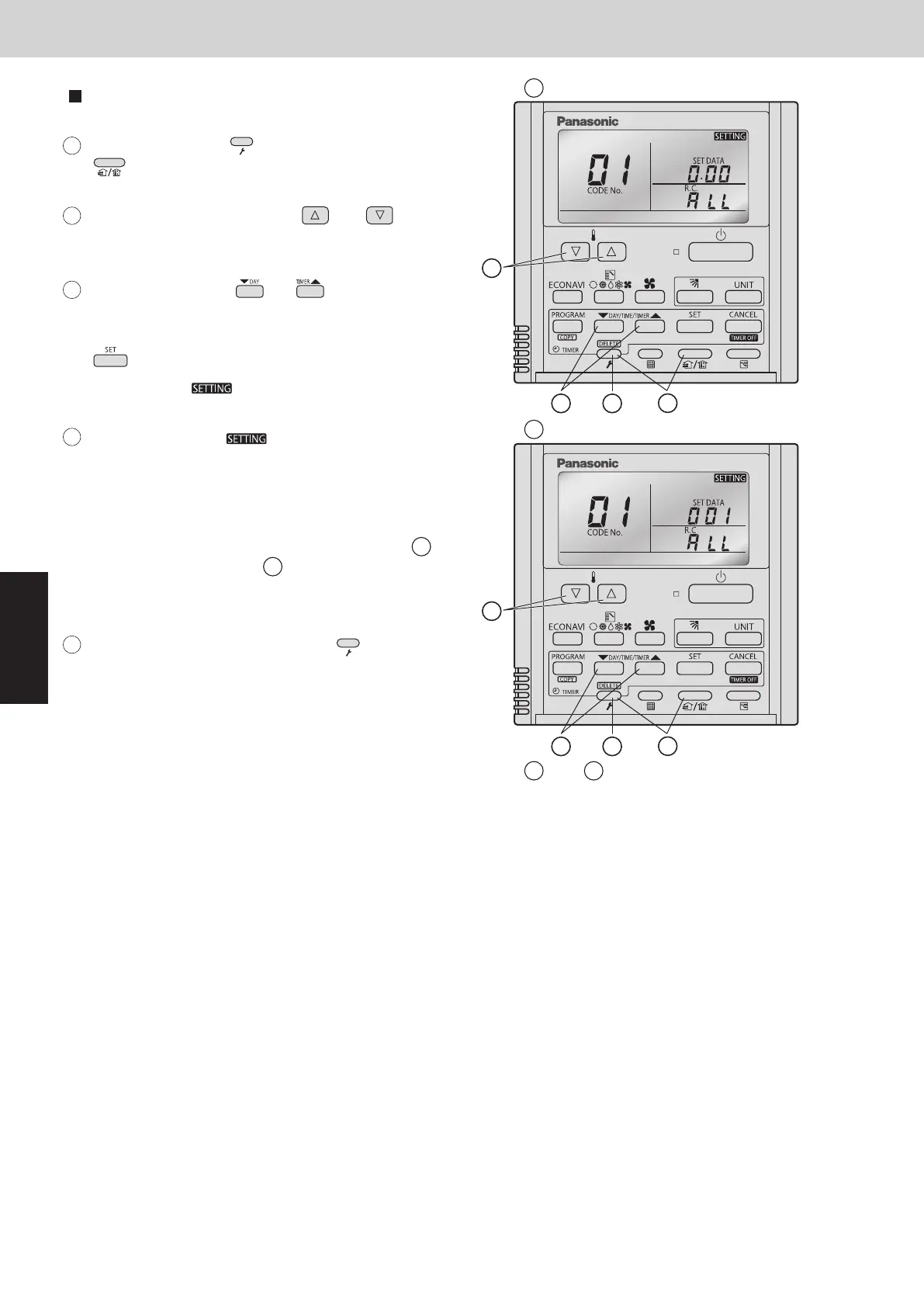
Press and hold the 1
2
(Check) button and
(Ventilation) button simultaneously for 4
seconds or longer.
Press the temperature setting and
buttons to change the item code. The item codes
and setting data are shown in the table below.
Press the timer time buttons to
change the setting data.
To confirm the changed setting data, press the
button.
(At this time, “ ” display stops blinking
and remains lit.)
During this mode, “ ” is displayed,
blinking. The outdoor unit address display section
displays “ALL,” the item code and number (DN
value in the table), and the setting data (6 digits).
(The setting data is displayed in 6 digits. The
display changes between the first 3 digits (Fig.
A
)
and the last 3 digits (Fig.
B
B
B
A
A
).
When the first 3 digits are displayed, the bottom dot
of the colon is illuminated.)
To exit the setting mode, press the (Check)
button.
Regarding the parameter setting, see the item "11. Detailed Settings in EEPROM of Outdoor Unit" under
Section 1.
2
5
1
and are displayed alternately.
(Example shows display of 000 001.)
Display of fi rst 3 digits
Display of last 3 digits
3
4
5
and
3
2
5
1
3
A
A
6. Mode Settings
SM830289-01_欧州向け R32 mini VRF 8,10HP SM&TRSM.indb 12SM830289-01_欧州向け R32 mini VRF 8,10HP SM&TRSM.indb 12 2021/05/07 10:15:502021/05/07 10:15:50



 To Next Page