6 - 4
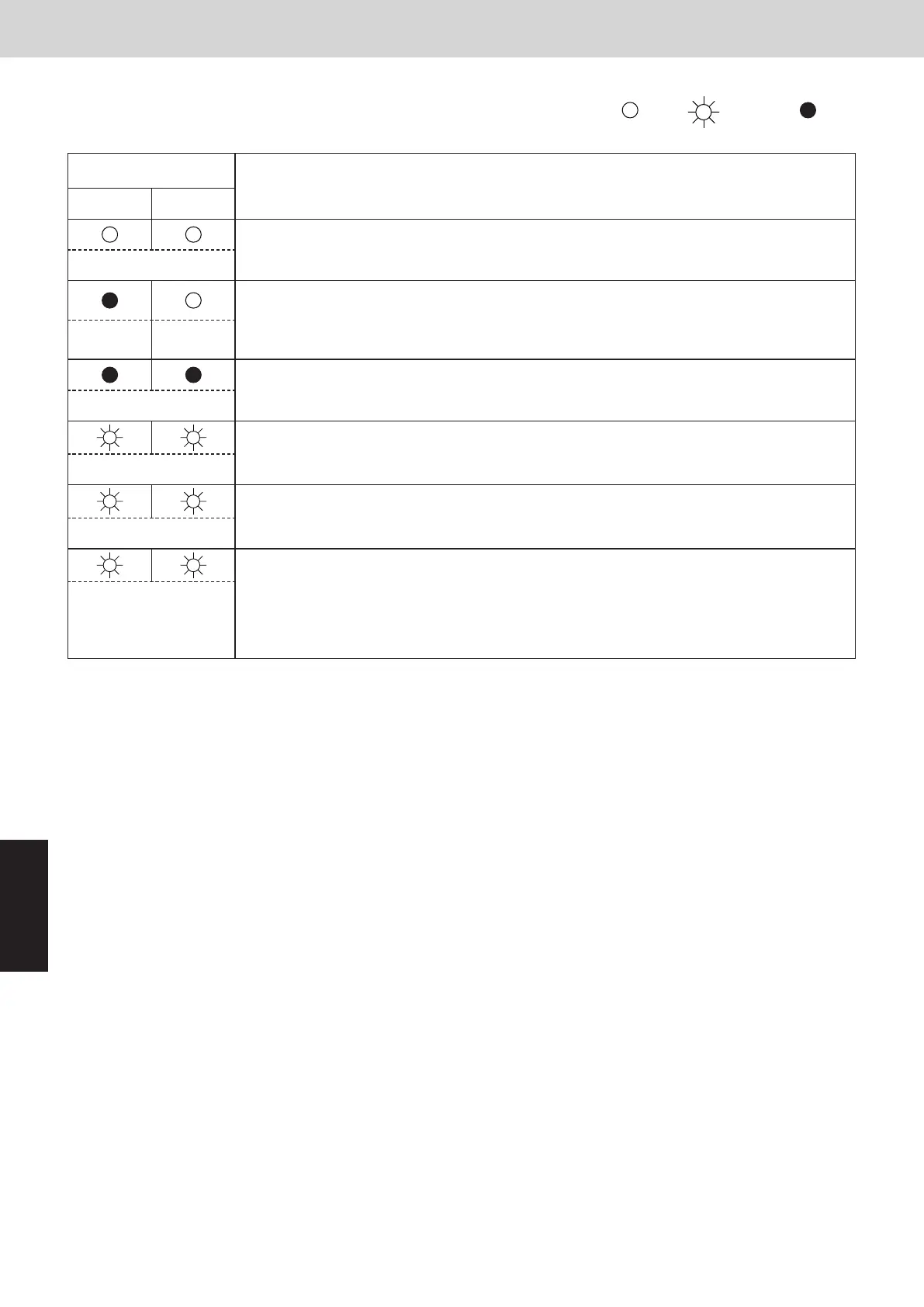
2. Outdoor Unit Control Panel LED Display
Mini VRF SYSTEM
Trouble Diagnosis
6
( : ON : Blinking : OFF)
LED (RED)
Display meaning
1 2
After the power is turned ON (and auto address setting is not in progress), no communication with
the indoor units in that system is possible.
(Both ON)
After power is turned ON (and auto address setting is not in progress), one or more indoor units are
conrmed in that system; however, the number of indoor units does not match the number that was
set. This status remains even if the indoor unit address (indoor EEPROM item code : 13) is set more
than 17 indoor units. In this case, be sure to set the indoor unit address less than 16.
(OFF) (ON)
Auto address setting was completed successfully. (After the power is turned ON, and auto address
setting is not in progress, the number of detected indoor units connected to that system matches
the number that was set, and regular communications are occurring.)
(Both OFF)
Auto address setting is in progress.
(Blinking alternately)
At time of auto address setting, the number of indoor units did not match the number that was set.
(Both blinking)
Alarm display
LED 1 blinks M times, then LED 2 blinks N times. The cycle then repeats.
M = 2: P alarm 3: H alarm 4: E alarm 5: F alarm 6: L alarm
N = Alarm No.
Example: LED 1 blinks 2 times, then LED 2 blinks 17 times. The cycle then repeats.
Alarm is “P17.”
(Blinking alternately)
SM830289-00_Sec6.indd 4SM830289-00_Sec6.indd 4 2021/01/29 16:15:402021/01/29 16:15:40



 To Next Page