4 - 9
Mini VRF SYSTEM
Outdoor Unit Maintenance Remote Controller
4
Display the indoor unit and outdoor unit sensor
temperatures.
<Operating procedure>
À
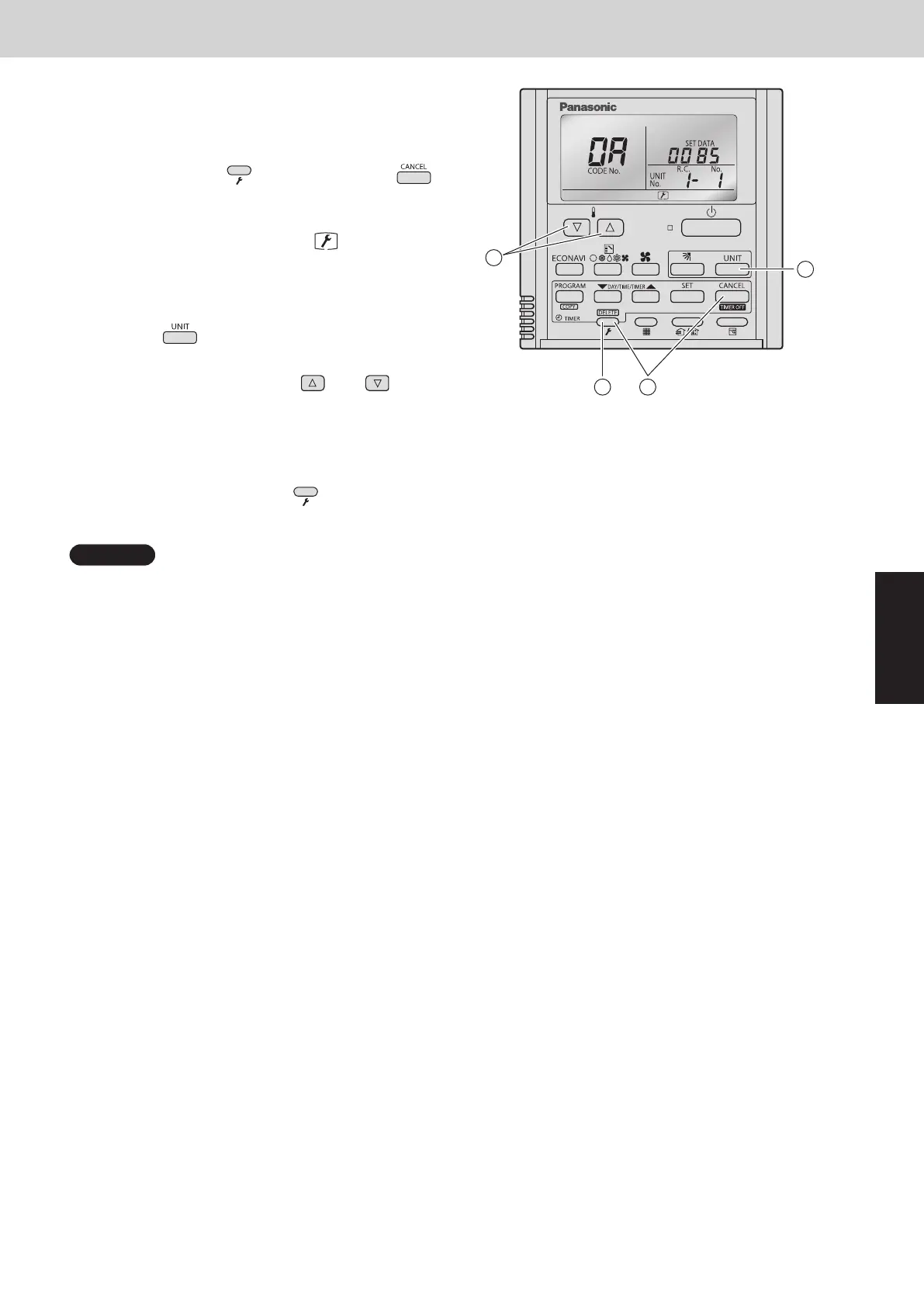
Press and hold the (Check) button and
buttons simultaneously for 4 seconds or longer to
engage temperature monitor mode.
During temperature monitoring,
is illuminates.
(The display and operations are the same as
for monitor mode using the indoor unit remote
controller.)
Á
Press the button and select the indoor unit to
monitor.
Â
Press the temperature setting and buttons
and select the item code of the temperature to
monitor.
The unit No. of the selected indoor unit, and the
temperature data, are displayed.
Ã
To end monitoring, press the (Check) button.
The display returns to the normal display.
NOTE
The display does not blink.
3
2
1
4
A
4. Monitoring Operations
SM830289-01_欧州向け R32 mini VRF 8,10HP SM&TRSM.indb 9SM830289-01_欧州向け R32 mini VRF 8,10HP SM&TRSM.indb 9 2021/05/07 10:15:492021/05/07 10:15:49



 To Next Page