Mini VRF SYSTEM
Remote Controller Functions
5 - 25
3. Remote Controller Servicing Functions
5
3. Remote Controller Servicing Functions
VRF SYSTEMS Indoor Unit
Code no.
Description
ECONAVI sensor ECONAVI panel
11 21
Data shows the status of the ECONAVI sensor.
0000: The sensor is not connected.
0001: The sensor can detect human motion.
0002: The sensor is initializing. (The sensor cannot detect human motion. )
The initial setting is completed after about 90 seconds when switched on.
0003: Multiple sensor units are connected.
Only one sensor unit per indoor group is connectable.
0004: The sensor is broken down.
0005: The floor temperature sensor is broken down.
Data is automatically updated every 30 seconds.
12 22
In 30 seconds, data shows the number of times human motion was detected.
Data is automatically updated every 30 seconds.
- 24
Data shows the floor temperature measured by the sensor.
Data is automatically updated every 30 seconds.
How to Check Human Detection Sensor
Step 1 Check that Code no.11 or 21 is showing “0001”.
Step 2 Make the sensor that can detect a person.
Move back and forth and around for about 10 seconds under sensor activation.
Step 3 Check that Code no.12 or 22 can show “1” or more within 30 seconds after Step 2 is performed.
Step 4 Make the sensor that cannot detect a person.
Exclude the persons or animals (an object to be detected) from the detection area.
If the remote controller is placed within the detection area of the ECONAVI sensor, an inspector
must check motionless the display of the remote controller.
Step 5 After a while, check that Code no.12 or 22 can show “0”. (For about 30 seconds to 2 minutes)
How to Check Floor Temperature Sensor
Code no. 24: There is no problem if data is within the range of -20 to 60.
If data shows -35, the floor temperature is broken down.
SM830232-03_欧州向けVRF Indoor SM&TRSM.indb 48 17/06/27 20:22:06
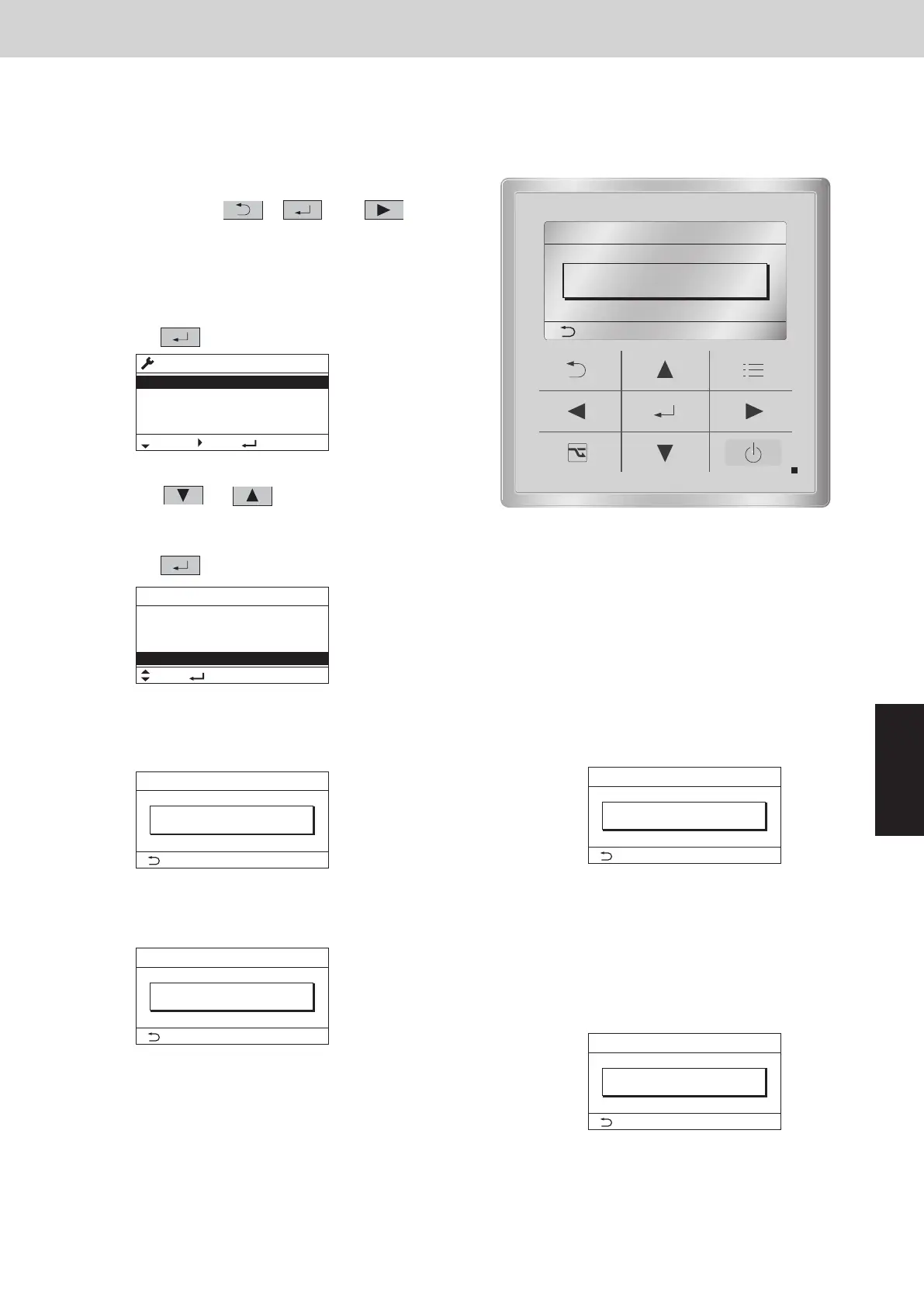
<Procedure of CZ-RTC5B>
(1)
Keep pressing the
, and
buttons simultaneously for 4 or more seconds.
The “Maintenance func” screen appears on the
LCD display.
(3)
Press the
(4)
There are four patterns of operational status display as shown below.
(4)-1 Under normal operation
State of no energy-saving operation
or button to see each
menu.
Select “Status info.” on the LCD display and
press the
button.
Check of ECONAVI Operational Status
The status of ECONAVI operation can be checked instantly.
It is available to check the operation when installing the indoor unit.
(2) Select “0. ECONAVI info.” on the LCD display and
press the button.
(4)-2 Under temperature shift
State of energy-saving
(temperature shift) operation
(4)-4 Under sensor communication error
Shows that the connected
ECONAVI sensor is in error state.
(4)-3 Under suspension with absentee
State of energy-saving (suspended)
operation
*Shows that air conditioner operation was
suspended because no person was detected
for a certain period.
This state remains until operation is restarted.
20:30 (THU)Status info.
[ ] Close
ECONAVI
Status
ON
Normal
Maintenance func
Sel. Page [ ] Confirm
20:30 (THU)
0. ECONAVI info.
1. Outdoor unit error data
2. Service contact
3. RC setting mode
ECONAVI info.
Sel. [ ] Check
20:30 (THU)
Setting info.
Sensor unit info.
System settings
Status info.
Status info. 20:30 (THU)
[ ] Close
ECONAVI
Status
ON
Normal
Status info. 20:30 (THU)
[ ] Close
ECONAVI
Status
ON
Shift
Status info. 20:30 (THU)
[ ] Close
ECONAVI
Status
ON
Vacant
Status info. 20:30 (THU)
[ ] Close
ECONAVI
Status
ON
Error
SM830289-01_欧州向け R32 mini VRF 8,10HP SM&TRSM.indb 25SM830289-01_欧州向け R32 mini VRF 8,10HP SM&TRSM.indb 25 2021/05/07 10:16:222021/05/07 10:16:22



 To Next Page