Mini VRF SYSTEM
Test Run
7 - 12
7
4. Auto Address Setting
Auto Address Setting from the High-spec Wired Remote Controller (CZ-RTC5B)
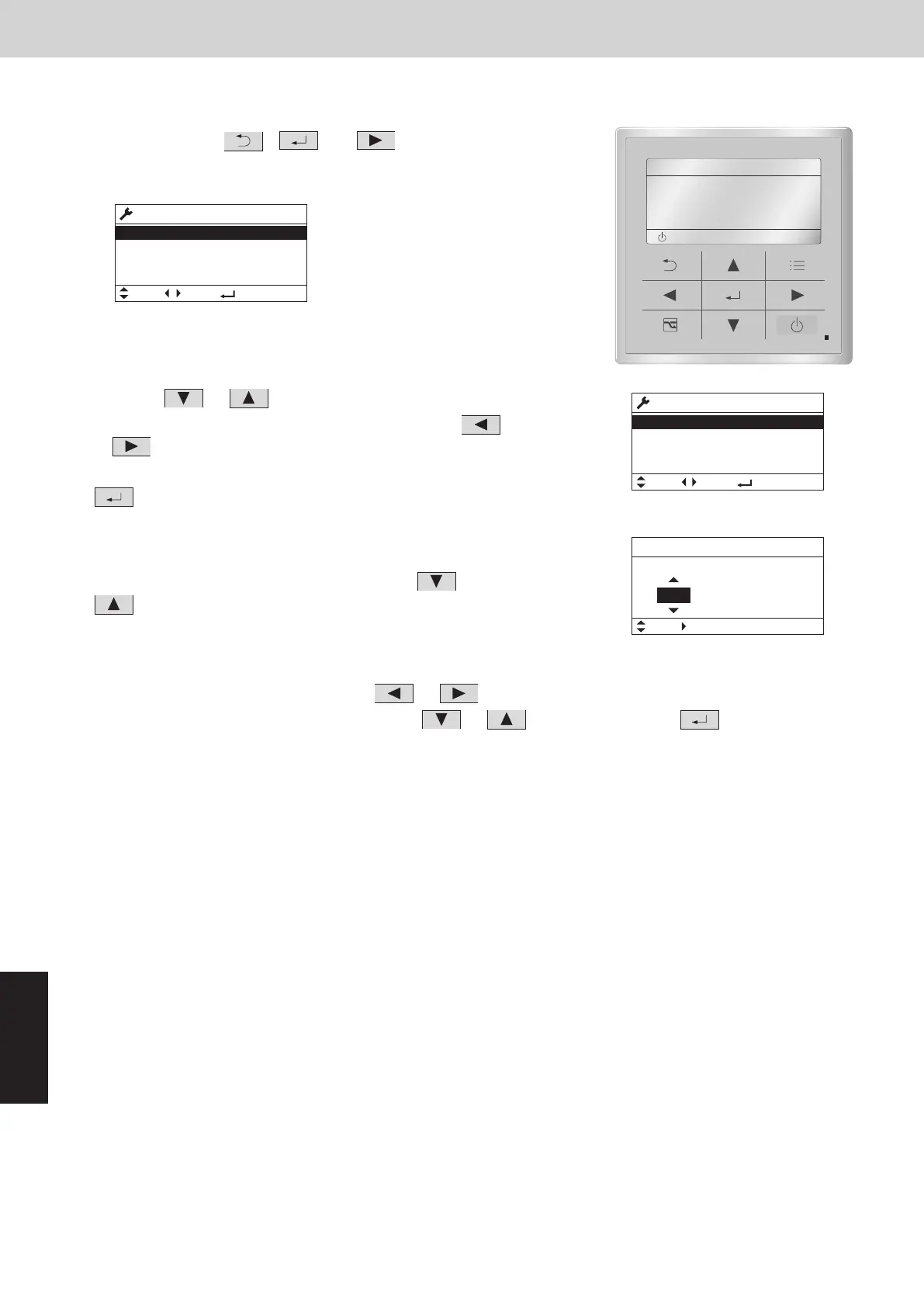
(1) Keep pressing the
, and buttons
simultaneously for 4 or more seconds.
The “Maintenance func” screen appears on the LCD display.
Maintenance func
1. Outdoor unit error data
2. Service contact
3. RC setting mode
4. Test run
20:30 (THU)
(2) Press the or button to see each menu.
If you wish to see the next screen instantly, press the
or button.
Select “9. Auto address” on the LCD display and press the
button.
(3) The “Auto address” screen appears on the LCD display.
Change the “Code no.” to “A1” by pressing the
or
button.
(4) Select the “O/D unit no.” by pressing the
or button.
Select one of the “O/D unit no.” by pressing the
or button and press the button for auto
address setting.
Approximately 10 minutes are required.
When auto address setting is completed, the units return to normal stopped status.
20:30 (THU)
START
[]
Maintenance func
10. Set elec. consumption
12. Check touch key
Sel. Page [ ] Confirm
20:30 (THU)
11. Set touch key
9. Auto address
Auto address
Code no. O/D unit no.
Sel. Next
20:30 (THU)
1
A1
Auto Address Setting* from the Remote Controller (CZ-RTC4)
* Auto address setting in Cooling mode cannot be done from the remote controller.
NOTE
Selecting each refrigerant system individually for auto address setting
Auto address setting for each system: Item code “A1”
(1) Press the remote controller timer time
button and button
at the same time.
(Press and hold for 4 seconds or longer.)
(2) Next, press either the temperature setting
button. (Check
that the item code is “A1”.)
(3) Use either the
button to set the system No. to perform auto
address setting.
(4)
Then press the
button.
(Auto address setting for one refrigerant system begins.) (When
auto address setting for one system is completed, the system
returns to normal stopped status.)
<Approximately 10 minutes are required.>
(During auto address setting, “
” is displayed on the
remote controller.
This message disappears when auto address setting is completed.)
(5) Repeat the same steps to perform auto address setting for each successive system.
SM830289-01_欧州向け R32 mini VRF 8,10HP SM&TRSM.indb 12SM830289-01_欧州向け R32 mini VRF 8,10HP SM&TRSM.indb 12 2021/05/07 10:16:482021/05/07 10:16:48



 To Next Page