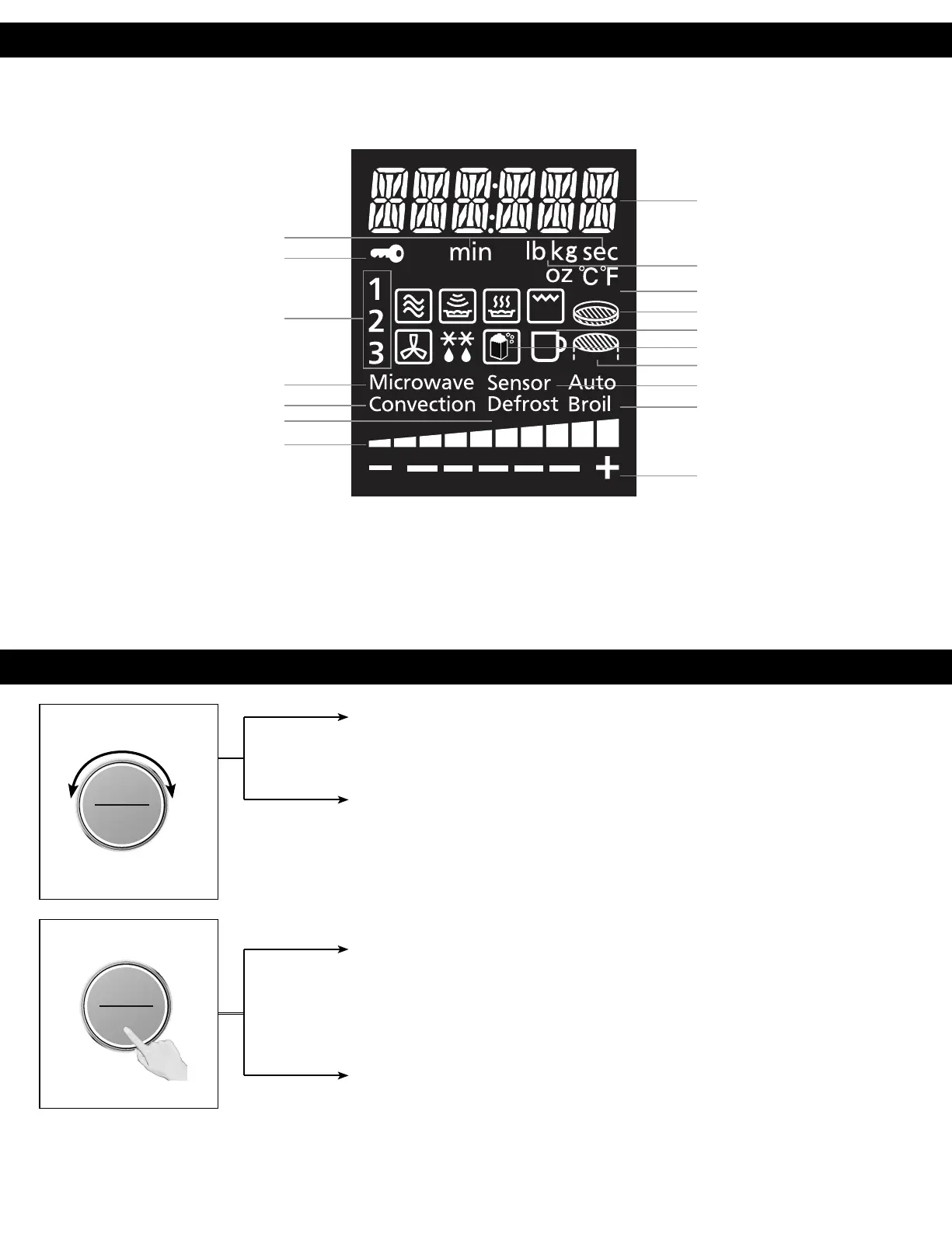
Display Window
Dial Feature
To help you operate the oven conveniently, the present state will appear in the display window.
Note: When cooking time is longer than 60 minutes, the time will appear in hours and minutes.
Number/Character
Time (Minute/Second)
Child Safety Lock Setting
Weight
Temperature
3-Stage Display
Airfry Basket
Beverage
Popcorn
Wire Rack
Sensor Cook Program
Broil Mode
More/Less
Microwave Mode
Convection Mode
Auto Defrost Program
Power Level
Time (Cooking time)
After selecting a manual cooking mode, enter time by turning the dial. Use the dial for
the Add Time function (page 30).
Defrost/Auto Cook (Defrost, Auto/Sensor Cook, Steam Clean)
a. When clock mode is displayed, turn the dial to select auto programs and weight
(pages 33-41).
b. Steam Clean: This Program is to clean the cavity and remove any food odour from
the microwave oven (page 42).
Start/Select (Confirmation)
Press the dial to start operating the oven or confirm the setting. If during cooking the
door is opened or Stop/Reset is pressed once, Start has to be pressed again to continue
cooking.
Sensor Reheat (One Push Reheating)
When Clock mode is displayed, press dial (Start) for quick start Sensor Reheat (Page 34).
ヵㄊㄎㄆ ヸㄆㄊㄈㄉㄕ
ュㄆㄇㄓㄐㄔㄕバモㄖㄕㄐチヤㄐㄐㄌ
ヴㄕㄓㄕバヴㄆㄍㄆㄕ
ヴㄆㄏㄔㄐㄓチンㄆㄉㄆㄕ
ヴㄕㄓㄕバヴㄆㄍㄆㄕ
ヴㄆㄏㄔㄐㄓチンㄆㄉㄆㄕ
F0003CD60AP_EN_0303.indd 13 2020/3/3 9:58:10








 To Next Page