Operation (continued)
3 4
ヵㄊㄎㄆ ヸㄆㄊㄈㄉㄕ
ュㄆㄇㄓㄐㄔㄕバモㄖㄕㄐチヤㄐㄐㄌ
ヴㄕㄓㄕバヴㄆㄍㄆㄕ
ヴㄆㄏㄔㄐㄓチンㄆㄉㄆㄕ
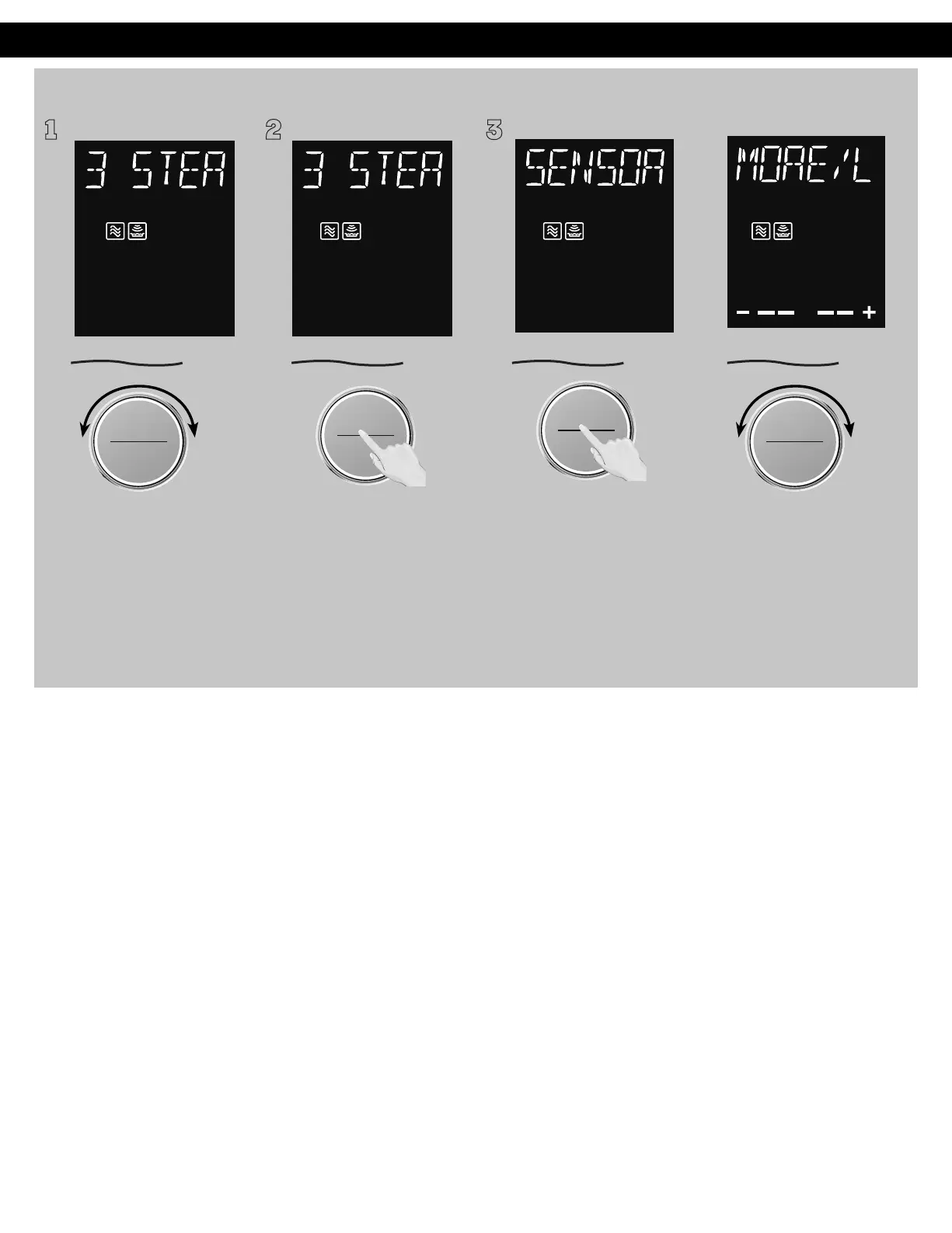
To allow auto program
operation, ensure the oven is in
Clock mode. Select the desired
menu by turning the dial.
(see chart on the next page.)
Auto Cook (Sensor): (No. 3 - No.8)
1 2
ヴㄕㄓㄕバヴㄆㄍㄆㄕ
ヴㄆㄏㄔㄐㄓチンㄆㄉㄆㄕ
Press the dial to confirm the
program.
ヴㄕㄓㄕバヴㄆㄍㄆㄕ
ヴㄆㄏㄔㄐㄓチンㄆㄉㄆㄕ
Press dial to Start.
NOTES:
1. If desires, More/Less adjustment can be done. Turn dial to
add or subtract the cooking time (3 levels can be select), after
turning the dial within 14 seconds.
2. After having used the Sensor Cook feature a few times, you
may decide you would prefer your food cooked to a different
doneness – that is why you would like to turning the dial
.
3. When steam is detected by the Genius Sensor and two beeps
sound, the remaining cooking time will appear in the display.
4. Automatic features are provided for your convenience. If
results are not suitable to your individual preference, or if
serving size is other than what is listed in next page, please
refer to manual cooking on page 25.
5. If the temperature of the cavity is too high, Sensor Cook feature
cannot be used. The message “HOT INSIDE WAIT” will appears
in the display window. Sensor Cook feature can be used again
when the “HOT INSIDE WAIT” message disappears. Please open
the door in order to cool the temperature of the cavity more
quickly.
For the best results with the GENIUS SENSOR, follow these
recommendations:
BEFORE Reheating/Cooking:
1. The room temperature surrounding the oven should be below
95 °F (35 °C).
2. Food weight should exceed 4 oz. (110 g).
3. Be sure the glass tray, the outside of the cooking containers
and the inside of the microwave oven are dry before placing
food in the oven. Residual beads of moisture turning into
steam can mislead the sensor.
4. Cover food with lid, or with vented plastic wrap. Never use
tightly sealed plastic containers—they can prevent steam from
escaping and cause food to overcook.
DURING Reheating/Cooking:
DO NOT open the oven door until two beeps sound and cooking time
appears in the display. Doing so will cause inaccurate cooking since
the steam from food is no longer contained within the oven cavity.
Once the cooking time begins to count down, the oven door may
be opened to stir, turn or rearrange foods.
AFTER Reheating/Cooking:
All foods should have a standing time.
F0003CD60AP_EN_0303.indd 35 2020/3/3 9:58:19
ヵㄊㄎㄆ ヸㄆㄊㄈㄉㄕ
ュㄆㄇㄓㄐㄔㄕバモㄖㄕㄐチヤㄐㄐㄌ
ヴㄕㄓㄕバヴㄆㄍㄆㄕ
ヴㄆㄏㄔㄐㄓチンㄆㄉㄆㄕ
Within 10 seconds, "MORE/LESS“
will scroll through the display
and you can adjust with more or
less cooking time by turning the
dial. After 10 seconds, Sensor will
keep displaying
in the window
till the oven calculates the
cooking time after detecting a
burst of steam. Then the
remaining time will display and
count down starts.








 To Next Page