Operation (continued)
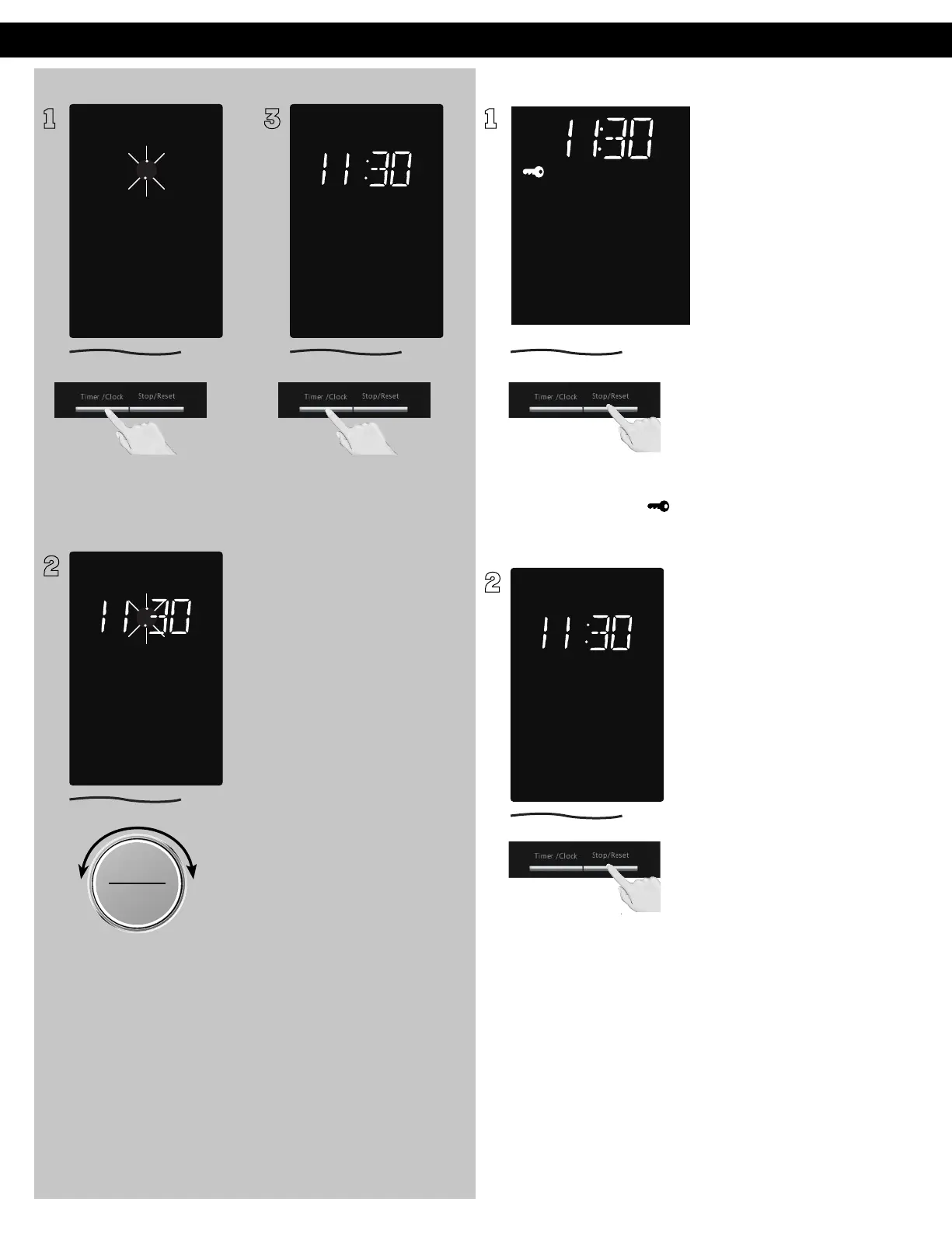
Setting the Clock Setting the Child Safety Lock
1
With the oven NOT cooking,
press Timer/Clock twice; the
colon will blink.
2
ヵㄊㄎㄆ ヸㄆㄊㄈㄉㄕ
ュㄆㄇㄓㄐㄔㄕバモㄖㄕㄐチヤㄐㄐㄌ
ヴㄕㄓㄕバヴㄆㄍㄆㄕ
ヴㄆㄏㄔㄐㄓチンㄆㄉㄆㄕ
Time appears in the display
window; colon continues
flashing. Set time of day by
turning the dial. After setting
the hour, press Start (Dial) to
continue setting of the minute.
3
Press Timer/Clock to finish
setting and the colon (:) will
stop blinking.
NOTES:
1. To reset the clock, repeat
steps.
2. The clock will retain the
time of day as long as the
oven is plugged in and
electricity is supplied.
3. The clock is a 12-hour
display.
4. Oven will not operate while
colon (:) is flashing.
1
When the colon or time of day
appears in the display, press
Stop/Reset three times; “
”
will appear in the display.
2
Press Stop/Reset three times;
the display will return to
the colon or time of the day
and Child Safety Lock will be
cancelled.
NOTES:
1. This feature prevents the
electronic operation of the
oven until cancelled. It does
not lock the door.
2. To set or cancel Child Safety
Lock, Stop/Reset button
must be pressed 3 times
within 10 seconds.
3. You can set Child Safety
Lock feature when the
display shows a colon or
time of day.
F0003CD60AP_EN_0303.indd 17 2020/3/3 9:58:12








 To Next Page