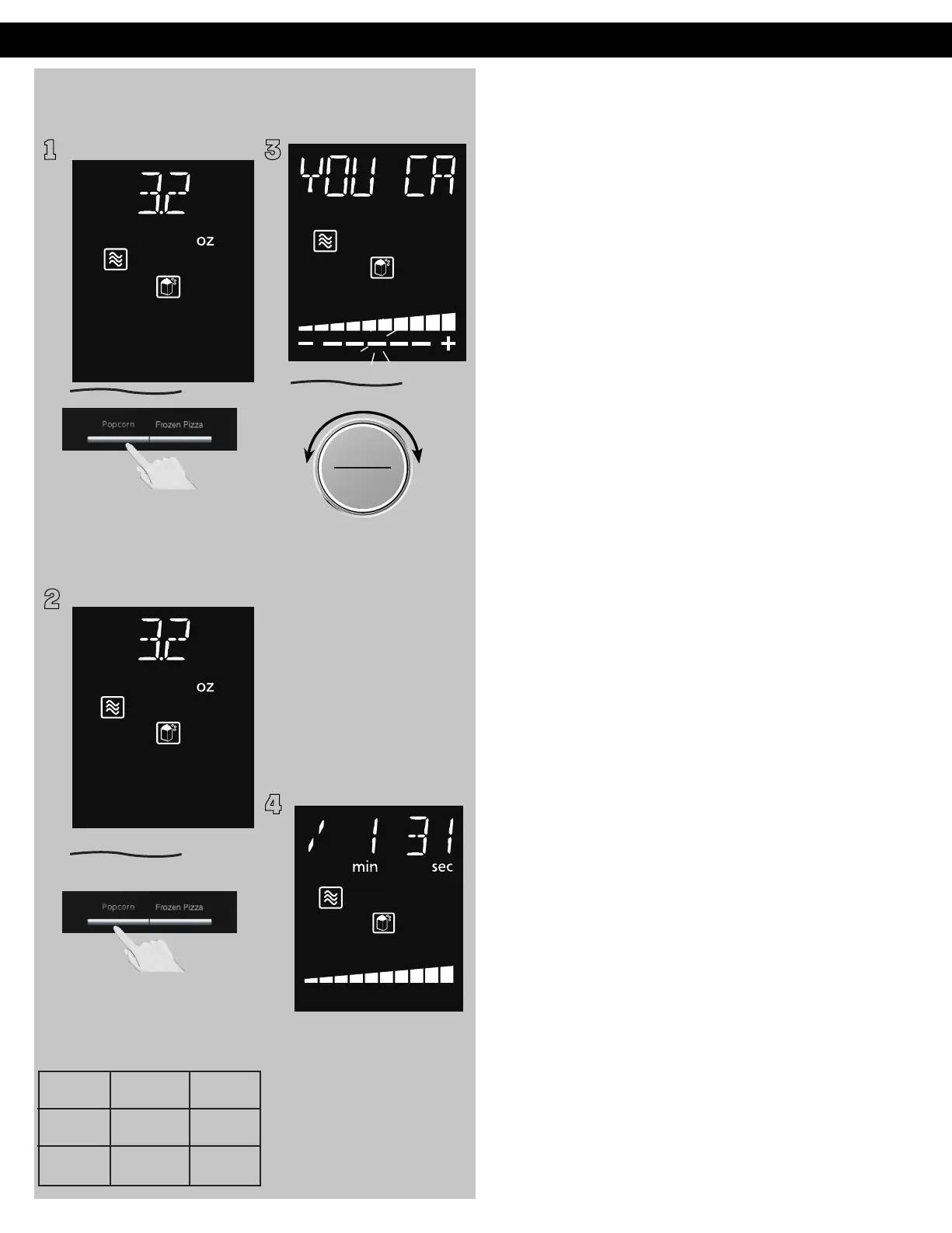
Popcorn
(Example:To pop 3.2 oz (90g). of popcorn)
1
Press Popcorn button to
enter the program. The
weight is preset as 3.2 oz
(or 0.09kg)
2
ヵㄊㄎㄆ ヸㄆㄊㄈㄉㄕ
ュㄆㄇㄓㄐㄔㄕバモㄖㄕㄐチヤㄐㄐㄌ
ヴㄕㄓㄕバヴㄆㄍㄆㄕ
3
NOTES:
1. Pop one bag at a time.
2. Place bag in oven according
to manufacturers' directions.
3. Start with popcorn at room
temperature.
4. Allow popped corn to sit
unopened for a few minutes.
5. Open bag carefully to
prevent burns, because steam
will scape.
6. Do not reheat unpopped
kernels or reuse bag.
7. If popcorn is of a different
weight than listed, follow
instructions on popcorn
package.
8. Never leave the oven
unattended.
9. If popping slows to 2 to 3
seconds between pops, stop
oven. Overcooking can burn
popcorn or cause fire.
10. When popping multiple
bags one right after the other,
the cooking time may vary
slightly. This does not affect the
popcorn results.
Operation (continued)
ヴㄆㄏㄔㄐㄓチンㄆㄉㄆㄕ
Press dial to Start.
"YOU CAN ADJUST
COOKING TIME MORE/
LESS" will appear in the
display window.
If desires, More/Less
adjustment can be done when
the bottom dotted line is
flashing.
Turn dial to add or
subtract the cooking time
(5 levels can be selected)
within 10 seconds.
4
After 10sec., The time
appears in the display
window and begins to
count down. At the
end of cooking, five beeps
will sound.
Once 3.2 oz (90g)
Twice 3.0 oz (85g)
3 times 1.5 oz (42g)
Press Popcorn button to
selet the weight you want.
The weight will cycle among
3.2, 3.0 and 1.5 oz (or 0.09,
0.085 or 0.042kg)








 To Next Page