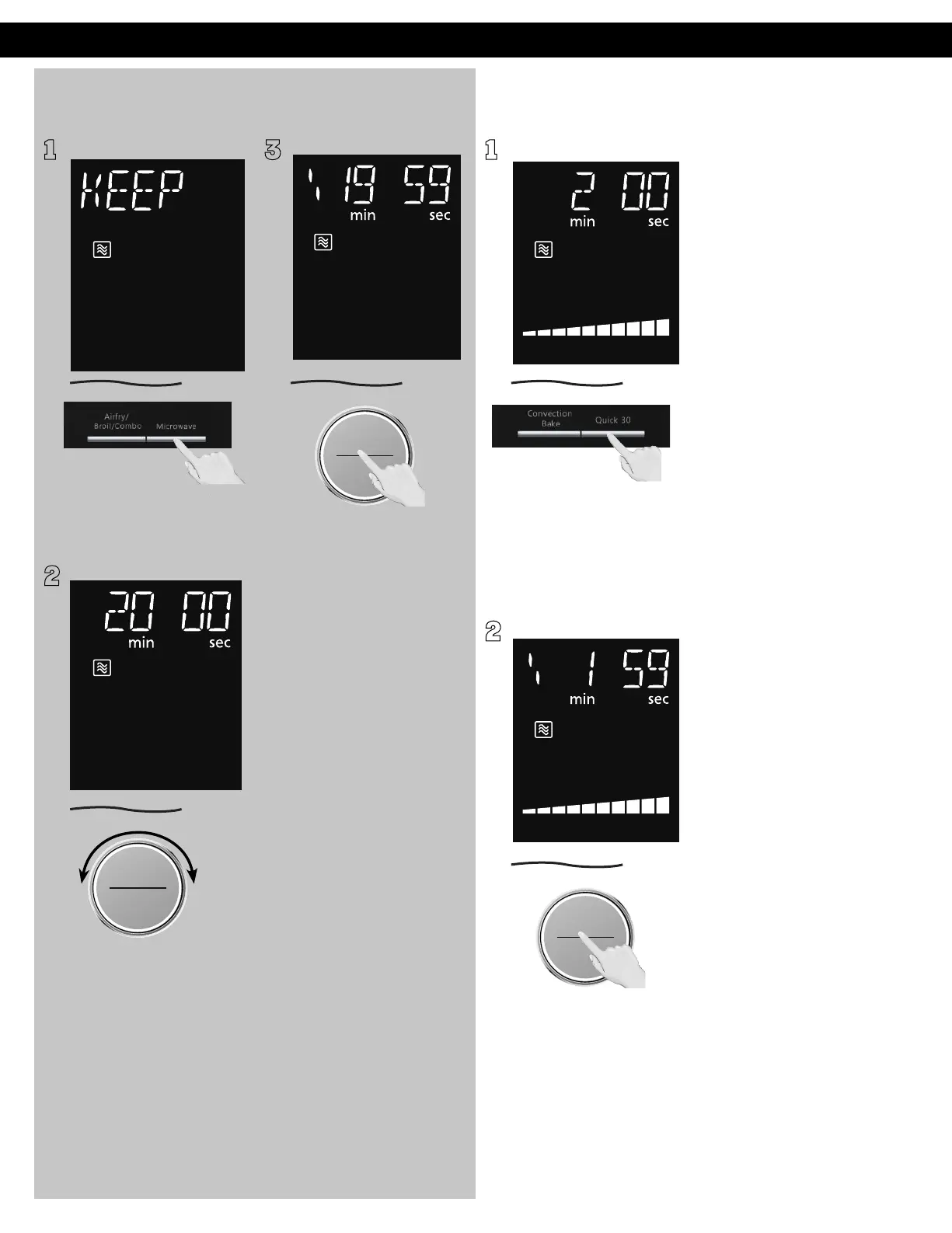
Keep Warm
(Will keep “cooked“ food warm for up to 90 minutes after cooking)
Quick 30
(Set or add cooking time in 30 seconds increments)
1
Press Microwave 11 times
to select the KEEP WARM.
2
ヵㄊㄎㄆ ヸㄆㄊㄈㄉㄕ
ュㄆㄇㄓㄐㄔㄕバモㄖㄕㄐチヤㄐㄐㄌ
ヴㄕㄓㄕバヴㄆㄍㄆㄕ
ヴㄆㄏㄔㄐㄓチンㄆㄉㄆㄕ
Set warming time by turning
dial (up to 30 minutes). Set
20 minutes cooking for an
example.
3
ヴㄕㄓㄕバヴㄆㄍㄆㄕ
ヴㄆㄏㄔㄐㄓチンㄆㄉㄆㄕ
Press dial to Start, the cooking
will start and the time will
count down in the display. At
the end of cooking, five beeps
will sound.
NOTES:
KEEP WARM can be set as
the final stage after cook time
has been manually entered.
It cannot be used with auto
programs (such as Defrost,
Sensor Reheat, Auto/Sensor
Cook and Steam Clean).
1
Press Quick 30 until the
desired cooking time (up to
5 minutes) appears in the
display. Power level is pre-set
at 1000 W.
2
ヴㄕㄓㄕバヴㄆㄍㄆㄕ
ヴㄆㄏㄔㄐㄓチンㄆㄉㄆㄕ
Press dial to Start; the cooking
will start and the time will
count down in the display. At
the end of cooking, five beeps
will sound.
NOTES:
1. If desired, you can use other
power levels. Select desired
power level before pressing
Quic
k 30.
2. Quick 30 button can also be
used to add more time
during manual cooking.
3. It cannot be used with auto
programs (such as Defrost,
Sensor Reheat, Auto/Sensor
Cook and Steam Clean).
Operation (continued)
F0003CD60AP_EN_0303.indd 26 2020/3/3 9:58:16








 To Next Page