Operation (continued)
Auto Cook:
Melt & Soften (No.9 - No.10)
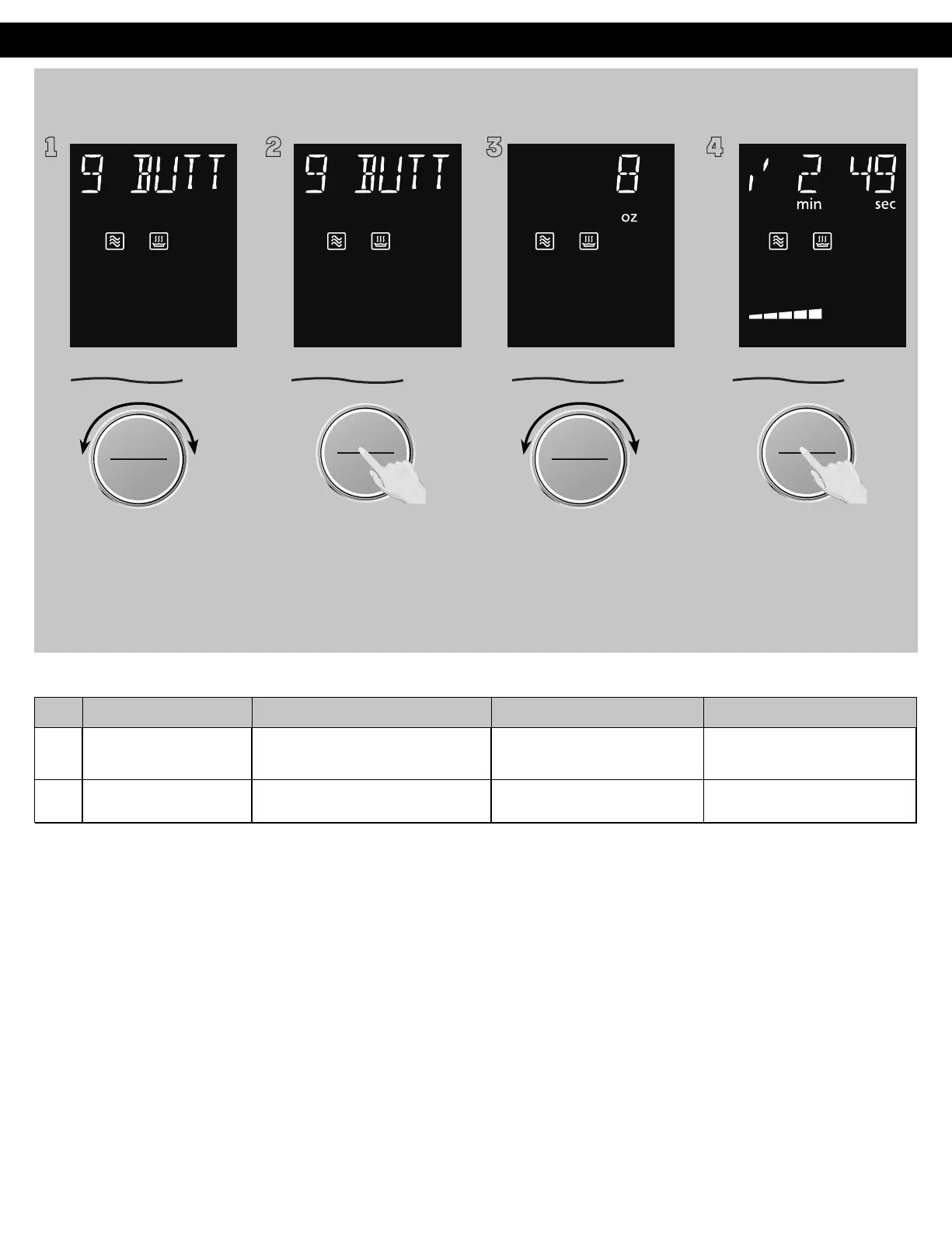
1 2 3 4
ヵㄊㄎㄆ ヸㄆㄊㄈㄉㄕ
ュㄆㄇㄓㄐㄔㄕバモㄖㄕㄐチヤㄐㄐㄌ
ヴㄕㄓㄕバヴㄆㄍㄆㄕ
ヴㄆㄏㄔㄐㄓチンㄆㄉㄆㄕ
To allow auto program
operation, ensure the oven is in
Clock mode. Select the desired
menu by turning the dial.
(see chart below)
ヴㄕㄓㄕバヴㄆㄍㄆㄕ
ヴㄆㄏㄔㄐㄓチンㄆㄉㄆㄕ
Press the dial to confirm the
program.
ヵㄊㄎㄆ ヸㄆㄊㄈㄉㄕ
ュㄆㄇㄓㄐㄔㄕバモㄖㄕㄐチヤㄐㄐㄌ
ヴㄕㄓㄕバヴㄆㄍㄆㄕ
ヴㄆㄏㄔㄐㄓチンㄆㄉㄆㄕ
Select the weight of the food by
turning dial.
ヴㄕㄓㄕバヴㄆㄍㄆㄕ
ヴㄆㄏㄔㄐㄓチンㄆㄉㄆㄕ
Press dial to Start. The time
appears in the display window
and begins to count down.
No. Menu Weight Range Recommended Container Accessory and Placement
9
Butter
2/4/6/8/10/12 oz.
(50/100/150/200/250/300 g)
microwave safe dish
with plastic wrap
Directly on the glass tray
10
Chocolate
2/4/6/8/10/12 oz.
(50/100/150/200/250/300 g)
microwave safe dish Directly on the glass tray
9. Butter
Remove wrapper, cut butter into 1 inch (3 cm) cube, and place in
a microwave safe dish. Cover with plastic wrap.
10. Chocolate
Suitable for melting milk chocolate. Remove wrapper, separate
chocolate into small pieces, and place in a microwave safe dish.
Cook without cover. Stir after cooking.
F0003CD60AP_EN_0303.indd 37 2020/3/3 9:58:20








 To Next Page