F0003CD60AP_EN_0303.indd 34 2020/3/3 9:58:19
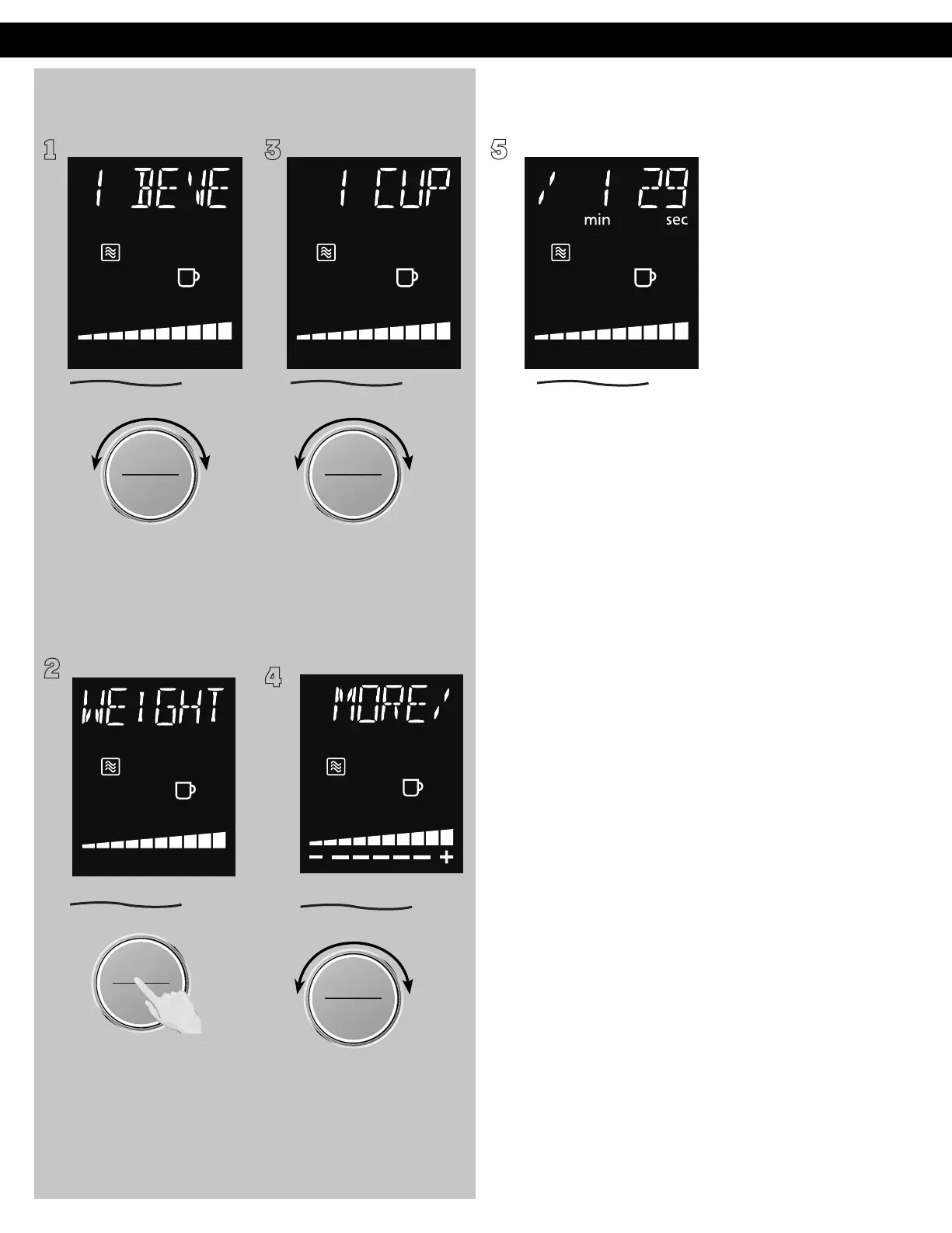
Beverage (No.1)
1 3
5
To allow auto program
operation, ensure the
oven is in clock mode.
Select the Beverage
by turning dial.
2
4
ヵㄊㄎㄆ ヸㄆㄊㄈㄉㄕ
ュㄆㄇㄓㄐㄔㄕバモㄖㄕㄐチヤㄐㄐㄌ
ヴㄕㄓㄕバヴㄆㄍㄆㄕ
ヴㄆㄏㄔㄐㄓチンㄆㄉㄆㄕ
Press the dial to select
Beverage. "Set Weight"
will scroll in the display.
Turn the dial to select weight.
The range is 1 to 2 cups. Press
the dial to start.
Within 10 seconds, you can
adjust time by turning the
dial to add time or decrease
time as "MORE/LESS"
adjustment.
Operation (continued)
ヴㄕㄓㄕバヴㄆㄍㄆㄕ
ヴㄆㄏㄔㄐㄓチンㄆㄉㄆㄕ
ヵㄊㄎㄆ ヸㄆㄊㄈㄉㄕ
ュㄆㄇㄓㄐㄔㄕバモㄖㄕㄐチヤㄐㄐㄌ
ヴㄕㄓㄕバヴㄆㄍㄆㄕ
ヴㄆㄏㄔㄐㄓチンㄆㄉㄆㄕ
ヵㄊㄎㄆ ヸㄆㄊㄈㄉㄕ
ュㄆㄇㄓㄐㄔㄕバモㄖㄕㄐチヤㄐㄐㄌ
ヴㄕㄓㄕバヴㄆㄍㄆㄕ
ヴㄆㄏㄔㄐㄓチンㄆㄉㄆㄕ
After 10 seconds, the cooking
time will display in the
window and start to count
down. Five beeps will sound
when the cooking is finished.








 To Next Page