Operation (continued)
Convection Bake
The oven can be used as a
conventional oven using the
Convection mode which
incorporates a heating element
with a fan. There is a choice of
Convection temperatures 100 °F
(40 °C) and 215 °F (100 °C) - 425 °F
(220 °C). For quick selection of the
most commonly used cooking
temperatures, the oven starts at
300 °F (150 °C) and then for each
press the temperature will count
up in 18 °F (10 °C) stages to 425 °F
(220 °C), then to, 100 °F (40 °C),
215 °F (100 °C), 230 °F (110 °C) etc.
This feature provides 2 modes to
select. For best results always
place food in a preheated oven.
Press Temperature
once 300 °F (150 °C)
twice 325 °F (160 °C)
3 times 340 °F (170 °C)
4 times 350 °F (180 °C)
5 times 375 °F (190 °C)
6 times 400 °F (200 °C)
7 times 410 °F (210 °C)
8 times 425 °F (220 °C)
9 times 100 °F (40 °C)
10 times 215 °F (100 °C)
11 times 230 °F (110 °C)
12 times 250 °F (120 °C)
13 times 270 °F (130 °C)
14 times 285 °F (140 °C)
With Preheating:
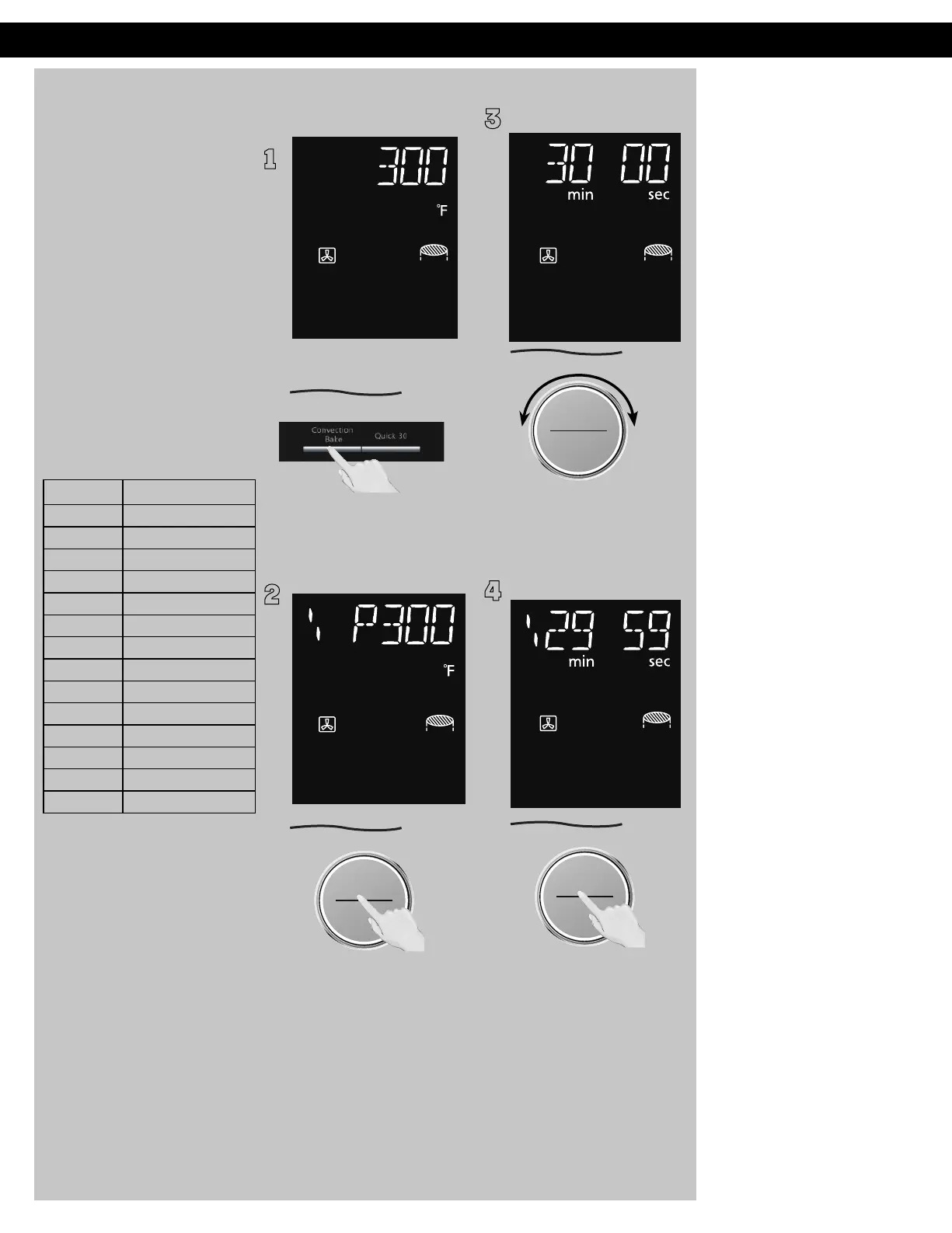
1
Press Convection Bake until
the desired temperature
appears in the display window.
2
ヴㄕㄓㄕバヴㄆㄍㄆㄕ
ヴㄆㄏㄔㄐㄓチンㄆㄉㄆㄕ
Press dial to preheat.
"P" will keep flashing during
preheating. When preheating
is completed, the oven will
beep and "P" will stop flashing
in the display window.
Then open the door and place
the food inside.*
3
ヵㄊㄎㄆ ヸㄆㄊㄈㄉㄕ
ュㄆㄇㄓㄐㄔㄕバモㄖㄕㄐチヤㄐㄐㄌ
ヴㄕㄓㄕバヴㄆㄍㄆㄕ
ヴㄆㄏㄔㄐㄓチンㄆㄉㄆㄕ
Set desired cooking time by
turning dial (up to 9 hours).
4
ヴㄕㄓㄕバヴㄆㄍㄆㄕ
ヴㄆㄏㄔㄐㄓチンㄆㄉㄆㄕ
Press dial to Start.
The cooking time appears in
the display window and begins
to count down.
NOTES:
1. * Open the door using
the door release button,
because if the Stop/
Reset button is pressed
the program may be
cancelled.
2.
3.
4.
5.
During cooking, to check
the temperature set for the
program, press
Convection Bake button.
To increase the cooking
time by 30 seconds, press
Quick 30 button. To adjust
duration of cooking, press
Stop/Reset button first
and turn the Dial to adjust
the time. The oven will
maintain the selected
preheated temperature for
approximately 30
minutes
without the door opened. If
no food has been placed
inside the oven or a cooking
time set, then it will beep 5
times and automatically
cancel the cooking program
and revert to colon or time
of day.
Once you open the door
and Start is not pressed,
after 6 minutes, the oven
will automatically cancel
the preheated program.
This display will revert back
to clock or colon mode. The
oven cannot preheat to
100 °F (40 °C).
For traditional cakes, with
long cooking times,
baked on Convection Bake
mode only, it is necessary
to cover the top of the tin
with foil 20-30 mins after
the start of baking or after
browning.
F0003CD60AP_EN_0303.indd 23 2020/3/3 9:58:14
6.








 To Next Page