Operation (continued)
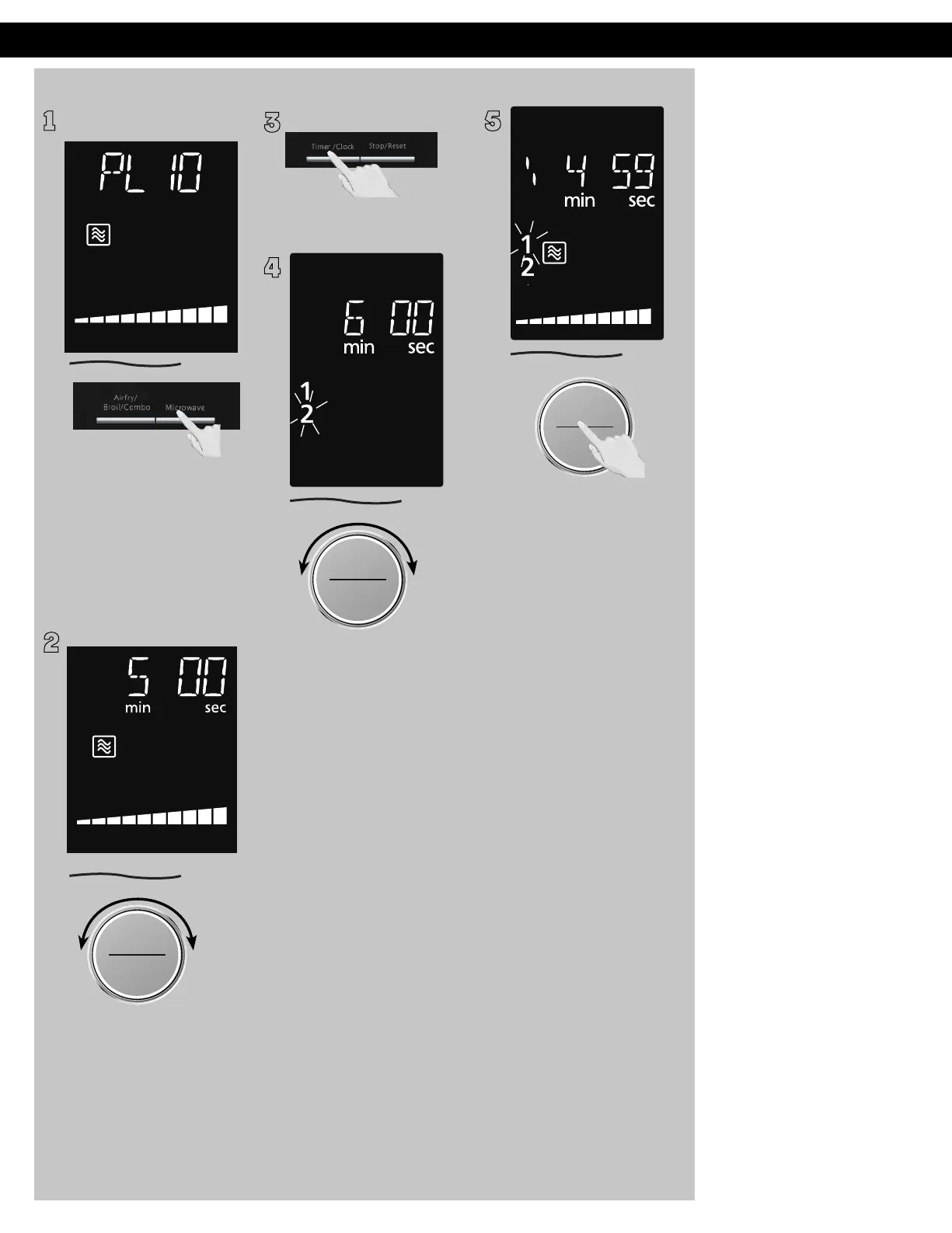
Setting a Standing Time
1
Some recipes call for a
standing time after cooking.
Press
Microwave until the
desired power level appears
in the display. PL10 is the
highest and PL1 is the
lowest.
2
ヵㄊㄎㄆ ヸㄆㄊㄈㄉㄕ
ュㄆㄇㄓㄐㄔㄕバモㄖㄕㄐチヤㄐㄐㄌ
ヴㄕㄓㄕバヴㄆㄍㄆㄕ
ヴㄆㄏㄔㄐㄓチンㄆㄉㄆㄕ
Set cooking time by turning
dial (see previous page for
maximum times).
3
Press Timer/Clock once.
4
ヵㄊㄎㄆ ヸㄆㄊㄈㄉㄕ
ュㄆㄇㄓㄐㄔㄕバモㄖㄕㄐチヤㄐㄐㄌ
ヴㄕㄓㄕバヴㄆㄍㄆㄕ
ヴㄆㄏㄔㄐㄓチンㄆㄉㄆㄕ
Set desired standing time by
turning dial (up to 90
minutes).
5
ヴㄕㄓㄕバヴㄆㄍㄆㄕ
ヴㄆㄏㄔㄐㄓチンㄆㄉㄆㄕ
Press dial to Start. Cooking will
start. After cooking, standing
time will count down without
oven operating.
NOTES:
1. If the oven door is opened
during Kitchen Timer,
Standing Time, Delay Start,
the time in the display
window will continue to
count down.
2. Standing Time and
Delay Start can not be
programmed together
with auto programs
(such as Defrost, Sensor
Reheat, Auto/Sensor
Cook and Steam Clean)
and preheating. This is
to prevent the starting
temperature of food from
rising before defrosting or
cooking begins. A change is
starting temperature could
cause inaccurate results.
3. When using Standing Time
or Delay Start, it is up to 2
power stages.
F0003CD60AP_EN_0303.indd 28 2020/3/3 9:58:16








 To Next Page