VQT2M18
13
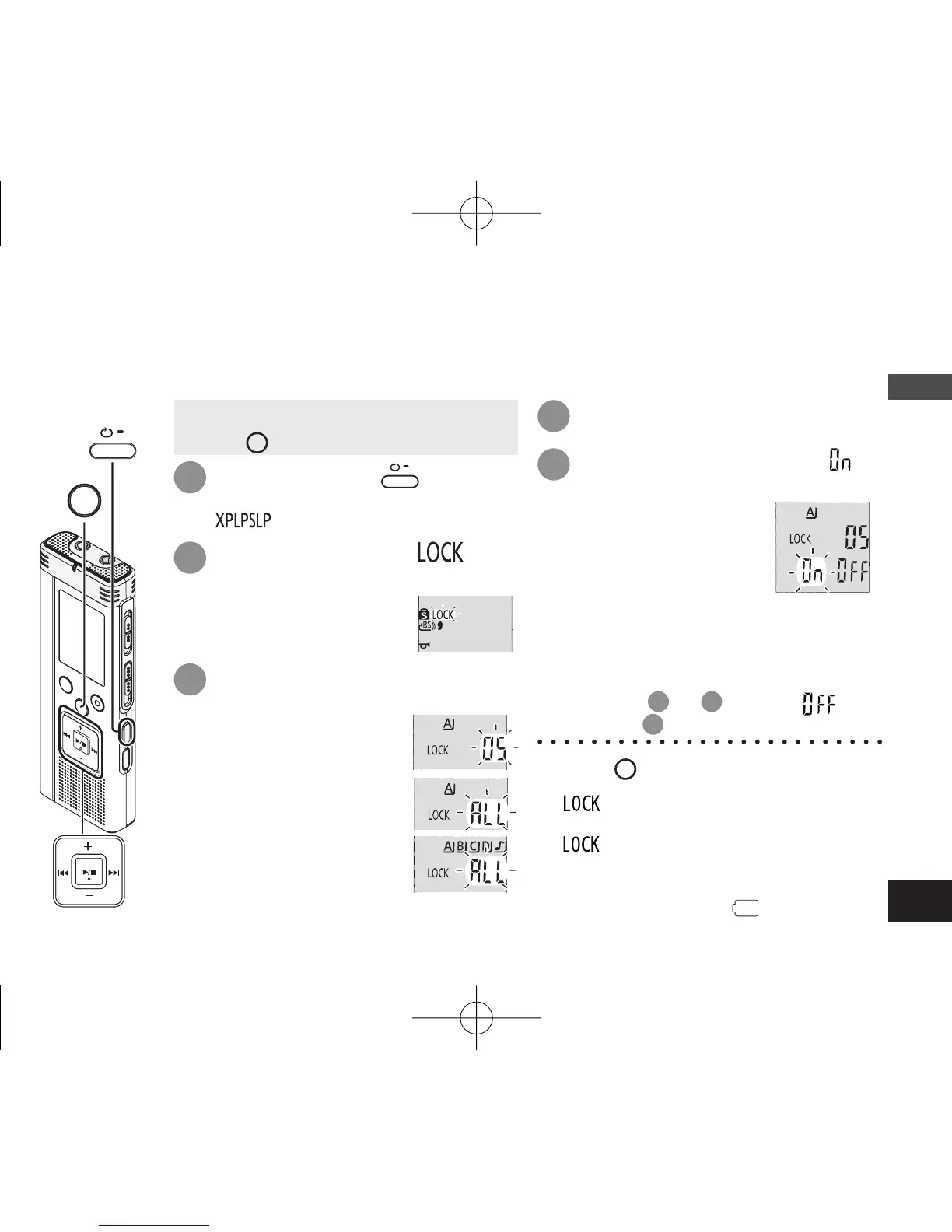
Locking recorded files (File protection)
Press and hold
•
A-B
/
MENU
for 1
second or longer.
“ ” (blinking) is displayed.
1
Locked files cannot be deleted on this unit (except when formatting).
Use this function to protect files.
• Select a folder (
➜
page 10).
• Press
STOP
to stop the unit.
Press
u
,
i
to select “ ”
and press
q
/
g
to enter.
Lock is performed.
It may take dozens of seconds until
locking is complete.
5
To cancel lock:
Follow step
1
to
4
, select “ ” and
enter in step
5
.
* Press
STOP
to stop the setting process
midway.
* “ ” is displayed for the locked files
when the file is selected.
* “ ” is not displayed when there is no
file in the selected folder.
*
You cannot lock files when the remaining
battery display shows “
” (blinking).
Press
q
/
g
to enter.
4
Press +, – to select “ ” and
press
q
/
g
to enter.
Press
u
,
i
to select the
file.
ӱ Selecting one file
Ӳ Selecting all files in
one folder
ӳ Selecting all files in all
folders
2
3
STOP
•
A-B
/
MENU
Basic Operations
4475AA'A'P836/AKPFF4475AA'A'P836/AKPFF ඦ೨ඦ೨















 To Next Page