VQT2M18
23
• Press
STOP
to stop the unit.
1
* Press
STOP
to stop the setting process midway.
2
3
Press
u
,
i
to select
“
” and press q/g to
enter.
Press +, – to select “
”
and press
q
/
g
to enter.
Press and hold
•
A-B
/
MENU
for 1
second or longer.
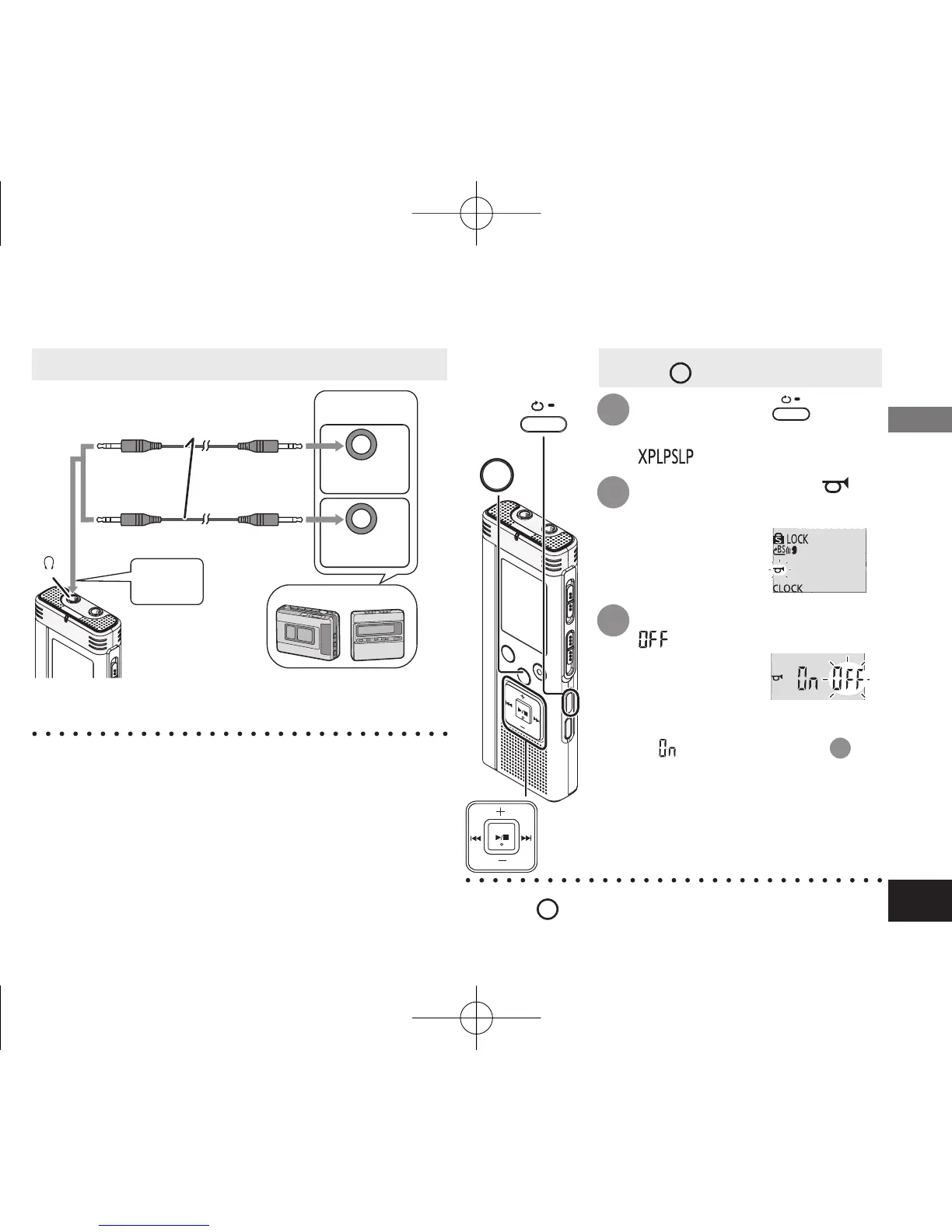
“ ” (blinking) is displayed.
Setting the operation beep ON:
Select “ ” and enter in step
3
.
STOP
•
A-B
/
MENU
Recording to other devices
ӱ
On this unit, play the file you want to copy (
➜
page 10).
Ӳ Record using recording equipment.
* Read the operating instructions for the
connected device.
*
Use the connection cable that matches monaural/stereo
of the connected device. Wrong connection may cause
recording trouble (i.e. Only 1 channel is recorded.).
* The recorded sound quality may differ from the
sound quality of this unit.
* Adjust the recording volume on this unit to the
desired level.
•
Cancel the operation beep while copying (
➜
right).
Advanced Operations
Cancelling the operation beep
4475AA'A'P836/AKPFF4475AA'A'P836/AKPFF ඦ೨ඦ೨















 To Next Page