VQT2M18
25
Using with a computer
The illustrations show Windows XP (OS). The
display may differ depending on the OS.
• Connect this unit to a Computer beforehand
(
➜
page 24).
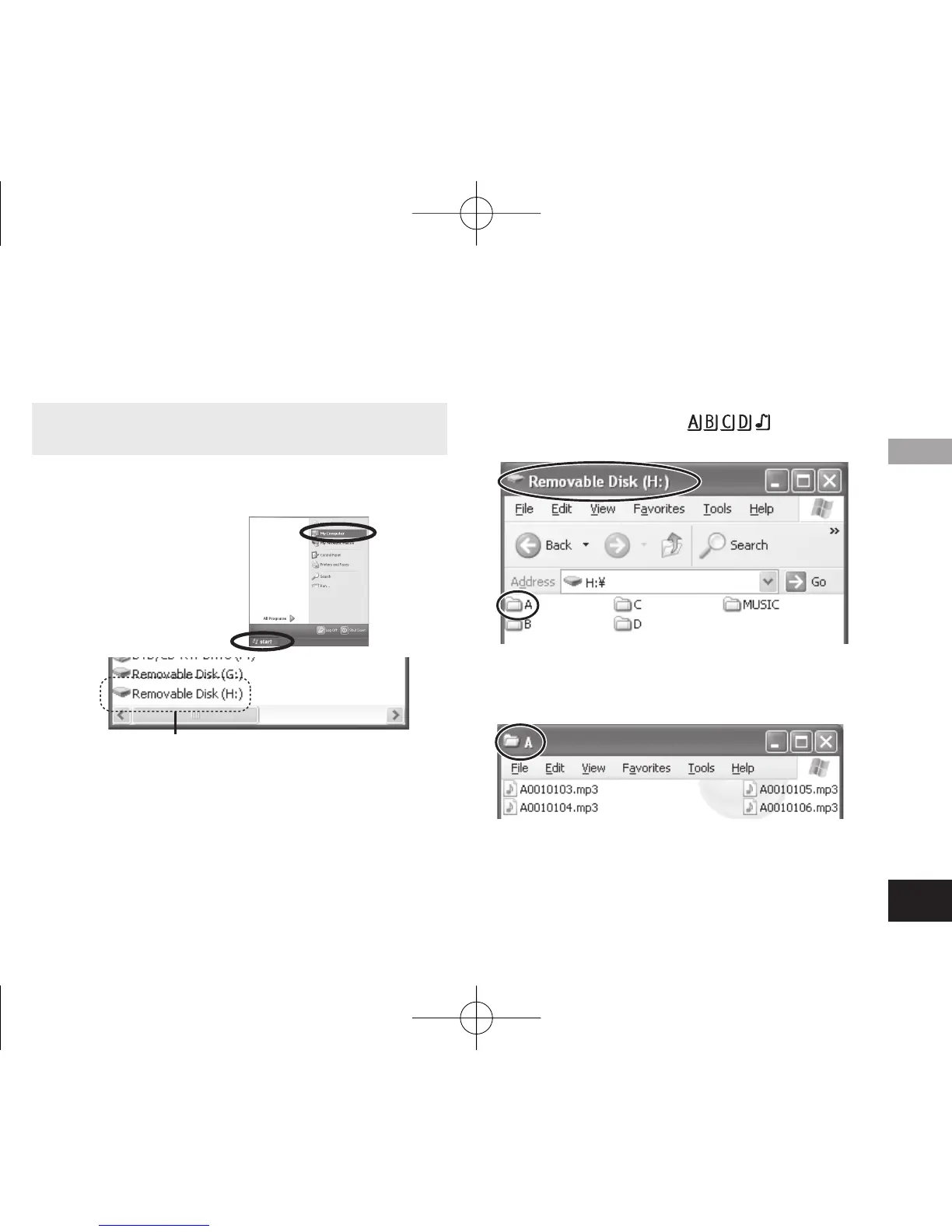
2. Right-click to open the removable disk
(this unit).
The folders (A to D, MUSIC) in this unit appear.
(They are displayed as
on this unit’s
screen.)
A removable disk is an external storage device (SD
memory card, USB memory etc.) connected to the
computer.
The components of the computer and the external
storage device illustrated here is an example.
The display may differ depending on the computer
you are using.
“H” indicated in Removable Disk (H:) is not a fixed
character.
1. Click [start] → [My Computer].
This unit is displayed as a removable disk.
3. Right-click to open the folder.
Recorded files in this unit appear.
Opening the folder of this unit using a computer
ユーザー名
4475AA'A'P836/AKPFF4475AA'A'P836/AKPFF ඦ೨ඦ೨















 To Next Page