VQT2M18
17
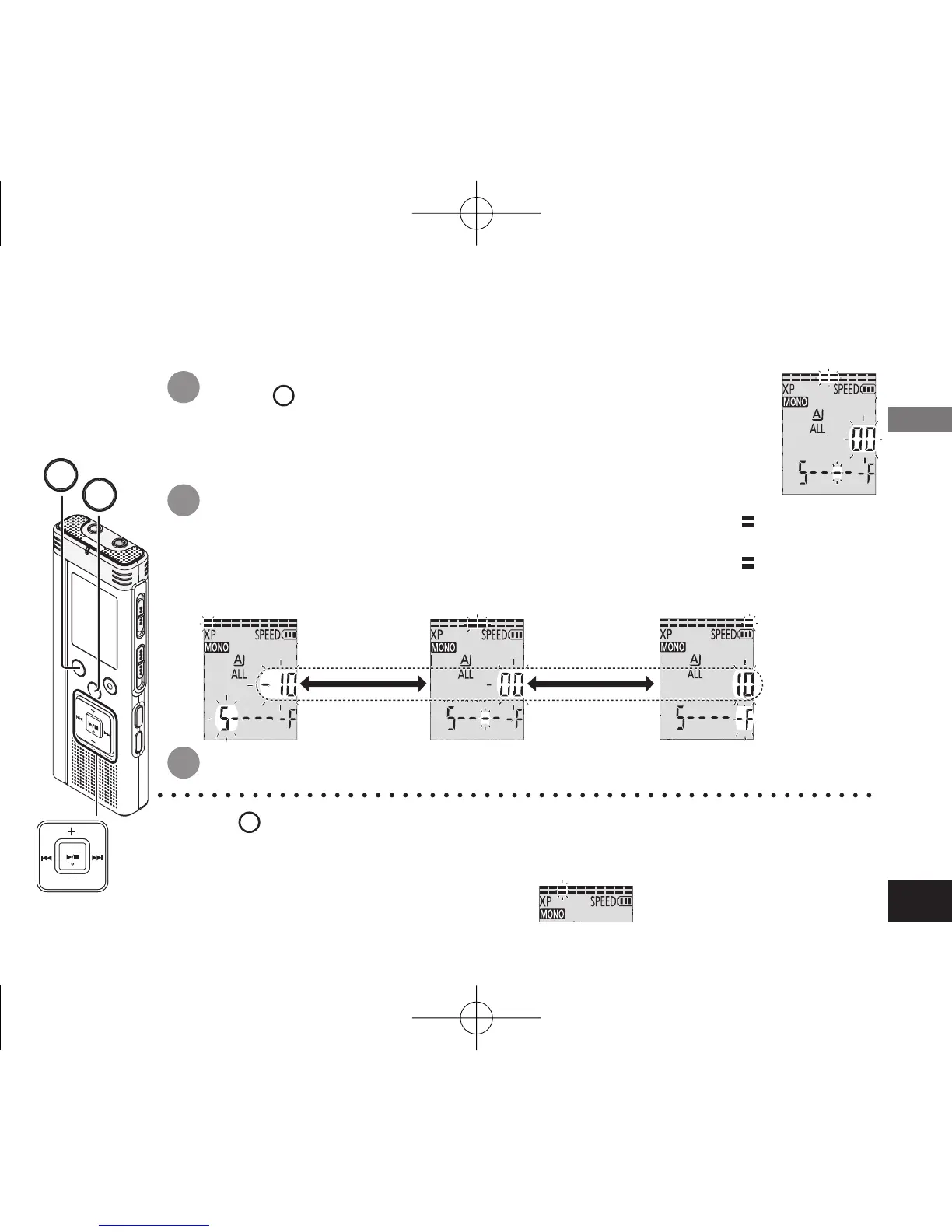
Setting the playback speed control function
1
2
Press
FOLDER/SPEED
during playback.
Playback speed adjustment display appears. (screen at right)
The figure of 2 digits represents a speed step.
(The figure returns to the file number after playback speed adjustment display finishes.)
Press
u
,
i
to select playback speed.
When pressing
i
, the playback speed becomes faster and “ ”
(blinking) moves to the right.
When pressing
u
, the playback speed becomes slower and “ ”
(blinking) moves to the left.
*
Press
STOP
to stop the setting process midway.
* When playing with speed other than 100% speed, the bar at the top blinks and
“
SPEED
” lights up.
3
Press
q
/
g
to enter.
e.g. When playing back with 75% speed
Playback speed can be adjusted at 21 different steps (50% to 200%).
50% 100% 200%
e.g. for 100% speed
adjustable
in 10 steps
(at 5% intervals)
adjustable
in 10 steps
(at 10% intervals)
STOP
FOLDER/SPEED
Advanced Operations
4475AA'A'P836/AKPFF4475AA'A'P836/AKPFF ඦ೨ඦ೨















 To Next Page