EasyManua.ls Logo

Panasonic RX-ES50 - Page 16

Panasonic RX-ES50
32 pages
Print Icon
To Next Page IconTo Next Page
To Previous Page IconTo Previous Page
Loading...
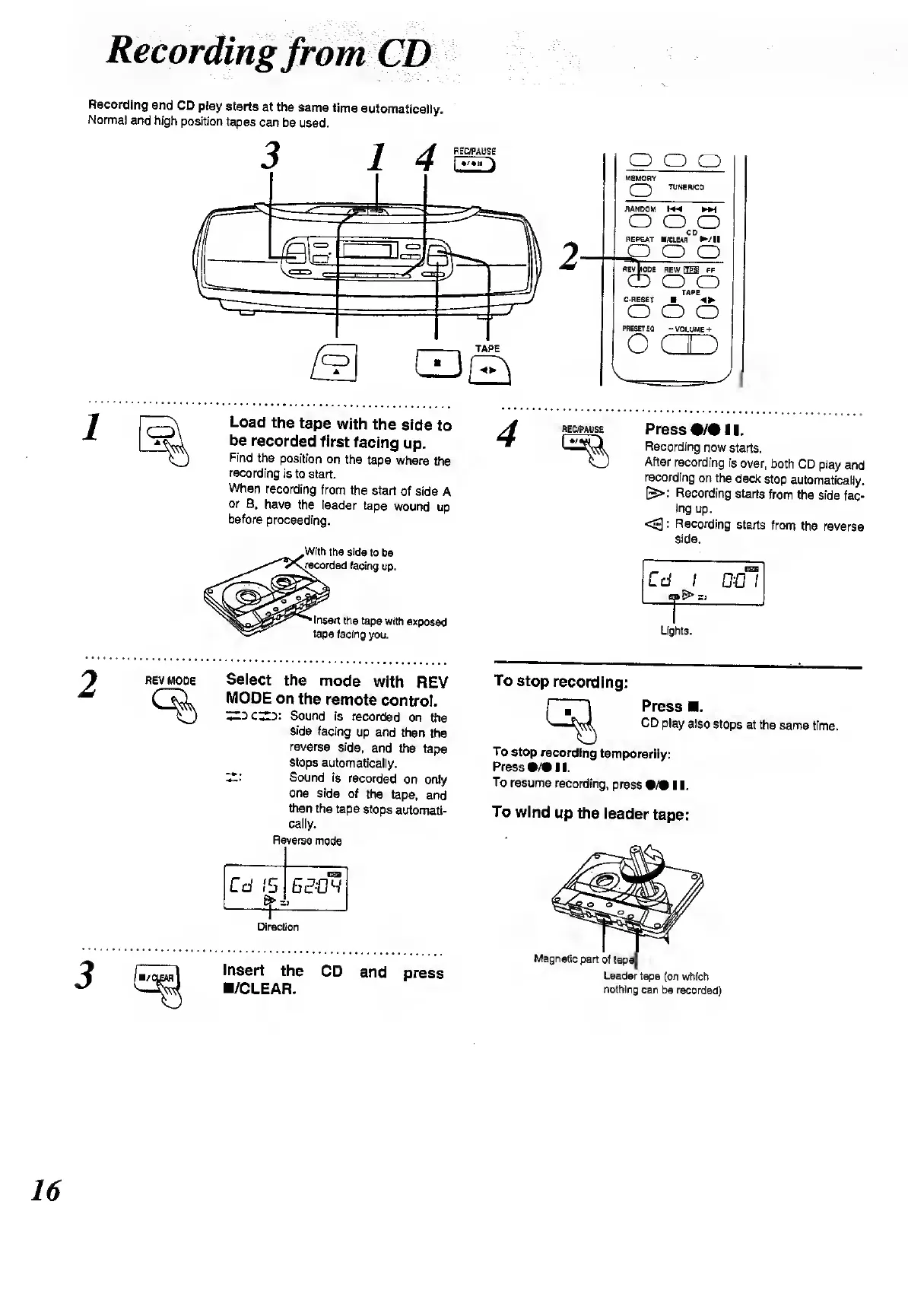
Recording
and
CD
play
starts
at
the
same
time
automatically.
Normal
and
high
position
tapes
can
be
used.
OOP
MEMORY
(
TUNER/CO
RANDOM
M4
KM
OOP
CD
REPEAT
/CLEAR
/!!
_P
O
O
REV
MODE
REW
HES
FF
CD
O
O
TAPE
C-RESET
4P
OOP
PRESET
EQ
-
VOLUME
+
o
c
1
Load
the
tape
with
the
side
to
be
recorded
first
facing
up.
Find
the
position
on
the
tape
where
the
recording
is
to
start.
When
recording
from
the
start
of
side
A
or
B,
have
the
leader
tape
wound
up
before
proceeding.
With
the
side
to
be
recorded
facing
up.
Insert
the
tape
with
exposed
tape
facing
you.
REC/PAUSE
%
Press
•/•
11.
Recording
now
starts.
After
recording
is
over,
both
CD
play
and
recording
on
the
deck
stop
automatically.
&>
Recording
starts
from
the
side
fac¬
ing
up.
<3:
Recording
starts
from
the
reverse
side.
I
ran
Cd
i
DC
(
=1
__
Lights.
REV
MODE
%
Select
the
mode
with
REV
MODE
on
the
remote
control.
Sound
is
recorded
on
the
side
facing
up
and
then
the
reverse
side,
and
the
tape
stops
automatically.
ZZ:
Sound
is
recorded
on
only
one
side
of
the
tape,
and
then
the
tape
stops
automati¬
cally.
Reverse
mode
Cd
15
EBB
sew
_
'}
Direction
insert
the
CD
and
press
/CLEAR.
To
stop
recording:
Press
.
CD
play
also
stops
at
the
same
time.
To
stop
recording
temporarily:
Press
•/•
II.
To
resume
recording,
press
•/•!!.
To
wind
up
the
leader
tape:
Leader
tape
(on
which
nothing
can
be
recorded)

Related product manuals