EasyManua.ls Logo

Panasonic RX-ES50 - Page 22

Panasonic RX-ES50
32 pages
Print Icon
To Next Page IconTo Next Page
To Previous Page IconTo Previous Page
Loading...
Using
Play
Timer
CLOCK/
PLAY
TIMER
REC
(ADJUST
|
[
TIMER
|
To
release
the
timer
function:
(only
when
the
unit
is
on)
Press
TIMER
to
turn
“OFF"
display
on.
The
timer
will
operate
on
the
time
you
have
set,
if
you
press
TIMER
again
so
that
the
‘TIMER”
indicator
lights.
To
check
what
has
been
programmed:
Press
ADJUST
when
the
unit
is
off
and
TIMER
display
on.
The
display
changes
automatically
as
follows:
1.
Programmed
time
2.
Programmed
source
3.
Programmed
volume
level
4.
Original
display
To
enjoy
play
after
programming:
(after
step
7)
1.
Start
playing
the
desired
sound
source.
2.
After
play,
turn
the
unit
off
before
timer
play
starts.
Even
if
you
change
the
volume
level
or
sound
source,
whatever
was
programmed
is
restored
at
the
play
time.
Using
the
timer
at
the
same
time
every
day:
First
check
that
TIMER
appears
on
the
display
and
then
turn
the
unit
off.
Lights.
nm*
E23
Cd
15
SEW
To
change
the
source
and
volume
for
the
timer
function:
Press
TIMER
to
turn
off
the
‘TIMER”
display,
and
then
perform
steps
5
to
8 on
page
21.
To
stop
the
timer
in
mid-operation:
Turn
the
unit
off.
Note
The
timer
will
not
operate
if
the
unit
is
on.
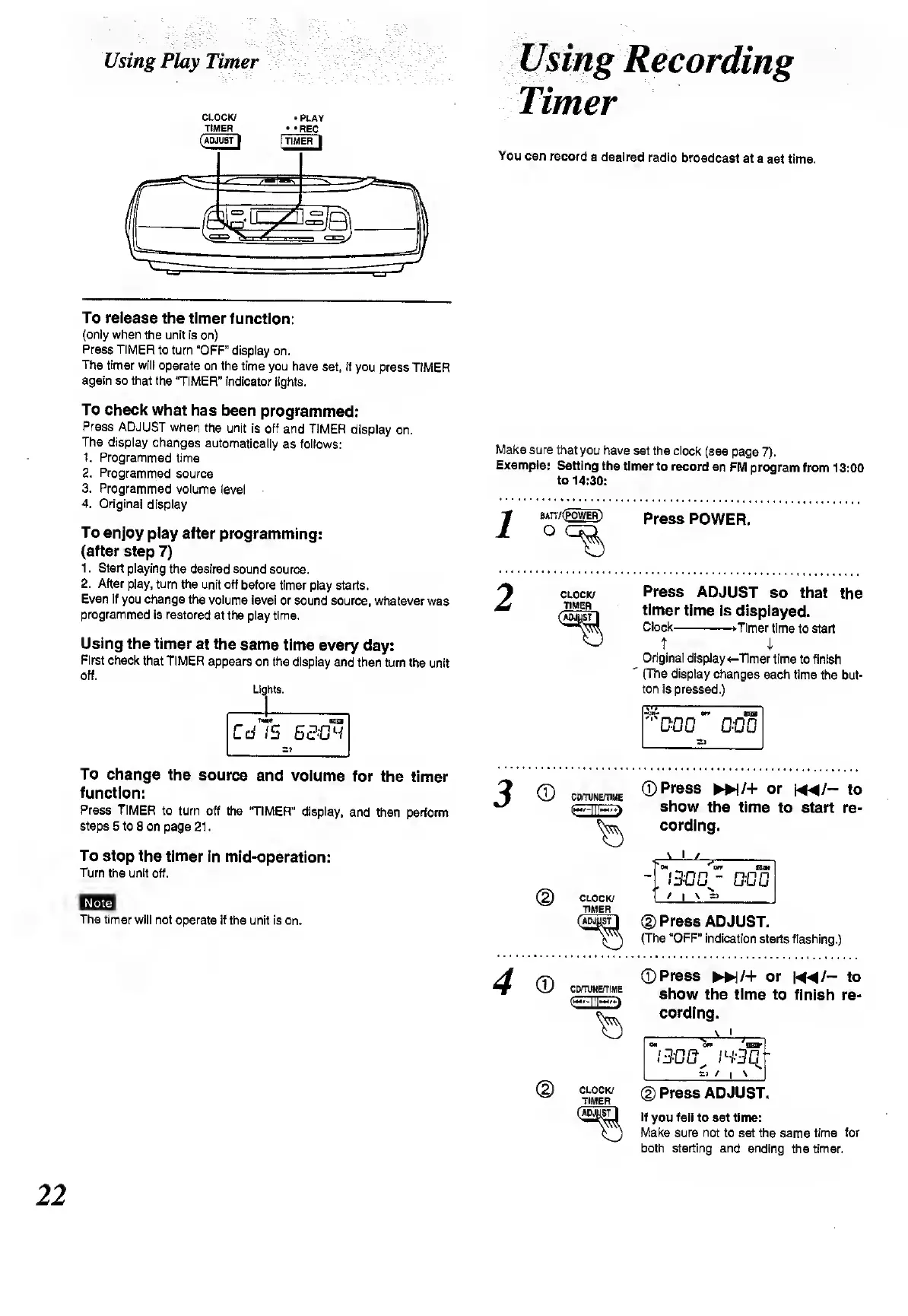
Timer
You
can
record
a
desired
radio
broadcast
at
a
set
time.
Make
sure
that
you
have
set
the
clock
(see
page
7).
Example:
Setting
the
timer
to
record
an
FM
program
from
13:00
to
14:30:
BATT/
(POWER)
Press
POWER.
CLOCK/
TIMER
Press
ADJUST
so
that
the
timer
time
is
displayed.
Clock-
Timer
time
to
start
T
i
Original
display
<-Timer
time
to
finish
(The
display
changes
each
time
the
but¬
ton
is
pressed.)
©
©
CttTlINE/TIME
e**—ill—
CLOCK/
TIMER
©Press
MN/+
or
m/-
to
show
the
time
to
start
re¬
cording.
\
i
/
_
off
Em
-.
1300^
000
/
i
\
_
©Press
ADJUST.
(The
“OFF”
indication
starts
flashing.)
©
CD/TUNE/TIME
<3©
©Press
W/+
or
M^/-
to
show
the
time
to
finish
re¬
cording.
On
OTP
EHB*
/300,
/S-3C
'
_
/
I
*
©
Press
ADJUST.
If
you
fail
to
set
time:
Make
sure
not
to
set
the
same
time
for
both
starting
and
ending
the
timer.
22

Related product manuals